- Mark as New
- Bookmark
- Subscribe
- Mute
- Subscribe to RSS Feed
- Permalink
- Report Inappropriate Content
03-14-2018 11:37 PM
Hi Folks,
I have created a client callable script include .
When answer is true it it should make a call to Script Include to create a new record
Please find the code below where it is not working as expected. kindly suggest if anything wrong.
Script Include:
var createoutage = Class.create();
createoutage.prototype = Object.extendsObject(AbstractAjaxProcessor, {

	incidentoutage: function(){
		var incout = new GlideRecord('cmdb_ci_outage');
		incout.initialize();
		incout.setValue('task_number',this.getParameter('sysparm_sys_id'));
		incout.setValue('cmdb_ci',this.getParameter('cmdb_ci'));
		var incoutid = incout.insert();

		var tskout = new GlideRecord ('task_outage');
		tskout.setValue('task',this.getParameter('sysparm_sys_id'));
		tskout.setValue('outage',incoutid);
		tskout.insert();

		action.setRedirectURL(incout);
		action.setReturnURL(current);

	},

	type: 'createoutage'
});
Client Script:
function onSubmit() {

	var pri = g_form.getValue('priority');
	var status = g_form.getValue('state');

	if (pri == 1 && status == 6){
		var ans = confirm('Do you want record to be created');
		if(ans){
			var ajax  = new GlideAjax ('createoutage');
			ajax.addParam('sysparm_name','incidentoutage');
			ajax.getXML(createout);

			function createout(response){
				var answer = response.responseXML.documentElement.getAttribute("answer");


			}

		}

	}
}
Thanks
Sumanth
Solved! Go to Solution.


- Mark as New
- Bookmark
- Subscribe
- Mute
- Subscribe to RSS Feed
- Permalink
- Report Inappropriate Content
03-15-2018 01:10 AM
Hi,
Here you go this is you final code:
Client Scripts:
function onSubmit() {
//Type appropriate comment here, and begin script below
var state = g_form.getValue('state');
var pri = g_form.getValue('priority');
if(state == 6 && pri == 1)//6 is resolved
{
var ans = confirm('Do you want to create Outage');
if(ans == true)
{
alert('Here');
var ajax = new GlideAjax ('createoutage');
ajax.addParam('sysparm_name','incidentoutage');
ajax.addParam('sysparm_sys_id',g_form.getUniqueValue());
ajax.addParam('cmdb_ci',g_form.getValue('cmdb_ci'));
ajax.getXML(createout);
}
}
function createout(response){
var answer = response.responseXML.documentElement.getAttribute("answer");
}
}
Script Include:
var createoutage = Class.create();
createoutage.prototype = Object.extendsObject(AbstractAjaxProcessor, {
incidentoutage: function(){
var incout = new GlideRecord('cmdb_ci_outage');
incout.initialize();
incout.task_number = this.getParameter('sysparm_sys_id');
incout.cmdb_ci = this.getParameter('cmdb_ci');
var incoutid = incout.insert();
var tskout = new GlideRecord ('task_outage');
tskout.initialize();
tskout.setValue('task',this.getParameter('sysparm_sys_id'));
tskout.setValue('outage',incoutid);
tskout.insert();
action.setRedirectURL(incout);
action.setReturnURL(current);
},
type: 'createoutage'
});
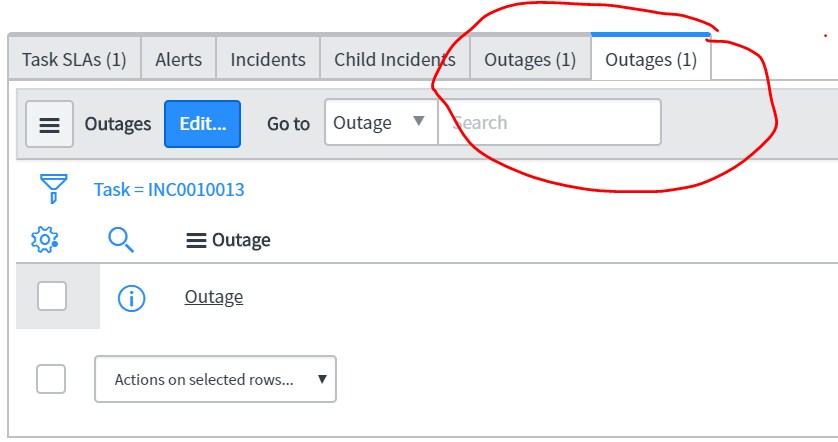
See below screen shot for Outages created:

Thanks,
Ashutosh Munot
Mark it correct or helpful
- Mark as New
- Bookmark
- Subscribe
- Mute
- Subscribe to RSS Feed
- Permalink
- Report Inappropriate Content
03-15-2018 01:10 AM
Hi,
Here you go this is you final code:
Client Scripts:
function onSubmit() {
//Type appropriate comment here, and begin script below
var state = g_form.getValue('state');
var pri = g_form.getValue('priority');
if(state == 6 && pri == 1)//6 is resolved
{
var ans = confirm('Do you want to create Outage');
if(ans == true)
{
alert('Here');
var ajax = new GlideAjax ('createoutage');
ajax.addParam('sysparm_name','incidentoutage');
ajax.addParam('sysparm_sys_id',g_form.getUniqueValue());
ajax.addParam('cmdb_ci',g_form.getValue('cmdb_ci'));
ajax.getXML(createout);
}
}
function createout(response){
var answer = response.responseXML.documentElement.getAttribute("answer");
}
}
Script Include:
var createoutage = Class.create();
createoutage.prototype = Object.extendsObject(AbstractAjaxProcessor, {
incidentoutage: function(){
var incout = new GlideRecord('cmdb_ci_outage');
incout.initialize();
incout.task_number = this.getParameter('sysparm_sys_id');
incout.cmdb_ci = this.getParameter('cmdb_ci');
var incoutid = incout.insert();
var tskout = new GlideRecord ('task_outage');
tskout.initialize();
tskout.setValue('task',this.getParameter('sysparm_sys_id'));
tskout.setValue('outage',incoutid);
tskout.insert();
action.setRedirectURL(incout);
action.setReturnURL(current);
},
type: 'createoutage'
});
See below screen shot for Outages created:
Thanks,
Ashutosh Munot
Mark it correct or helpful

- Mark as New
- Bookmark
- Subscribe
- Mute
- Subscribe to RSS Feed
- Permalink
- Report Inappropriate Content
03-15-2018 01:42 AM
Thank you very much ashutosh. That was awesome. I have tested and it is working.
But one small correction please. The outage record is getting created automatically. Actually when I click Ok it should take me to the outage record form and after submit manually redirect to current record.
If possible could you please correct the script/ kindly let me know the changes.
Thanks in advance.
Sumanth
- Mark as New
- Bookmark
- Subscribe
- Mute
- Subscribe to RSS Feed
- Permalink
- Report Inappropriate Content
03-15-2018 01:46 AM
Thank you very much ashutosh. That was awesome. I have tested and it is working.
But one small correction please. The outage record is getting created automatically. Actually when I click Ok it should take me to the outage record form and after submit manually redirect to current record.
If possible could you please correct the script/ kindly let me know the changes.
Thanks in advance.
Sumanth
- Mark as New
- Bookmark
- Subscribe
- Mute
- Subscribe to RSS Feed
- Permalink
- Report Inappropriate Content
03-15-2018 01:52 AM
Hi,
Which record you want to get redirected? task_outage or cmdb_ci_outage.
Thanks,
Ashutosh Munot
- Mark as New
- Bookmark
- Subscribe
- Mute
- Subscribe to RSS Feed
- Permalink
- Report Inappropriate Content
03-15-2018 02:06 AM
Hi Ashutosh,
On click of Ok the outage record is getting created currently. (cmdb_ci_outage)
Ref from script: action.setRedirectURL(incout); - This creates Outage record (cmdb_ci_outage).
> Actually on click of Ok it should take me to outage form (cmdb_ci_outage). Please see the screenshot below.

And after submit it should redirect back to current incident form. (this will allow user to fill in the duration and other required fields).
Thanks
Sumanth