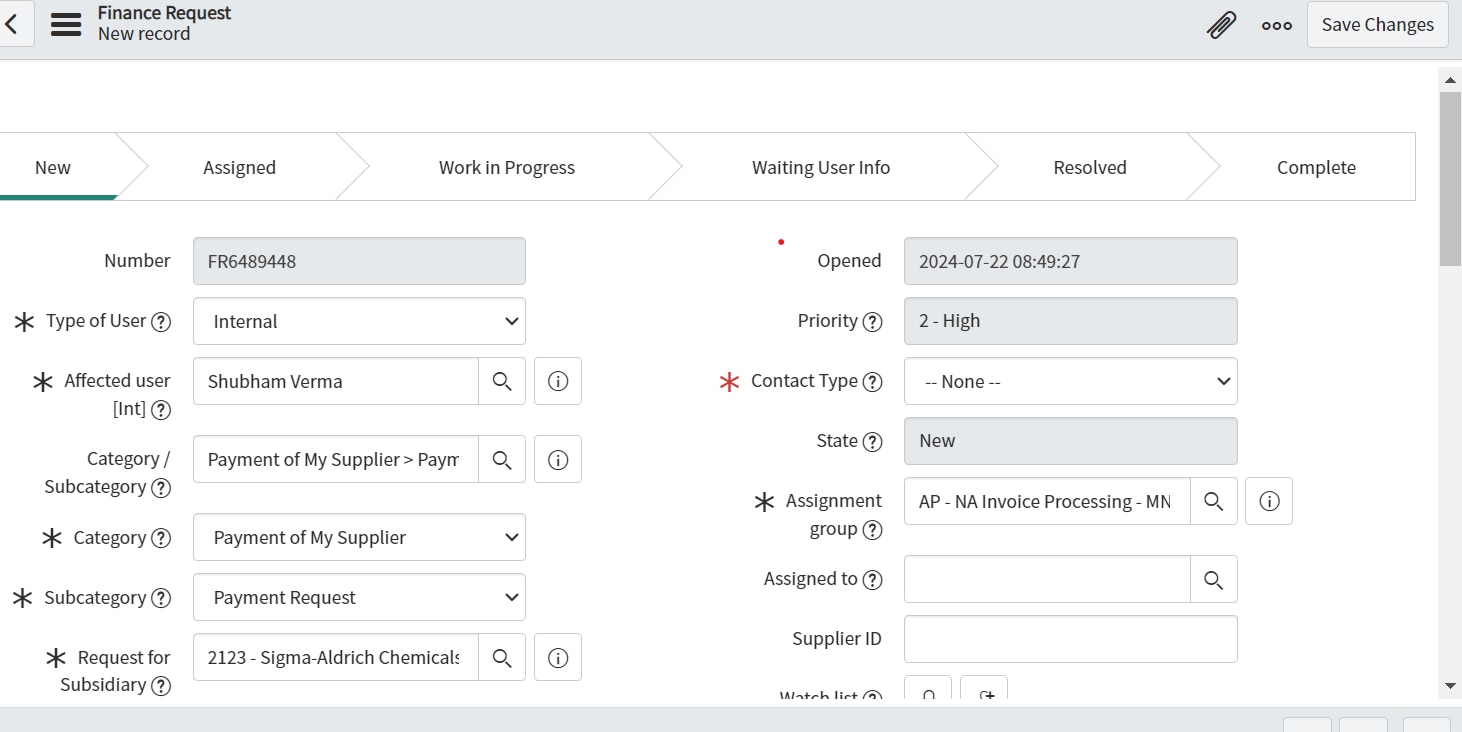
Display error message if wrong assignment group is selected based on auto assign on categry ,sub cat

- Mark as New
- Bookmark
- Subscribe
- Mute
- Subscribe to RSS Feed
- Permalink
- Report Inappropriate Content
07-21-2024 11:55 PM
Hi,
I am trying to display error message if different assignment group is selected after auto assign based on category & sub category.
In e1 ,category is "Payment of my supplier",Sub category is "payment request .Based on category & sub category ,assignment group -"Buy & pay APAC" is auto assigned.
en e2 ,if category is "Payment of my supplier",Sub category is "payment request .Based on category & sub category,
it should display error on assignment group-AP - NA Invoice Processing - MNL which is not aligned based on cat & sub cat.
How can I achieve this?
- Mark as New
- Bookmark
- Subscribe
- Mute
- Subscribe to RSS Feed
- Permalink
- Report Inappropriate Content
07-22-2024 12:03 AM
Hi @shubhamverm3478 ,
Create a Onchange client script for the assignment group field,
function onChange(control, oldValue, newValue, isLoading) {
if (isLoading || newValue == '') {
return;
}
// Get the values of category and subcategory
var category = g_form.getValue('category');
var subcategory = g_form.getValue('subcategory');
// Define the correct assignment group based on category and subcategory
var correctAssignmentGroup = '';
if (category == 'Payment of my supplier' && subcategory == 'payment request') {
correctAssignmentGroup = 'Buy & pay APAC';
}
// Validate the selected assignment group
if (newValue != correctAssignmentGroup) {
g_form.showFieldMsg('assignment_group', 'Invalid assignment group selected based on category and subcategory.', 'error');
g_form.setValue('assignment_group', oldValue); // Revert to the previous value
}
}
Please accept as solution working fine.
Thanks
Arun
- Mark as New
- Bookmark
- Subscribe
- Mute
- Subscribe to RSS Feed
- Permalink
- Report Inappropriate Content
07-22-2024 12:31 AM
Hi arunm1
I want to display error message not only for one particular assignment group.I want it to displayed every single time if any random assignment group is selected based on cat & sub cat.
- Mark as New
- Bookmark
- Subscribe
- Mute
- Subscribe to RSS Feed
- Permalink
- Report Inappropriate Content
07-22-2024 12:49 AM
function onChange(control, oldValue, newValue, isLoading) {
// Return if the form is still loading or if the new value is empty
if (isLoading || newValue == '') {
return;
}
// Get the values of category and subcategory
var category = g_form.getValue('category');
var subcategory = g_form.getValue('subcategory');
// Define the correct assignment groups based on category and subcategory
var assignmentGroupMap = {
'Payment of my supplier|payment request': 'Buy & pay APAC',
'Payment of my supplier|invoice inquiry': 'Invoice Processing APAC',
'Order management|order processing': 'Order Processing Team',
'Customer support|technical issue': 'Technical Support Team'
// Add more category|subcategory mappings here
};
// Create the key for the current category and subcategory
var key = category + '|' + subcategory;
// Get the correct assignment group for the current category and subcategory
var correctAssignmentGroup = assignmentGroupMap[key];
// Validate the selected assignment group
if (correctAssignmentGroup && newValue != correctAssignmentGroup) {
g_form.showFieldMsg('assignment_group', 'Invalid assignment group selected based on category and subcategory.', 'error');
g_form.setValue('assignment_group', oldValue); // Revert to the previous value
} else {
//g_form.hideFieldMsg('assignment_group'); // Hide the error message if the correct assignment group is selected
}
}