flow designer action output not showing in subflow

- Mark as New
- Bookmark
- Subscribe
- Mute
- Subscribe to RSS Feed
- Permalink
- Report Inappropriate Content
05-26-2022 05:04 AM
Hi,
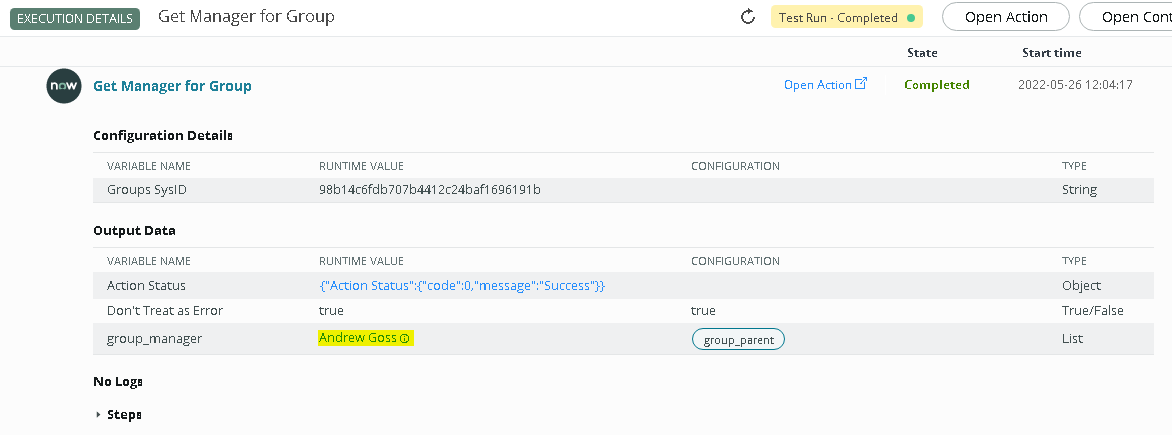
I have created action in flow designer, When I tested Action in Output it's working but in subflow output is not triggering.
Attaching screenshot below check and help me out.
Subflow

Action

Action Script
(function execute(inputs, outputs) {
// ... code ...
  var grpMngrs = '';
  var grps = new GlideRecord("sys_user_group");
  grps.addEncodedQuery('sys_idIN' +inputs.groups_sysid);
  grps.query();
  while(grps.next()){
    gs.info("User Sys_id4 groups Sys_id" +inputs.groups_sysid);
    grpMngrs += grps.manager.sys_id + ',';
    gs.info("User Sys_id5 grpmngrs Sys_id" +grpMngrs);
  }
  outputs.group_parent = grpMngrs;
})(inputs, outputs);
Please Someone help me out.
Thanks & Regards,
Chaitanya

- Mark as New
- Bookmark
- Subscribe
- Mute
- Subscribe to RSS Feed
- Permalink
- Report Inappropriate Content
05-31-2022 06:19 AM
So you are looking for groups manager by passing Group Sys ID.
For every group there is only one Manager. And hence it will return only one Manager Sys ID.
And I have seen you have used Outputs Type=List.
Instead,
Use Output Variables Type as Refrence(sys_user) as there will be only one User/Manager for a Group.
Hence you will be getting manager as a record and you can extract any info from it.
Img 1- Custom Action Script

Img 2 - Action Output

Img 3 - Actions O/P in Subflow

Alternative/Recommended way of doing this -
As you have Sys ID of group.
Lookup to sys_user_group table using that sys id.
Hence you will have access to the groups manager.
In below img I have looked up Group record.

Please Mark Helpful/Correct if this has solved your problem.
Thanks,
Chinmay T.