Formatting how email appears in activity feed

- Mark as New
- Bookmark
- Subscribe
- Mute
- Subscribe to RSS Feed
- Permalink
- Report Inappropriate Content
06-07-2017 03:22 PM
Hey all, have another one I am stuck on..
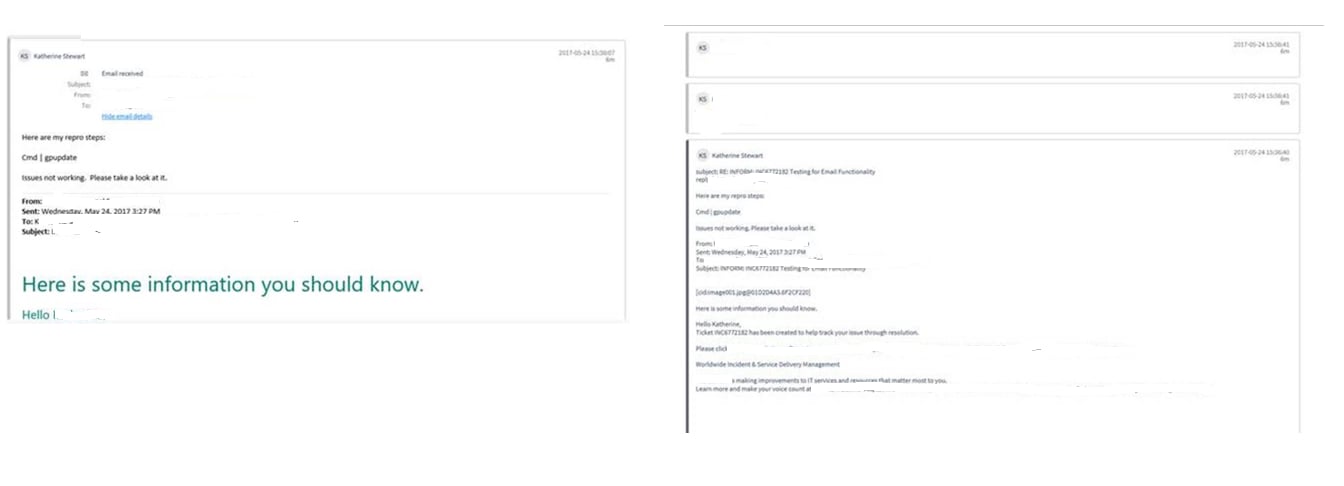
Currently when an inbound email is received, it appears as 2 activities. (Screenshots below)
#1…it is added as Email Received and you have ability to Open/Hide email details
#2... Several entries, non-collapsible, very messy, separates logos etc. that are in the email
I need to make it so only #1 above is true where It shows up in the activity feed but you can expand/hide the emails if you need to instead of having a bunch of clutter.
I was looking in to the Activity Formatter but it doesn't look like I am looking in the right spot to fix this issue.

- Mark as New
- Bookmark
- Subscribe
- Mute
- Subscribe to RSS Feed
- Permalink
- Report Inappropriate Content
06-13-2017 11:57 AM
So I've been combing through inbound email actions as those are what puts these in the activity feed but I am at a loss for how to change how it is splitting the images apart in separate entries.
I looked in to Tim's suggestion above as well an so far no luck.
Anyone else have any ideas? I am checking with the process owner to see if this behavior has always been the case or is a new behavior recently.