- Mark as New
- Bookmark
- Subscribe
- Mute
- Subscribe to RSS Feed
- Permalink
- Report Inappropriate Content
07-03-2018 08:40 AM
I have a copy of a .jpg in which I want to add that to a catalog item.
How can I accomplish this please? Can this be done via a Macro variable type?

Thank you,
Karen
Solved! Go to Solution.
- Mark as New
- Bookmark
- Subscribe
- Mute
- Subscribe to RSS Feed
- Permalink
- Report Inappropriate Content
07-11-2018 06:22 AM
I got it working. Here is how I made it work. This works for Service Portal
a. Created the variable
b. Variable type = macro
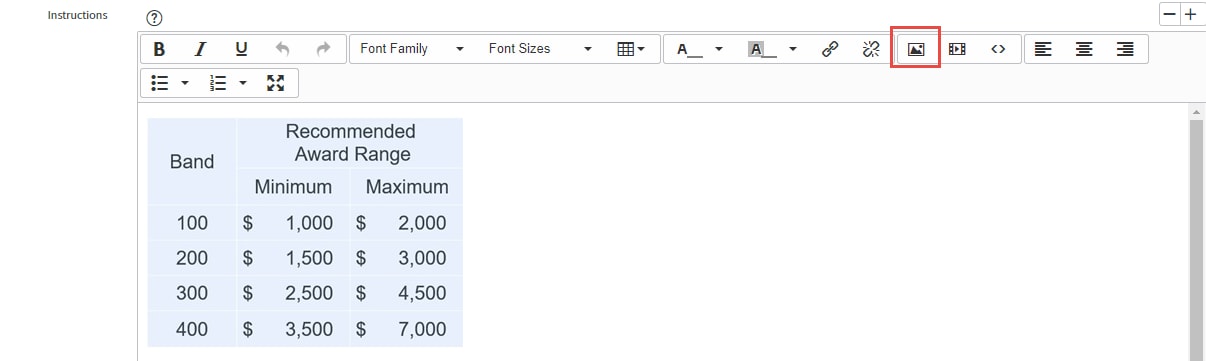
c. Under the Annotation tab - in the Instructions box click the Image icon to add your image
d. Under the Type specifications tab - give it a macro of images_for_variable_items

- Mark as New
- Bookmark
- Subscribe
- Mute
- Subscribe to RSS Feed
- Permalink
- Report Inappropriate Content
07-11-2018 06:22 AM
I got it working. Here is how I made it work. This works for Service Portal
a. Created the variable
b. Variable type = macro
c. Under the Annotation tab - in the Instructions box click the Image icon to add your image
d. Under the Type specifications tab - give it a macro of images_for_variable_items