How to change the order of search results in portal?

- Mark as New
- Bookmark
- Subscribe
- Mute
- Subscribe to RSS Feed
- Permalink
- Report Inappropriate Content
03-11-2020 09:55 AM
Hi All,
How to change the order of search results in portal?
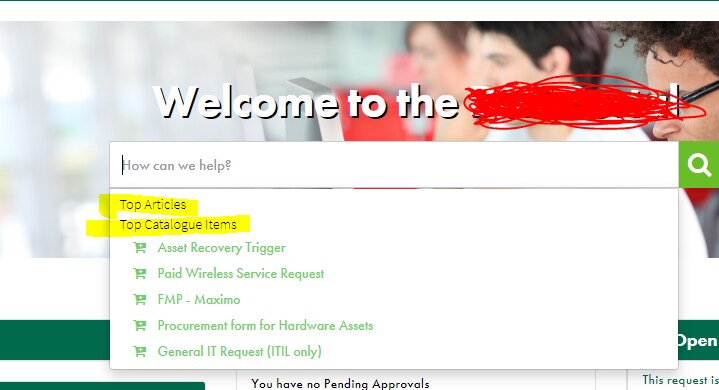
PFB, now i want to change order of catalog results and KB article results. Catalog should be first and then KB articles.

Thanks,
Rajashekhar Mushke


- Mark as New
- Bookmark
- Subscribe
- Mute
- Subscribe to RSS Feed
- Permalink
- Report Inappropriate Content
06-07-2021 06:30 AM
Hi,
Glad my reply was Helpful, please mark it as such above, if you don't mind and haven't already.
Thanks! 🙂

- Mark as New
- Bookmark
- Subscribe
- Mute
- Subscribe to RSS Feed
- Permalink
- Report Inappropriate Content
03-11-2020 10:49 AM
Search for "Service Portal" in the filter navigator and click "Portals" and then the active "Service Portal" (sp URL Suffix), review the Search Sources related list....ours looks like this and we are using the out of the box Typeahead Search. Catalog items appear above Knowledge articles:




- Mark as New
- Bookmark
- Subscribe
- Mute
- Subscribe to RSS Feed
- Permalink
- Report Inappropriate Content
03-11-2020 10:59 AM
Hi Steven,
i checked it but i didn't see the Search sources in related list.
- Mark as New
- Bookmark
- Subscribe
- Mute
- Subscribe to RSS Feed
- Permalink
- Report Inappropriate Content
03-11-2020 11:01 AM
Correct...notice in the screenshot I posted, we changed the order of the Search Sources. It's been a while since I worked on that, but I am pretty sure that's what put the Catalog items above the Knowledge articles. Change the "Catalogs" order to "90" instead of "300" (300 is the out of the box I believe).
