How to force non grouped "skip" button on playbook card

- Mark as New
- Bookmark
- Subscribe
- Mute
- Subscribe to RSS Feed
- Permalink
- Report Inappropriate Content
6 hours ago
- Mark as New
- Bookmark
- Subscribe
- Mute
- Subscribe to RSS Feed
- Permalink
- Report Inappropriate Content
6 hours ago
It would be useful to know if there’s a supported way to force the "skip" button to appear separately on the playbook card.
- Mark as New
- Bookmark
- Subscribe
- Mute
- Subscribe to RSS Feed
- Permalink
- Report Inappropriate Content
6 hours ago
Hi, you may need to override the toolbar/action configuration rather than assigning a custom action alone. Check whether the “Skip” action has a specific priority or placement setting that controls whether it appears directly or under the overflow menu. If you share the relevant configuration or framework/version, someone may be able to point you to the exact setting.
- Mark as New
- Bookmark
- Subscribe
- Mute
- Subscribe to RSS Feed
- Permalink
- Report Inappropriate Content
3 hours ago
Hi @Fabio Fragapane ,
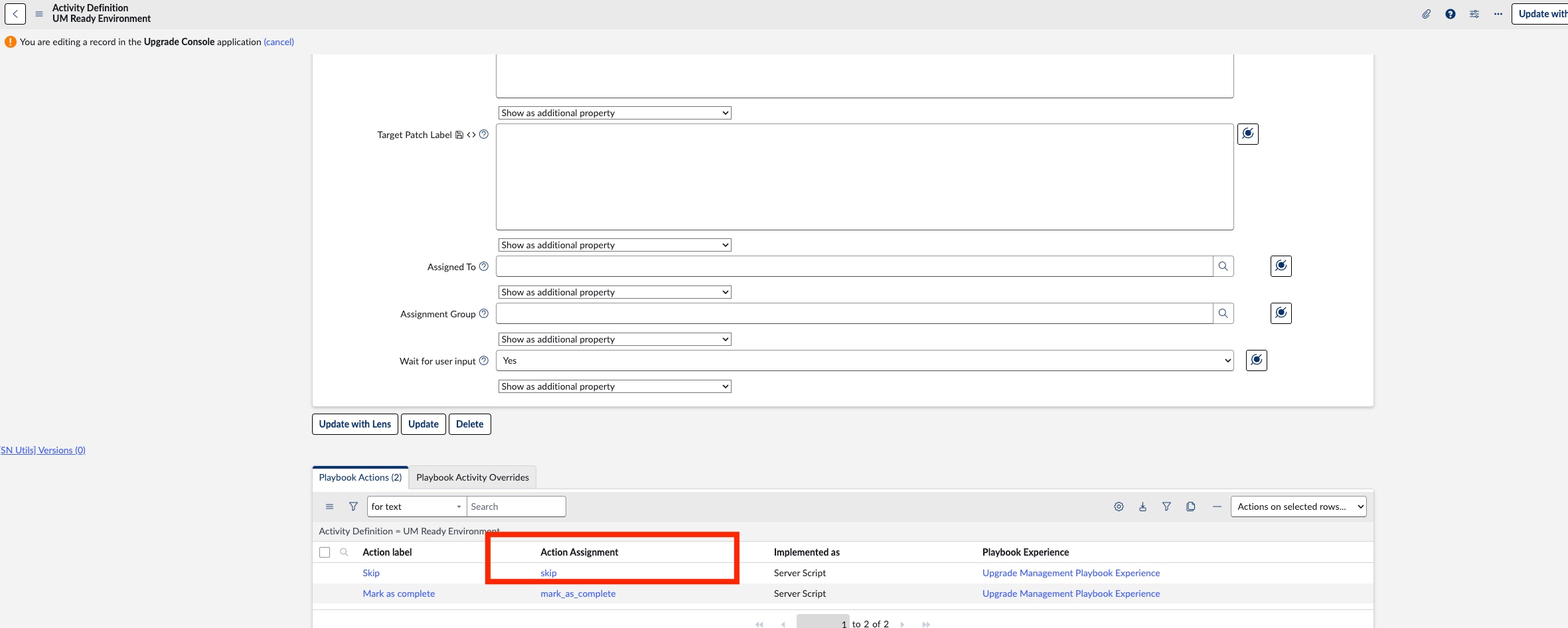
Find the targeted Activity Definition record. For example, in my instance, I used the “UM Ready Environment” Activity Definition.
Under the Related Lists, you will find the Playbook Actions. From there, open the Skip Action Assignment record, as shown in the screenshot below.
In the Declarative Action, if the Render Mode is set to Overflow, change it to Button.


Once this is configured, the action will be rendered as a button instead of appearing as an item in the Overflow menu.
If you find this information useful, please mark the response as Helpful and Accept the Solution.
Regards,
Harish