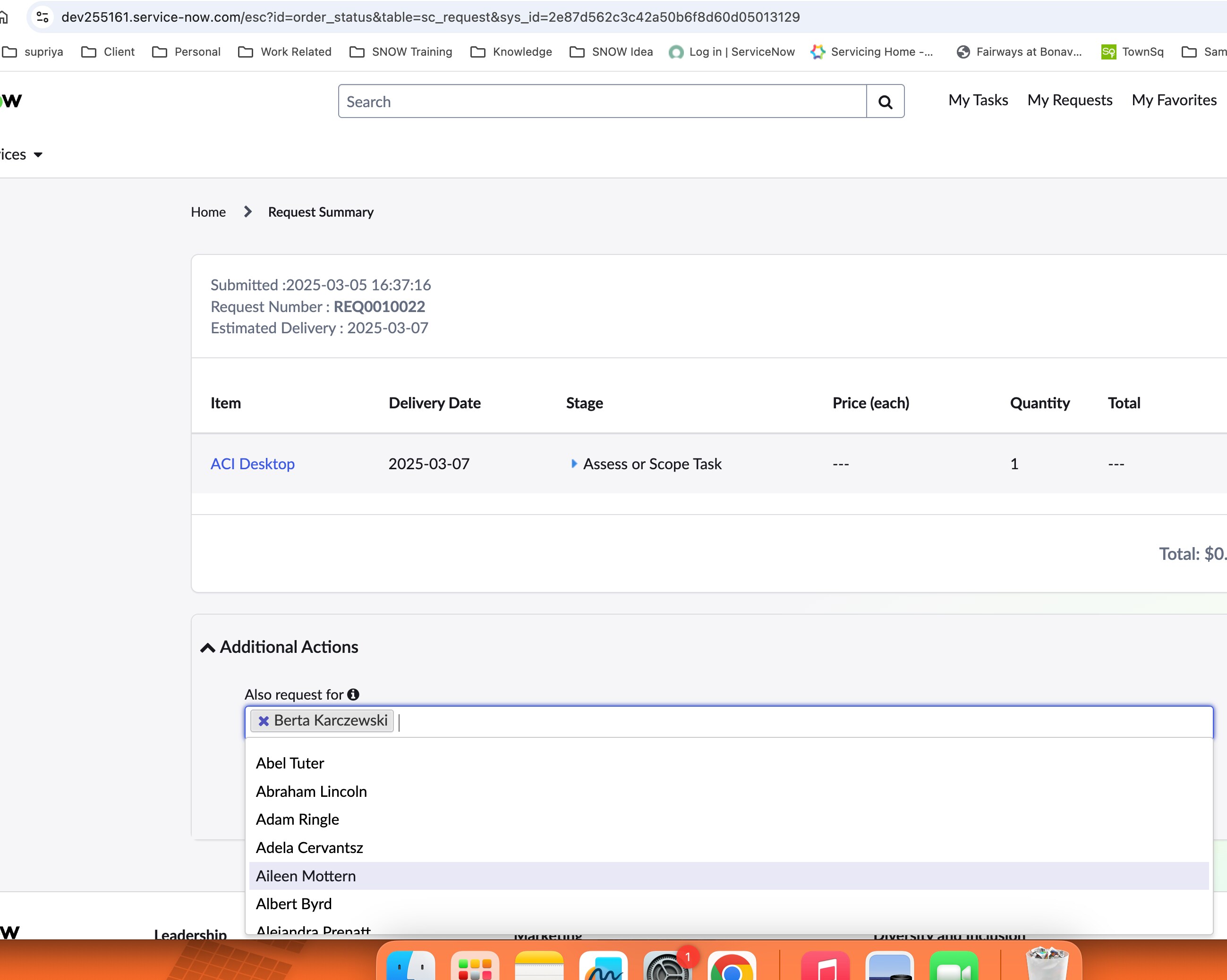
How to show additonal user field under this select box

- Mark as New
- Bookmark
- Subscribe
- Mute
- Subscribe to RSS Feed
- Permalink
- Report Inappropriate Content
03-17-2025 08:02 AM


- Mark as New
- Bookmark
- Subscribe
- Mute
- Subscribe to RSS Feed
- Permalink
- Report Inappropriate Content
03-17-2025 10:18 AM
You need to add the attribute to this variable
like this: ref_auto_completer=AJAXTableCompleter,ref_ac_columns=name;code,ref_ac_order_by=code
Regards
Dr Atul G. - Learn N Grow Together ServiceNow Techno - Functional Trainer
LinkedIn: https://www.linkedin.com/in/dratulgrover
YouTube: https://www.youtube.com/@LearnNGrowTogetherwithAtulG
******************************************************************************************
- Mark as New
- Bookmark
- Subscribe
- Mute
- Subscribe to RSS Feed
- Permalink
- Report Inappropriate Content
03-17-2025 10:26 AM
this is not the catalog variables. This is inbuilt lookup in widget.

- Mark as New
- Bookmark
- Subscribe
- Mute
- Subscribe to RSS Feed
- Permalink
- Report Inappropriate Content
03-18-2025 12:12 AM
Hi Varun,
Do you use sn-record-picker? Try add more field in search-fields attribute following this topic.

- Mark as New
- Bookmark
- Subscribe
- Mute
- Subscribe to RSS Feed
- Permalink
- Report Inappropriate Content
03-18-2025 12:23 AM
how it's getting rendered?
Did you add custom widget on your page?
Check the widget code and share here
If you are using sn-record-picker then check this link
Customize sn-record-picker to display two columns
Also within your widget tag add the extra fields
<sn-record-picker
    field="user"
    table="'sys_user'"
    display-field="'name,email'"
    value-field="'sys_id'"
    search-fields="'name'"
    page-size="100"
    default-query="'active=true'">
</sn-record-picker>
If my response helped please mark it correct and close the thread so that it benefits future readers.
Ankur
✨ Certified Technical Architect || ✨ 10x ServiceNow MVP || ✨ ServiceNow Community Leader