Multi-provider SSO with system properties.

- Mark as New
- Bookmark
- Subscribe
- Mute
- Subscribe to RSS Feed
- Permalink
- Report Inappropriate Content
3 weeks ago
In my work, we setup our instance to use SAML SSO in the multi-provider SSO with our company's IDP. Do we still need to enter values in these system properties:
- glide.authenticate.sso.saml2.idp_authnrequest_url
- glide.authenticate.sso.saml2.idp
Our SAML SSO is working without these properties set.
- Mark as New
- Bookmark
- Subscribe
- Mute
- Subscribe to RSS Feed
- Permalink
- Report Inappropriate Content
3 weeks ago
Hi @newdev111
No, you don't need to populate those properties. Your setup works without them because Multi-Provider SSO doesn't read them.
glide.authenticate.sso.saml2.idp and glide.authenticate.sso.saml2.idp_authnrequest_url come from the legacy single-IdP SAML configuration (the old "SAML 2 Single Sign-on > Properties" page). Back then an instance could only have one IdP, so its settings were stored as system properties.
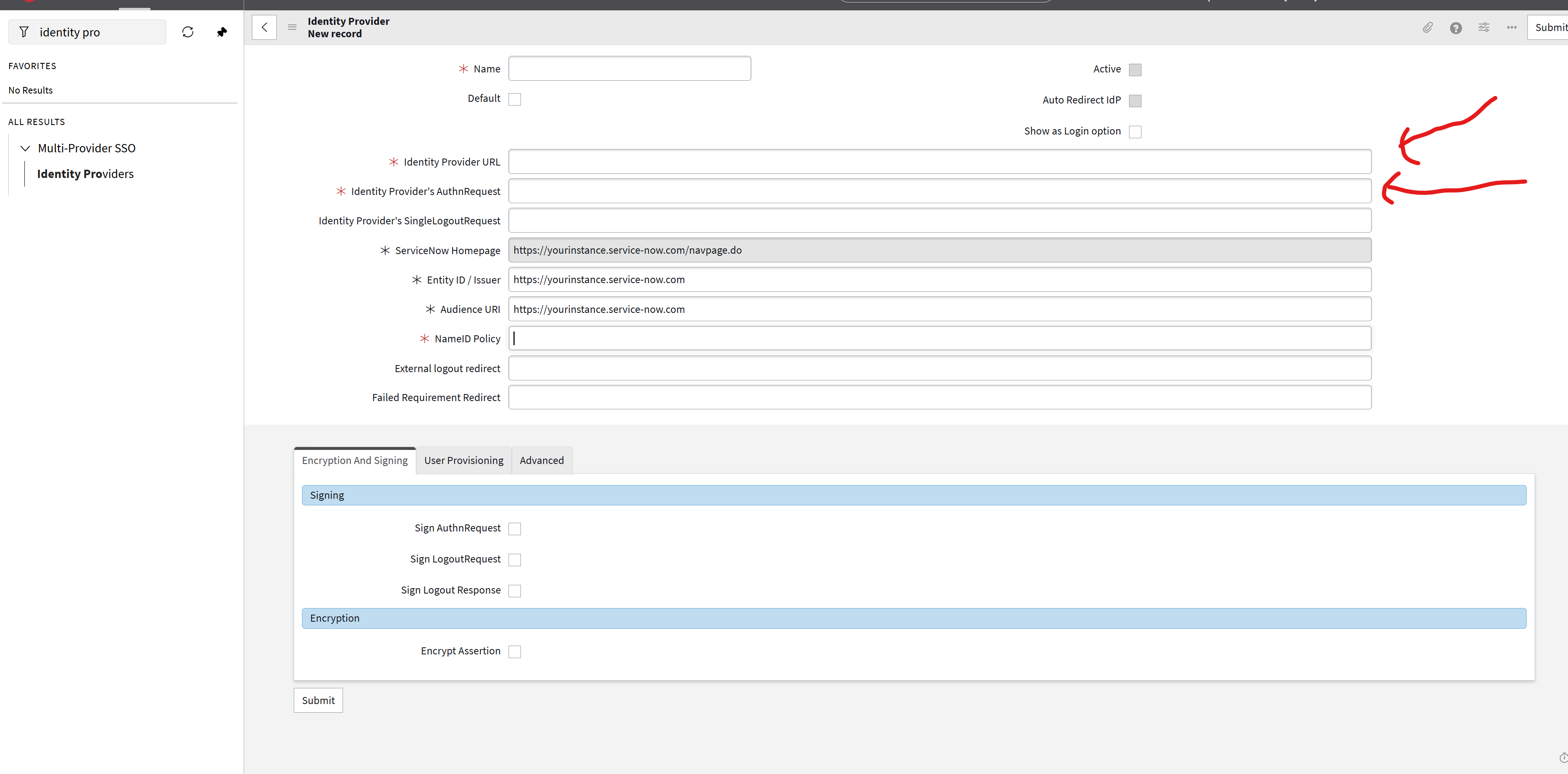
With Multi-Provider SSO (glide.authenticate.multisso.enabled = true), each IdP's settings are stored on its own Identity Provider record (Multi-Provider SSO > Identity Providers) instead. The two properties map directly to fields on that form:(Refer Attached Screenshot for your Reference)
- glide.authenticate.sso.saml2.idp → Identity Provider URL (the IdP's Entity ID)
- glide.authenticate.sso.saml2.idp_authnrequest_url → Identity Provider's AuthnRequest
Since those fields are already filled in on your IdP record, SSO works without the properties.
The Reason on why you might see them:
- On instances configured directly with Multi-Provider SSO, these properties often don't exist in sys_properties at all. They're only created when someone saves the legacy SAML properties page.
- The legacy "SAML 2 Single Sign-on" application menu is often present but inactive. You can check sys_app_application for it.
My recommendation is to leave the properties empty (or remove them if they're left over from an older setup and you've confirmed nothing references them), and keep all SSO configuration on the Identity Provider records. That way there's a single source of truth and no confusion about which configuration is in effect.
If my reply helped, please mark it as Helpful and Accept as Solution
Regards
Raghavendra G