On-call escalation policy

- Mark as New
- Bookmark
- Subscribe
- Mute
- Subscribe to RSS Feed
- Permalink
- Report Inappropriate Content
04-08-2026 12:14 PM - edited 04-08-2026 12:27 PM
Hi all 🙂
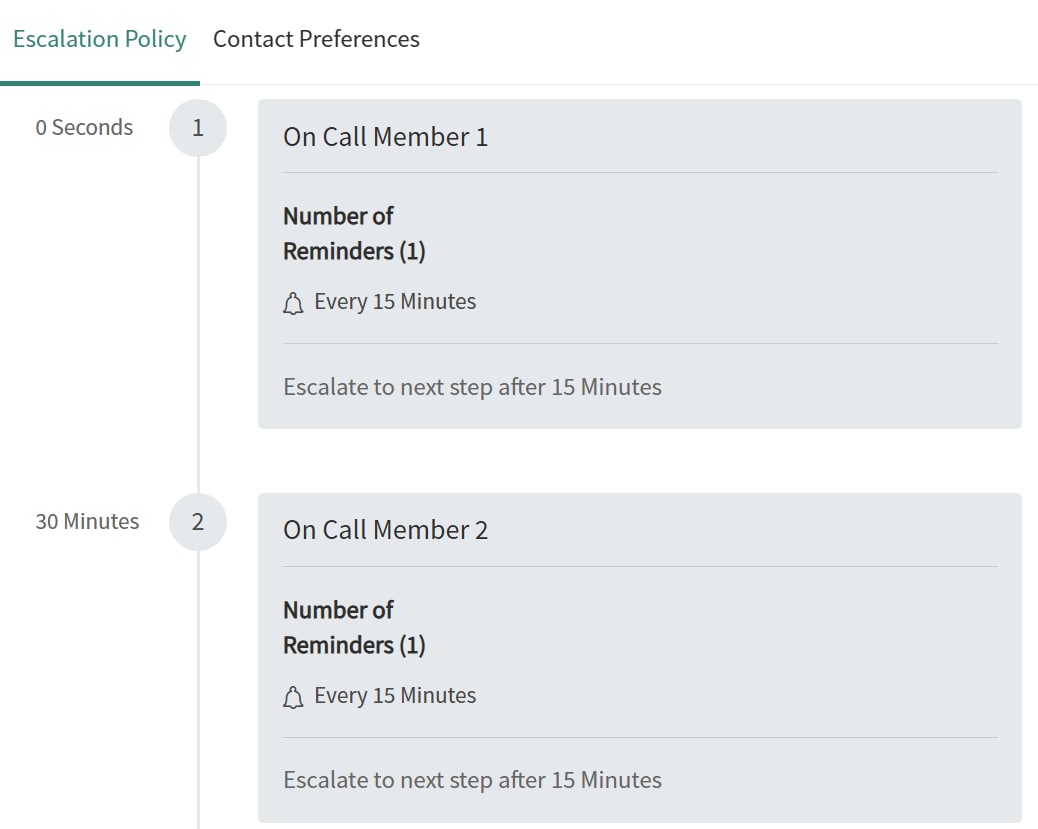
I am still struggling with my on-call scheduling. Please look at my screenshot. When I create a schedule, that is there by default. I would like to know where to set the 15 minutes to 10 minutes (in the template or wherever the system gets that from) because I would like all our schedules to be 10 minutes instead of 15. And then, I would also like to notify the manager but only 10 minutes after the second person did not react to the notification. I can see that you can choose 'notify manager' but it seems like the manager is then notified at the same time as the on-call person. I would also appreciate if you can guide me as to how to create a template if it is at all possible?
In the second screenshot I created manually for one group, but I would like to have a template that I can apply to all groups that does exactly what is displayed in the screenshot (primary, secondary, level 1 manager, level 2 manager).
Regards
Thereza

- Mark as New
- Bookmark
- Subscribe
- Mute
- Subscribe to RSS Feed
- Permalink
- Report Inappropriate Content
04-08-2026 10:54 PM
Try this option: Clone Script + Business Rule
Create one escalation policy with your desired 4-step structure (Primary → Secondary → L1 Manager → L2 Manager, all at 10-minute intervals). Then use a Fix Script to clone it to every group:
function cloneEscalationPolicy(masterSysId, targetGroupSysId) {
    var master = new GlideRecord('on_call_escalation');
    master.get(masterSysId);

    var np = new GlideRecord('on_call_escalation');
    np.initialize();
    np.name = 'Escalation - ' + getGroupName(targetGroupSysId);
    np.group = targetGroupSysId;
    var npId = np.insert();

    var steps = new GlideRecord('on_call_escalation_step');
    steps.addQuery('escalation_policy', masterSysId);
    steps.orderBy('order');
    steps.query();
    while (steps.next()) {
        var ns = new GlideRecord('on_call_escalation_step');
        ns.initialize();
        ns.escalation_policy = npId;
        ns.order = steps.order;
        ns.reminder_interval = steps.reminder_interval;
        ns.escalation_timeout = steps.escalation_timeout;
        ns.notify_type = steps.notify_type;
        ns.insert();
    }
}
Then add a before-insert Business Rule on on_call_escalation_step that overrides the default 15 to 10 minutes — this ensures any future manually-created steps also get 10-minute intervals automatically:
current.reminder_interval = 600; // 10 minutes in seconds
current.escalation_timeout = 600;
This covers both bulk rollout (the clone script) and ongoing enforcement (the business rule).