PDI Scheduled for Reclamation Despite Daily Usage

- Mark as New
- Bookmark
- Subscribe
- Mute
- Subscribe to RSS Feed
- Permalink
- Report Inappropriate Content
07-24-2026 09:01 AM
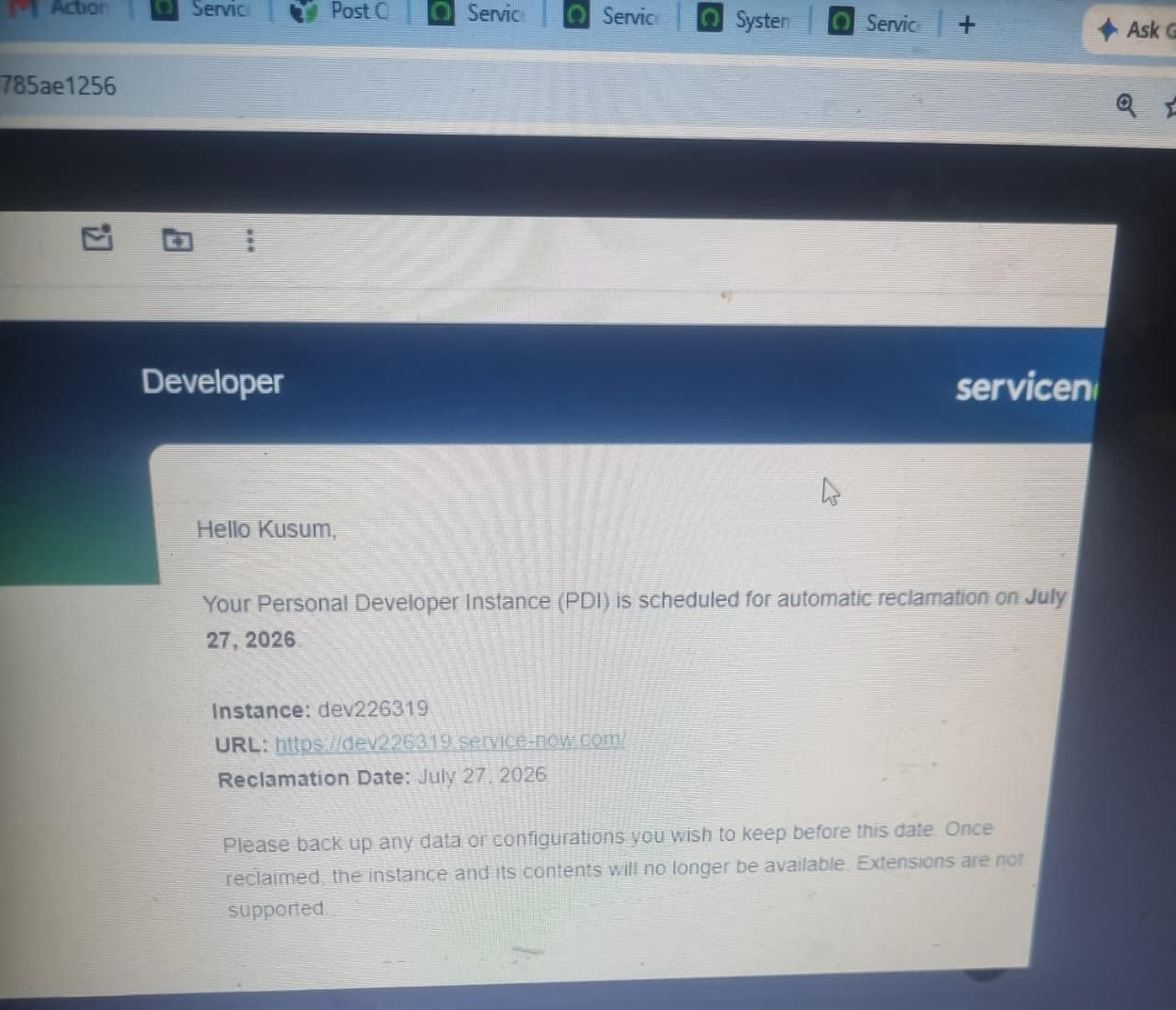
My Personal Developer Instance (dev226319) has been scheduled for automatic reclamation due to inactivity. However, I actively use this instance every day for development, including creating tables, records, business rules, client scripts, Script Includes, and other configurations.
Please help me out how can i reslve this even i received email from serviceNow that if i dont backup my pdi thn my data will be lost nd PDI will be reclaimed by July 27th refer the screenshot below .


- Mark as New
- Bookmark
- Subscribe
- Mute
- Subscribe to RSS Feed
- Permalink
- Report Inappropriate Content
07-24-2026 11:41 AM
Hi @KusumP
As per the latest blog from ServiceNow regarding PDI reclamation:
ServiceNow Personal Developer Instance (PDI) Update – Summary
ServiceNow is reclaiming inactive Personal Developer Instances (PDIs) to improve availability, as demand for PDIs has exceeded capacity.
Why is this happening?
Many inactive PDIs are occupying resources.
Reclaiming unused instances will help active developers obtain PDIs more easily.
This is part of a broader initiative to improve PDI availability and performance.
Which PDIs will be reclaimed?
A PDI will be reclaimed only if it meets both of the following conditions:
90 days or older (from the provisioning date), and
No direct login to the PDI in the last 10 days.
Note: Logging into the Developer Site or background activity does not count. You must log in directly to your PDI.
Notification Schedule
If your PDI is eligible for reclamation, ServiceNow will notify you before taking action:
July 7: Initial notification
July 10: Reminder (one day before reclamation)
July 11: PDI reclamation
If you receive any of these emails, back up your work immediately.
How to Protect Your Work
Before your PDI is reclaimed:
Export Update Sets
Connect Scoped Applications to Source Control
Export any custom data
Save attachments and configurations
Back up custom scripts and system properties
Future Improvements
ServiceNow is also working on:
Improving the underlying PDI infrastructure
Providing a more reliable and performant developer experience
Continuously monitoring and enhancing PDI availability for the developer community
Key Takeaway
If your PDI is older than 90 days and you haven't logged into it within the last 10 days, it may be reclaimed. Log in regularly and back up your work to avoid losing your customizations and development artifacts.
How to Take Backup of PDI going forward:
Summary: How to Back Up Your ServiceNow Personal Developer Instance (PDI)
This guide explains the different methods for backing up your Personal Developer Instance (PDI) to protect your work before a reset or reclamation.
1. Back Up Using ServiceNow Studio (Scoped Applications)
Use ServiceNow Studio for scoped applications.
Steps:
Create a GitHub account (if you don't already have one).
Generate a GitHub Personal Access Token (PAT) with the repo scope.
Create Basic Auth Credentials in ServiceNow using your GitHub username and PAT.
Create a GitHub repository for your application.
In System Applications > Studio, select your application.
Link the application to Source Control using the GitHub repository URL and credentials.
Push your application to GitHub.
Restore: Import the application back from Source Control using the same repository and branch.
2. Back Up Using App Engine Studio (AES)
For applications built in App Engine Studio:
Steps:
Configure GitHub and a Personal Access Token.
Create ServiceNow credentials.
Open App Engine Studio.
Select your application.
Choose Link to Source Control.
Connect it to your GitHub repository.
Restore: Use Import App in App Engine Studio to retrieve the application from GitHub.
3. Back Up Using Update Sets
Update Sets capture configuration changes made on the platform.
Steps:
Create a new Local Update Set.
Make it the Current update set.
Perform all configuration work within that update set.
Set the update set to Complete.
Export it as an XML file.
You can also:
Export multiple update sets as a batch.
Publish an entire scoped application to an Update Set and export it.
Restore: Import the XML file into Retrieved Update Sets, then Preview and Commit the update set.
Important Notes
Always store backups outside your PDI.
GitHub is recommended for application source control.
Update Sets capture configuration changes, not business data.
Metadata such as records is not backed up automatically.
Export any required custom data, attachments, scripts, and configurations separately.
Never store passwords or sensitive credentials in a public GitHub repository.
- Mark as New
- Bookmark
- Subscribe
- Mute
- Subscribe to RSS Feed
- Permalink
- Report Inappropriate Content
07-24-2026 11:42 AM
It looks like this is a known issue.
There is no official support for this issue, so it is difficult to say exactly what is causing it or when it will be resolved. At this stage, patience may be the best option while waiting for a fix.
An infrastructure-related issue beginning on July 22 caused the ServiceNow Developer Site to become temporarily unavailable and affected the availability of some Personal Developer Instances (PDIs).
The Developer Site is now back online, but some PDI-related actions remain paused while ServiceNow continues to investigate and resolve the issue.
Current status:
Developer Site: Available
New PDI provisioning: Paused
PDI reclaim and wake actions: Paused
Existing PDIs: Some remain offline
User action required: None at this time
ServiceNow does not expect any data loss. Affected PDIs are currently hibernating, and the data stored on them is expected to remain available once the instances are restored.
If your PDI is offline, you will need to wait until it becomes available again before accessing your data. No action is currently required.
ServiceNow is continuing to monitor the situation and will provide further updates as more information becomes available.

- Mark as New
- Bookmark
- Subscribe
- Mute
- Subscribe to RSS Feed
- Permalink
- Report Inappropriate Content
07-24-2026 08:40 PM
Hi @KusumP
Refer: Incident: Developer Site Restored and PDI Availability Issues
Since 23rd July'26 morning , many community members also reported the same.
Wait for some time. At some certain interval Refresh the instance from developer portal.
Do not worry. It would be working as before.
Wait for some times. From Developer portal Keep refreshing .
There is no support available for PDI .
Regards
Tanushree Maiti
ServiceNow Technical Architect
LinkedIn: https://www.linkedin.com/in/tanushreemaiti

- Mark as New
- Bookmark
- Subscribe
- Mute
- Subscribe to RSS Feed
- Permalink
- Report Inappropriate Content
07-25-2026 02:39 PM
ahoy @KusumP,
it might be resolved, at least my PDI is back!
Don't forget to access your PDI via /login.do
If you don't do an explicit login within 10 days, your PDI will be considered inactive and thus reclaimed.
✂-----Cutting-out-the---✦AI-noise✦---All-replies-written-and-vouched-for-by-GlideFather---