- Mark as New
- Bookmark
- Subscribe
- Mute
- Subscribe to RSS Feed
- Permalink
- Report Inappropriate Content
07-08-2025 12:12 AM
Hi.
Our consultants asks us to use private tasks (PTSK) for tasks that we are doing for our own department, not Universal requests (UR) as we have done now.
I am not able to display my private tasks in the dashboard of UR, INC, SCTASK that I already made. Anyone who knows what table I should use, or if it isn't possible?
Solved! Go to Solution.


- Mark as New
- Bookmark
- Subscribe
- Mute
- Subscribe to RSS Feed
- Permalink
- Report Inappropriate Content
07-08-2025 02:51 AM
Hi @Ingy
To fix this, you need to create a new report of type "List" and then add that report to the dashboard. This is how it works out of the box (OOTB).
Regards
Dr Atul G. - Learn N Grow Together ServiceNow Techno - Functional Trainer
LinkedIn: https://www.linkedin.com/in/dratulgrover
YouTube: https://www.youtube.com/@LearnNGrowTogetherwithAtulG
******************************************************************************************
- Mark as New
- Bookmark
- Subscribe
- Mute
- Subscribe to RSS Feed
- Permalink
- Report Inappropriate Content
07-08-2025 01:20 AM
Hi @Ingy
Could you please share a screenshot of what you're referring to? Did you create the report for the tasks? If so, please share it for reference. Kindly provide more details.
Regards
Dr Atul G. - Learn N Grow Together ServiceNow Techno - Functional Trainer
LinkedIn: https://www.linkedin.com/in/dratulgrover
YouTube: https://www.youtube.com/@LearnNGrowTogetherwithAtulG
******************************************************************************************
- Mark as New
- Bookmark
- Subscribe
- Mute
- Subscribe to RSS Feed
- Permalink
- Report Inappropriate Content
07-08-2025 01:48 AM
Thanks for coming back to me on this!
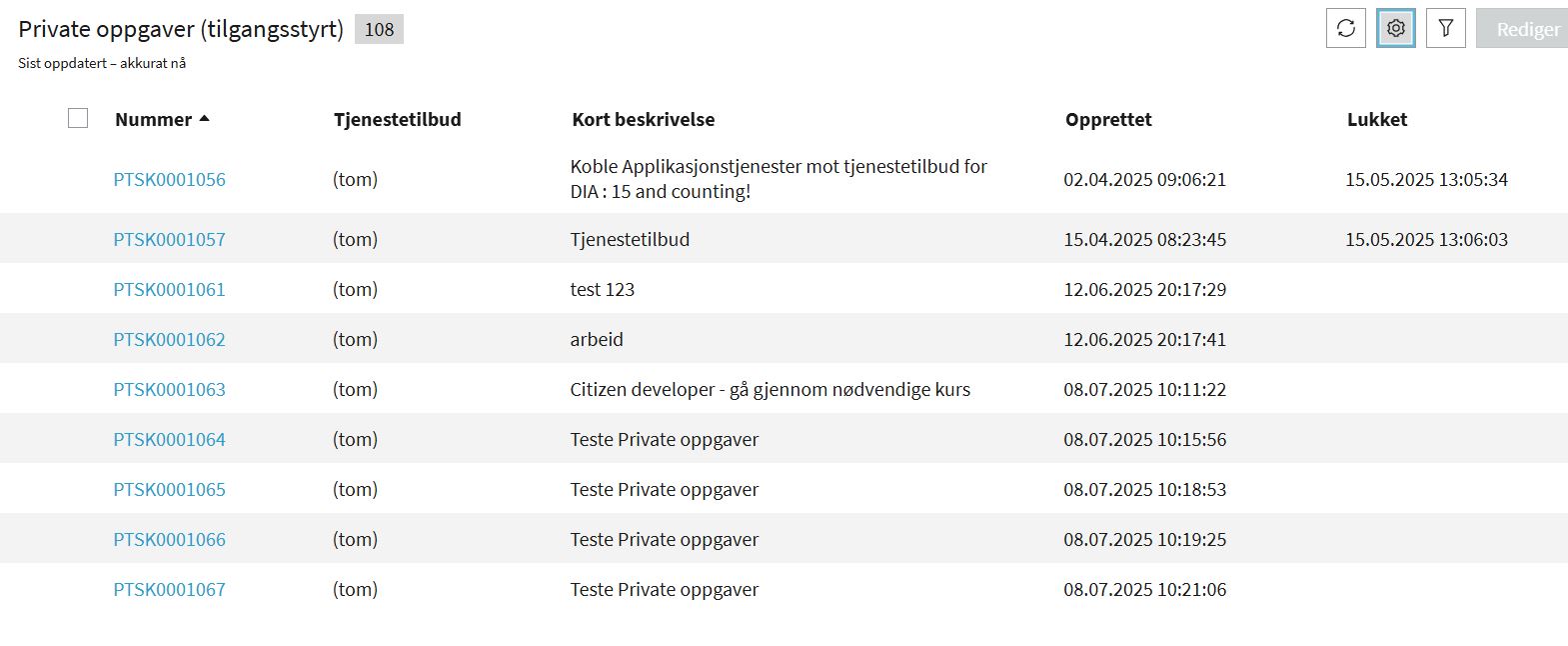
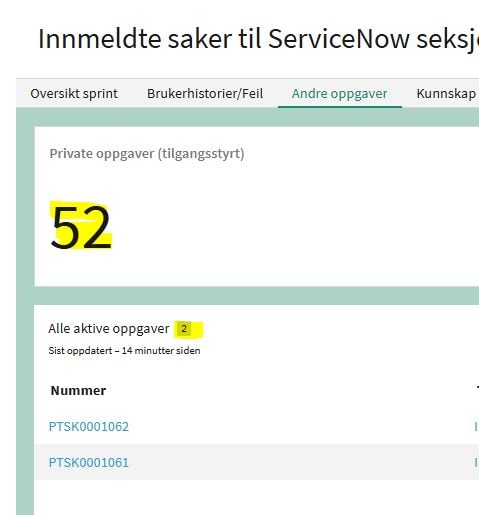
I am able to view the private tasks in my dashboard as I found them in table vtb_task. But it is very limited, as I can not display my tasks in a list, column etc as there is restrictions on the private task table. I can only make it as number, meeter etc and it gives the number of EVERY task in the table, not mine. I have added a picture showing the number, and another picture of the list of tasks that I actually can see. The dashboard view isn't good as I do not want to see the number of tasks that is not available to me. I would like to see the number of tasks available to me 🙂
- Mark as New
- Bookmark
- Subscribe
- Mute
- Subscribe to RSS Feed
- Permalink
- Report Inappropriate Content
07-08-2025 02:51 AM
Hi @Ingy
To fix this, you need to create a new report of type "List" and then add that report to the dashboard. This is how it works out of the box (OOTB).
Regards
Dr Atul G. - Learn N Grow Together ServiceNow Techno - Functional Trainer
LinkedIn: https://www.linkedin.com/in/dratulgrover
YouTube: https://www.youtube.com/@LearnNGrowTogetherwithAtulG
******************************************************************************************
- Mark as New
- Bookmark
- Subscribe
- Mute
- Subscribe to RSS Feed
- Permalink
- Report Inappropriate Content
07-08-2025 03:30 AM
Seems impossible to get the results I need for my Dashboard here, seems we have to build a new type of task in stead 🙂
If I use the List option I can only see my own tasks, not those I have assigned to others.
If I should see those tasks I have assigned to others I have to use the Number option in stead. Then I get a total number in front that is totally not my business. By pressing the total number displayed I get the list I want. Why do I have to go by so many steps, and why is the number showing the total, not those in the list? What I need is the list added as picture named "List of 9..."
Seems I have to choose either to see only mine, not those I have addressed to others. Or I can see mine and those I have assigned to others behind a number that is totally confusing. Now it says 52, but my team has only 7 open tasks listed behind that number