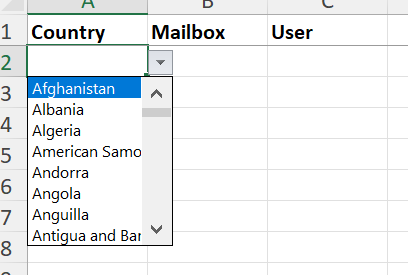
Reference list choice not coming in excel template

- Mark as New
- Bookmark
- Subscribe
- Mute
- Subscribe to RSS Feed
- Permalink
- Report Inappropriate Content
02-16-2022 03:00 AM
I have used easy_import_ref_as_choice=true to show reference list in excel template. But this is working for some reference field only. Not working for reference field which references sys_user table.
Can somebody help me on this?

- Mark as New
- Bookmark
- Subscribe
- Mute
- Subscribe to RSS Feed
- Permalink
- Report Inappropriate Content
02-16-2022 04:03 AM
Hi
Can you show me how you are exporting and if you are getting any error?
Thank you
Prasad
- Mark as New
- Bookmark
- Subscribe
- Mute
- Subscribe to RSS Feed
- Permalink
- Report Inappropriate Content
02-16-2022 04:25 AM
I have created a table with 3 fields . All are reference fields. I have added that attribute in dictionary of the three fields. And using import menu i downloaded the template. So i could see that reference list choice is showing in 2 columns in excel. But the column which is referencing to sys_user table, no reference list is showing in the excel.Please find below screenshots


- Mark as New
- Bookmark
- Subscribe
- Mute
- Subscribe to RSS Feed
- Permalink
- Report Inappropriate Content
02-16-2022 04:41 AM
Seems weird. As per the docs it should work if you added properly.
https://docs.servicenow.com/bundle/rome-platform-administration/page/administer/import-sets/task/show-excel-reference-dropdowns.html
Can you please try to add this attribute 'easy_import_ref_as_choice = true'?
- Mark as New
- Bookmark
- Subscribe
- Mute
- Subscribe to RSS Feed
- Permalink
- Report Inappropriate Content
02-16-2022 04:48 AM