Trigger UI action through rest api call

- Mark as New
- Bookmark
- Subscribe
- Mute
- Subscribe to RSS Feed
- Permalink
- Report Inappropriate Content
02-04-2020 08:05 AM
Hello,
I want to be able to trigger a UI action that is located on a record on a specific table
I tried using this method found in this link: https://servicenowthink.wordpress.com/2019/10/15/call-any-ui-action-with-rest-api-or-ajax-ootb-updat...
This is in python:
url = 'https://URLHERE/api/now/ui/ui_action/sys_id_of_ui_action?' \
'sysparm_table=table_of_target_record&' \
'sysparm_sys_id=' sys_id_of_target_record& '\
'api=api'
headers = {"Content-Type":"application/json","Accept":"application/json"}
response = requests.post(url, auth=(user, pwd), headers=headers, verify = False )
if response.status_code != 200 and response.status_code != 201:
print('Status:', response.status_code, 'Headers:', response.headers, 'Error Response:',response.json())
exit()
data = response.json()
and i am receiving
- Mark as New
- Bookmark
- Subscribe
- Mute
- Subscribe to RSS Feed
- Permalink
- Report Inappropriate Content
02-04-2020 11:41 AM
- Mark as New
- Bookmark
- Subscribe
- Mute
- Subscribe to RSS Feed
- Permalink
- Report Inappropriate Content
02-04-2020 12:15 PM

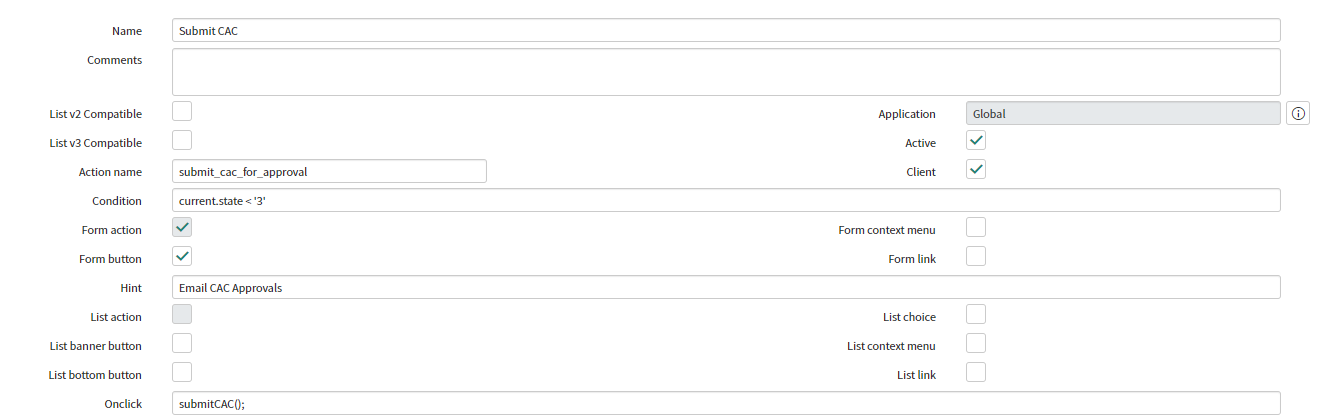
function submitCAC() {
	//check if there are any empty mandatory fields
	var manField = false;
	var alertStr = '';
	var manArray = [];
	if(g_form.getValue('u_release_type') == 'Production' && g_form.getValue('u_release_type_new') == '')
	{
		manArray = ['u_change_number','u_business_manager','u_project_leader','u_project_contact','u_application_support_required'];

		g_form.setMandatory('u_acceptance_tester', false);
	}
	else
	{
		manArray = ['u_acceptance_tester','u_business_manager','u_project_leader','u_project_contact','u_application_support_required'];
		g_form.setMandatory('u_change_number', false);
	}


	for(var i = 0;i<manArray.length;i++)
		{
		if(g_form.getValue(manArray[i]) == ''){
			g_form.setMandatory(manArray[i], true);
			alertStr += (g_form.getLabelOf(manArray[i]) + ', ');
			manField = true;
		}
	}
	alertStr = alertStr.replace(/,\s*$/, "");

	if (manField){
		alert('Please complete the following mandatory fields before submitting for Approval: '  + alertStr);
		return false;
	}

	if(!manField)
	{
	if (g_form.getValue('u_change_number') == '' && g_form.getValue('u_enhancement_number') == '' && g_form.getValue('u_request_number') == '')
		{
			alert('You must enter a Change Control #, Request # or Enhancement Number before submitting for approval.');
		return false;
		}
	}

	g_form.setValue('state', '3'); //"Approval"

	// Call the UI Action, and skip the "onclick" function.
	gsftSubmit(null, g_form.getFormElement(), 'submit_cac_for_approval');
}

//Code that runs without 'onclick'
//Ensure call to server-side function with no browser errors
if(typeof window == 'undefined')
	runUpdateCode();

//Server-side function
function runUpdateCode(){
	current.update();
	gs.addInfoMessage(current.number + ' submitted for Approval');
	action.setRedirectURL(current);
}- Mark as New
- Bookmark
- Subscribe
- Mute
- Subscribe to RSS Feed
- Permalink
- Report Inappropriate Content
02-04-2020 03:40 PM
I believe your rest message is triggering the UI action, however it is using client side API's like g_form which cannot be triggered from server side REST, you would have to remove any client only side code and use server side, for example current.u_change_number instead of g_form.getValue('u_change_number') I believe.