Trying to add dynamic text block on catalog order form

- Mark as New
- Bookmark
- Subscribe
- Mute
- Subscribe to RSS Feed
- Permalink
- Report Inappropriate Content
12-06-2018 11:29 AM
Hello all,
I have a requirement to dynamically show some text based on values from other variables on a catalog order form.
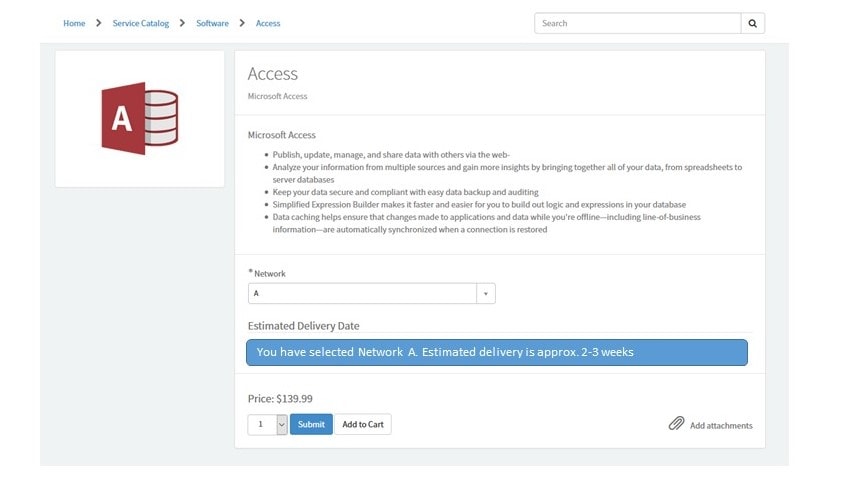
Here is an image that shows the order form... very basic. I ask the user to select a network. The Estimated Delivery Date is the title on a variable set:

From here, the user selects a 'Network'. Based on the network, a block appears under the 'Estimated Delivery Date' title (which is a variable set):

I'm thinking of using a Macro to show the blue box with text. Then I thought of use g_form.showFieldMessage but I need a field to put the message below. In my case, I am thinking I just a Marco variable in my variable set and the macro would display what I need to. The macro would be the only variable in the variable set
Any insight/suggestions would be greatly appreciated-

- Mark as New
- Bookmark
- Subscribe
- Mute
- Subscribe to RSS Feed
- Permalink
- Report Inappropriate Content
12-06-2018 11:37 AM
Hi Matthew, The approach you are considering is the way to go I believe due to the fact, it is just a message. Just a note: Create a widget with same content (since it is just HTML, you can literally copy paste) and, on macro variable, there is a field called widget, just select you widget there. This will make your Catalog service portal compatible. g_form ($scope.page.g_form()) API is available in widget, if it is part of a Catalog item.
- Mark as New
- Bookmark
- Subscribe
- Mute
- Subscribe to RSS Feed
- Permalink
- Report Inappropriate Content
12-06-2018 11:38 AM
- Mark as New
- Bookmark
- Subscribe
- Mute
- Subscribe to RSS Feed
- Permalink
- Report Inappropriate Content
12-08-2018 07:30 AM
Hi Rauhulpandey,
I see the field for Widget under the related list Default Value.
I created a simple widget and added it to the widget field of the macro variable.
It now shows up. Wahoo.
Now I just need to see if there is a widget is can use as a guide that will get the value from another variable on the form, do some calculation, and then show a 'custom' message
- Mark as New
- Bookmark
- Subscribe
- Mute
- Subscribe to RSS Feed
- Permalink
- Report Inappropriate Content
12-08-2018 09:40 PM
Hi Matthew,
You can certainly do that via $scope.page.g_form() .
In your widget's client controller, You can get value of another variable like below
var variableValue = $scope.page.g_form.getValue('your variable name');