- Mark as New
- Bookmark
- Subscribe
- Mute
- Subscribe to RSS Feed
- Permalink
- Report Inappropriate Content
01-05-2022 07:09 AM
Hello,
Currently I have a requirement to add the ITIL role to all groups of type "Support". There are over 300 groups of this type and if possible I would like to script it to save time. How can I go about configuring this? I tried the solution from this post but nothing happens when I execute the script.
Thanks!
Solved! Go to Solution.


- Mark as New
- Bookmark
- Subscribe
- Mute
- Subscribe to RSS Feed
- Permalink
- Report Inappropriate Content
01-05-2022 07:53 AM
Try this and replace the group type sys_id with the group type sys_id in your instance and the role sys_id with the sys_id of ITIL role from your instance....
var now_GR = new GlideRecord("sys_user_group");
now_GR.addEncodedQuery("typeLIKE1cb8ab9bff500200158bffffffffff62");
now_GR.query();
while(now_GR.next()) {
var does_not_have_role = new GlideRecord("sys_group_has_role");
does_not_have_role.addQuery('group', now_GR.sys_id);
does_not_have_role.addQuery('role', "282bf1fac6112285017366cb5f867469");
does_not_have_role.query();
if(!does_not_have_role.next()){
var add_new = new GlideRecord("sys_group_has_role");
add_new.initialize();
add_new.group = now_GR.sys_id;
add_new.role = "282bf1fac6112285017366cb5f867469";
add_new.insert();
}
}


- Mark as New
- Bookmark
- Subscribe
- Mute
- Subscribe to RSS Feed
- Permalink
- Report Inappropriate Content
01-05-2022 07:12 AM
Can you show the script you came up with, it would easier to modify it and you will learn what you missed.
- Mark as New
- Bookmark
- Subscribe
- Mute
- Subscribe to RSS Feed
- Permalink
- Report Inappropriate Content
01-05-2022 07:38 AM
Hello, see script below:
var gr = new GlideRecord('sys_group_has_role');


gr.addEncodedQuery('group.type=d66994f011646000071e389470fb2e25'); // Runs on all Support Type Groups


gr.query();


while(gr.next()){


gr.role = '802d29e6db3f7300ee6d59b2ca961963';   //Pass the sys_id of ITIL


gr.update();
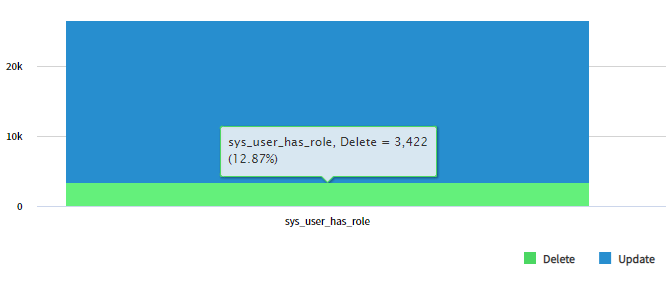
When I ran the script, it also DELETED 3,422 records on the sys_user_has_role table, do you know why that is?

- Mark as New
- Bookmark
- Subscribe
- Mute
- Subscribe to RSS Feed
- Permalink
- Report Inappropriate Content
01-05-2022 08:01 AM
You need to insert records and not update them.
follow what Linda Suggested.

- Mark as New
- Bookmark
- Subscribe
- Mute
- Subscribe to RSS Feed
- Permalink
- Report Inappropriate Content
01-05-2022 07:16 AM
You can do it without scripting.
Export template from the "sys_group_has_role" table in excel. And then export the Group List from the 'sys_user_group' table.
Now copy the group names from the exported sheet and paste those in the "sys_group_has_role" template group column, in the role column provide the itil.
Now your sheet is ready to import on "sys_group_has_role" table.
Note: Make sure to do the import only for 5 records as a test of everything is fine then proceed with rest of the records.
Thanks,
Ankur