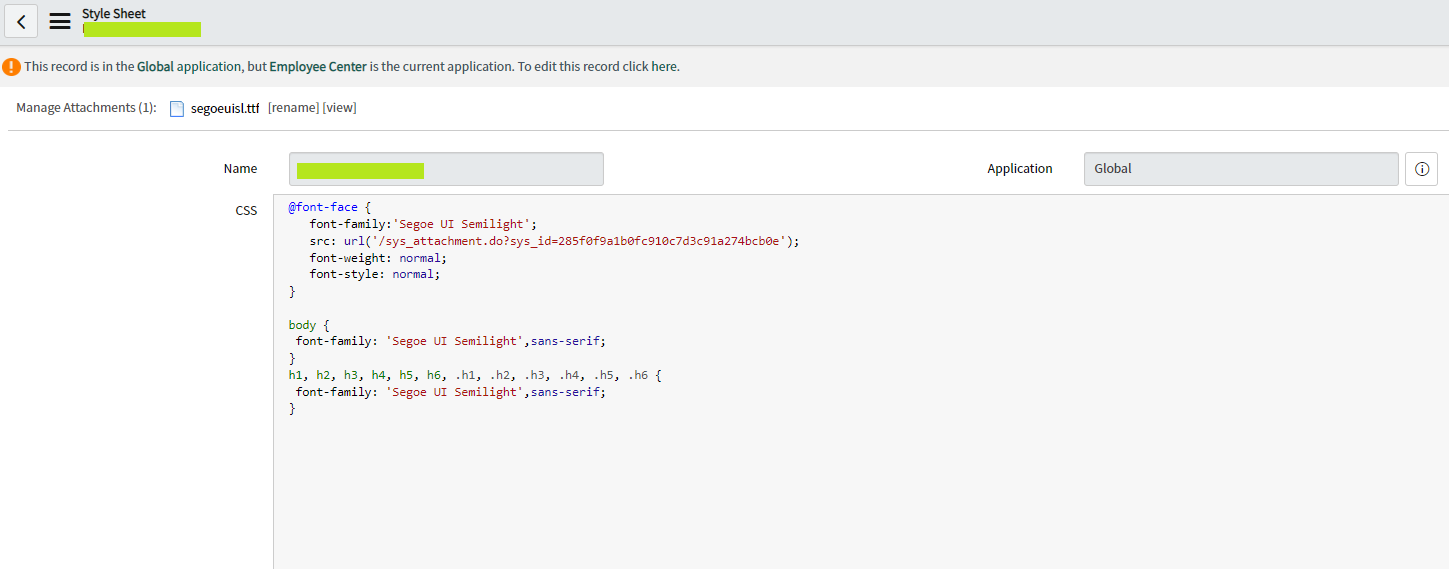
How to change the font type of employee center portal?

- Mark as New
- Bookmark
- Subscribe
- Mute
- Subscribe to RSS Feed
- Permalink
- Report Inappropriate Content
08-04-2022 11:21 PM
I was curious to know how we can change the font type of employee center portal.

- Mark as New
- Bookmark
- Subscribe
- Mute
- Subscribe to RSS Feed
- Permalink
- Report Inappropriate Content
08-07-2022 08:27 PM
Hi Shiva,
Any update to this ?Any follow-up required? if not
Kindly mark the answer as Correct & Helpful both such that others can get help.
Thanks,
Sandeep
- Mark as New
- Bookmark
- Subscribe
- Mute
- Subscribe to RSS Feed
- Permalink
- Report Inappropriate Content
08-08-2022 11:32 PM
Hi Shiva,
Have you tried this?
- Mark as New
- Bookmark
- Subscribe
- Mute
- Subscribe to RSS Feed
- Permalink
- Report Inappropriate Content
08-09-2022 12:01 AM


- Mark as New
- Bookmark
- Subscribe
- Mute
- Subscribe to RSS Feed
- Permalink
- Report Inappropriate Content
08-07-2022 10:38 PM
Hi Shiva,
If you have specific font to apply for your portal then first you need to download or get base 64 code font file. If it's the most known common font then you can give a direct URL (google font- check option1 in the below article) as well. Once you add the stylesheet to the portal theme then you can use it within the portal. If any font especially use on portal page or widget, then it will override font applied at the theme level. I would recommend applying at the theme level.
I found option3 in the article more useful from a performance perspective.
https://community.servicenow.com/community?id=community_blog&sys_id=c95d2629dbd0dbc01dcaf3231f9619ed
Please mark as correct answer or helpful if the provided response resolves your query!

- Mark as New
- Bookmark
- Subscribe
- Mute
- Subscribe to RSS Feed
- Permalink
- Report Inappropriate Content
08-08-2022 11:12 PM