How to reopen closed case

- Mark as New
- Bookmark
- Subscribe
- Mute
- Subscribe to RSS Feed
- Permalink
- Report Inappropriate Content
08-12-2020 05:39 AM
Hi, I want to know how to reopen a closed case when we receive an update\reply on it via email?


- Mark as New
- Bookmark
- Subscribe
- Mute
- Subscribe to RSS Feed
- Permalink
- Report Inappropriate Content
08-12-2020 06:37 AM
Normally a Case would be set to resolved. After x number of days it will be closed. In the period from Resolved to Closed it can be reopened. After that the user must create a new Case.
If you still want to reopen, please find:

- Mark as New
- Bookmark
- Subscribe
- Mute
- Subscribe to RSS Feed
- Permalink
- Report Inappropriate Content
08-12-2020 11:30 PM
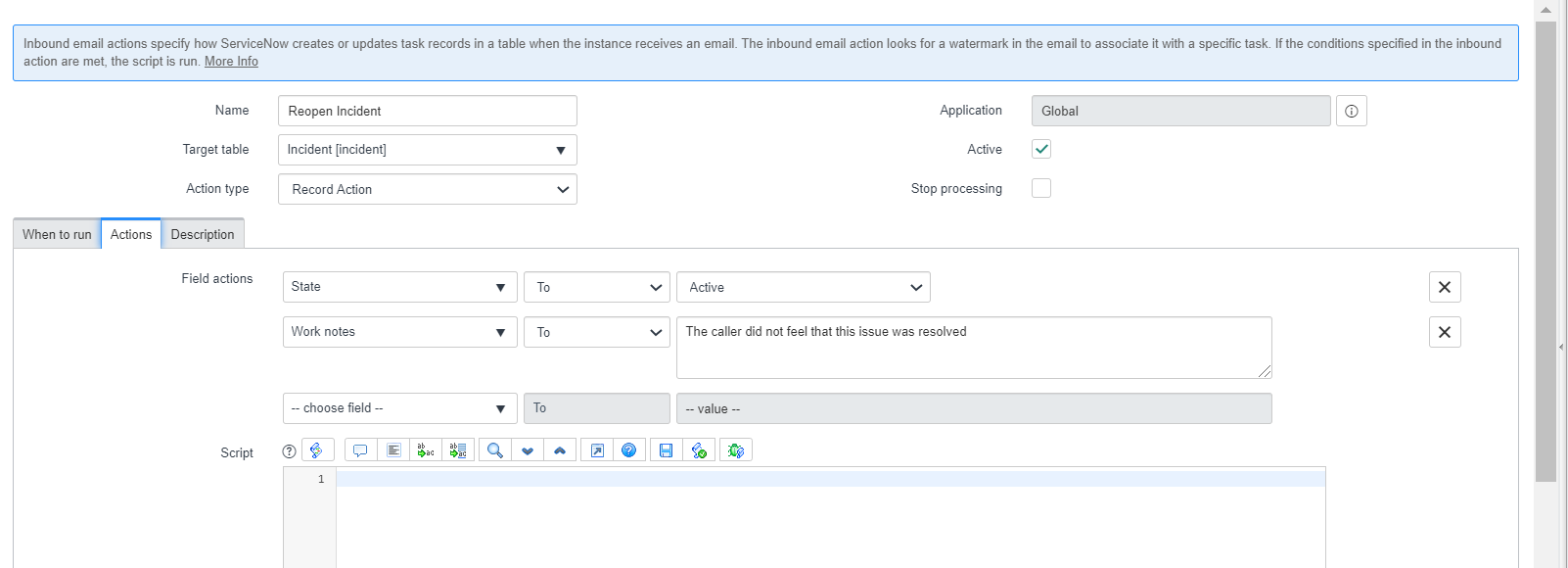
You will have to configure inbound email action for this if there isn't any.
Refer this OOB inbound email action for Reopening Incident
Name: Reopen Incident
URL: https://instanceName.service-now.com/nav_to.do?uri=sysevent_in_email_action.do?sys_id=62db1effef7221002841f7f775c0fb6c
What it performs is -> when reply comes it sets the Incident State as Active
You can have something similar on your Case Table which you want
below links should help you as well:
Reopen or closed incident by mail in ServiceNow
Email Re-opening Closed Incidents


Regards
Ankur
Ankur
✨ Certified Technical Architect || ✨ 10x ServiceNow MVP || ✨ ServiceNow Community Leader

- Mark as New
- Bookmark
- Subscribe
- Mute
- Subscribe to RSS Feed
- Permalink
- Report Inappropriate Content
08-12-2020 11:45 PM
Be wary of re-opening records as it can invalidate reporting.
E.g. Record is closed in July, report for closed records in July gets sent, the record is re-opened in August, then closed in August, you now have a record that was closed twice, inflating the statistics. This can have contractual implications too - re-opening the record could make a previously passed SLA fail. It's just not a great idea to implement and would be non-standard in this industry.
ServiceNow Nerd
ServiceNow Developer MVP 2020-2022
ServiceNow Community MVP 2019-2022