- Marcar como nuevo
- Favorito
- Suscribir
- Silenciar
- Suscribirse a un feed RSS
- Resaltar
- Imprimir
- Informe de contenido inapropiado
el 12-27-2019 01:16 PM
The Manage contacts from the customer portal documentation states that a contact with the sn_customerservice.customer_admin role may create contacts from the 'customer_contacts' portal page. However, a 'new' button does not appear to exist.
I spun up a new dev instance and tested OOB functionality before posting. I found a few posts on the Community on this subject but they refer to Helsinki documentation. Can anyone confirm that this is NOT supported in the csm portal on New York?
¡Resuelto! Ir a solución.
- Etiquetas:
-
Customer Service Management
- Marcar como nuevo
- Favorito
- Suscribir
- Silenciar
- Suscribirse a un feed RSS
- Resaltar
- Imprimir
- Informe de contenido inapropiado
el 12-31-2019 01:22 AM
I can't seems to find the new button also but the 'create contact' is actually a record producer that you can acces by using Request something -> Services or navigate to the following URL
csm?id=sc_cat_item&sys_id=56c62944c30102003d3b7bfaa2d3ae36
- Marcar como nuevo
- Favorito
- Suscribir
- Silenciar
- Suscribirse a un feed RSS
- Resaltar
- Imprimir
- Informe de contenido inapropiado
el 01-02-2020 10:50 AM
I re-enabled the Create Contact record producer and inserted it in our Customer Service Portal Header as a URL. This enables the functionality we were after. Thank you.
- Marcar como nuevo
- Favorito
- Suscribir
- Silenciar
- Suscribirse a un feed RSS
- Resaltar
- Imprimir
- Informe de contenido inapropiado
el 01-02-2020 12:37 AM
Hi Brad,
Yes as already mentioned, it is accessible from Services -> Create Contact and the Customer Admin will be able to add a new contact through portal.
- Marcar como nuevo
- Favorito
- Suscribir
- Silenciar
- Suscribirse a un feed RSS
- Resaltar
- Imprimir
- Informe de contenido inapropiado
el 01-02-2020 08:40 AM
A newly spun up dev instance of New York does not appear to have the Services portal header option for a customer admin. I will be testing khadija's above suggestion today and will report back. Below are the steps I followed in investigating the initial post.
I created a test account in a fresh dev instance:

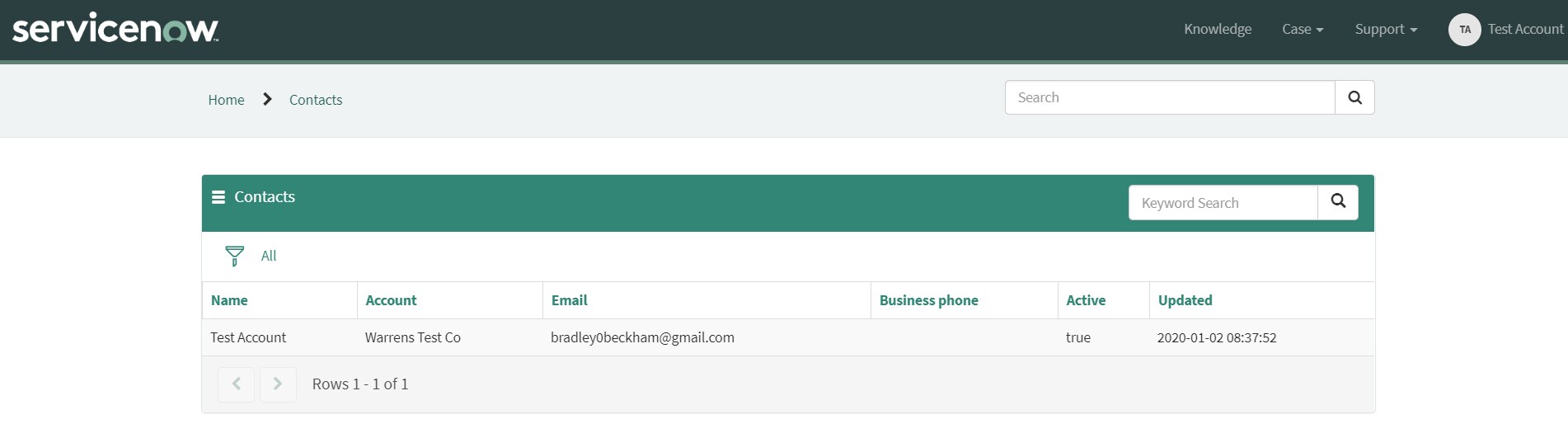
I logged into the csm portal with the test account. Per the documentation, the option should be under Support > Contacts.

But on the contacts list, there is not new option.