- Mark as New
- Bookmark
- Subscribe
- Mute
- Subscribe to RSS Feed
- Permalink
- Report Inappropriate Content
3 hours ago
In our instance, we only have technicians creating Requests (users can create Incidents). We will create Requests from Incidents. I have tried creating a Business Rule to cancel the Incident after the Request has been made and I'm running into a couple issues.
Here is the script I'm using:
(function executeRule(current, previous /*null when async*/) {
// Ensure the request has a valid parent Incident
var grIncident = new GlideRecord('incident');
if (grIncident.get(current.parent)) {
// Update the incident state to Cancelled (typically 😎
grIncident.incident_state = 8;
// Populate required cancellation fields (verify exact choices for your instance)
grIncident.close_code = 'Service Request Created';
grIncident.close_notes = 'Incident canceled due to automatic Request creation: ' + current.number;
grIncident.update();
}
})(current, previous);
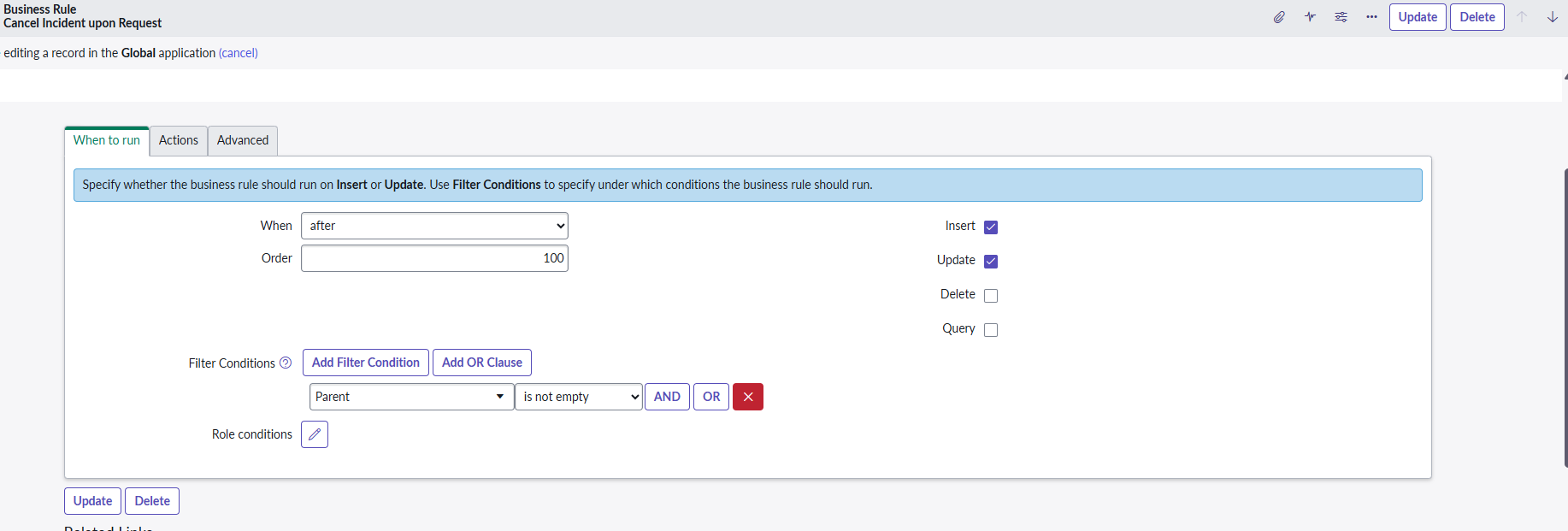
This instructions I see ask me to use the following conditions:
Configure the Filter Conditions:
- Parent (or Request for) is not empty
- Parent.sys_class_name is incident (ensures it only runs when the request is generated from an incident)
Please help me figure out how to configure parent.sys_class_name
I do not have that option in my settings (see screenshot). I don't see it as a filter, clause or role condition.
Solved! Go to Solution.
- Mark as New
- Bookmark
- Subscribe
- Mute
- Subscribe to RSS Feed
- Permalink
- Report Inappropriate Content
3 hours ago
Hi @TALENAJ ,
You can check the condition in the Advanced tab, as shown in the image below.

current.parent.sys_class_name=='incident'
If my response helped, mark it as helpful and accept the solution.
Thanks,
Dinesh

- Mark as New
- Bookmark
- Subscribe
- Mute
- Subscribe to RSS Feed
- Permalink
- Report Inappropriate Content
3 hours ago - last edited 3 hours ago
Hi @TALENAJ
Update the existing Active UI Action "Create Request" on Incident
- Navigate to System Definition > UI Actions and find the existing UI Action used to create Requests
- Add the following Script to your UI Action script, ensuring it updates the incident state and closure fields before updating the record:
current.state = 8;
current.close_code = 'Service Request Created';
current.close_notes = 'Incident cancelled as it was converted to a Request.';
current.update();
Regards
Tanushree Maiti
ServiceNow Technical Architect
LinkedIn: https://www.linkedin.com/in/tanushreemaiti