- Mark as New
- Bookmark
- Subscribe
- Mute
- Subscribe to RSS Feed
- Permalink
- Report Inappropriate Content
07-08-2021 01:29 AM
Hi ,
I am trying to create an UI action to update only one field. I tried using the below code
function saveDesc() {
    var desc = g_form.getValue('description');
    g_form.setValue('description', desc);
    gsftSubmit(null, g_form.getFormElement(), 'save_dec');
    action.setRedirectURL(current);
}
Action Name : save_dec
I am bale to save if i added the value of the description in the setvalue method. But if I am trying to get and set it is not working as expected. and after this script the page should be redirected to the same form page.

Can someone help me out.
Thanks.
Solved! Go to Solution.
- Labels:
-
Scripting and Coding
- Mark as New
- Bookmark
- Subscribe
- Mute
- Subscribe to RSS Feed
- Permalink
- Report Inappropriate Content
07-08-2021 01:31 AM
Hi!
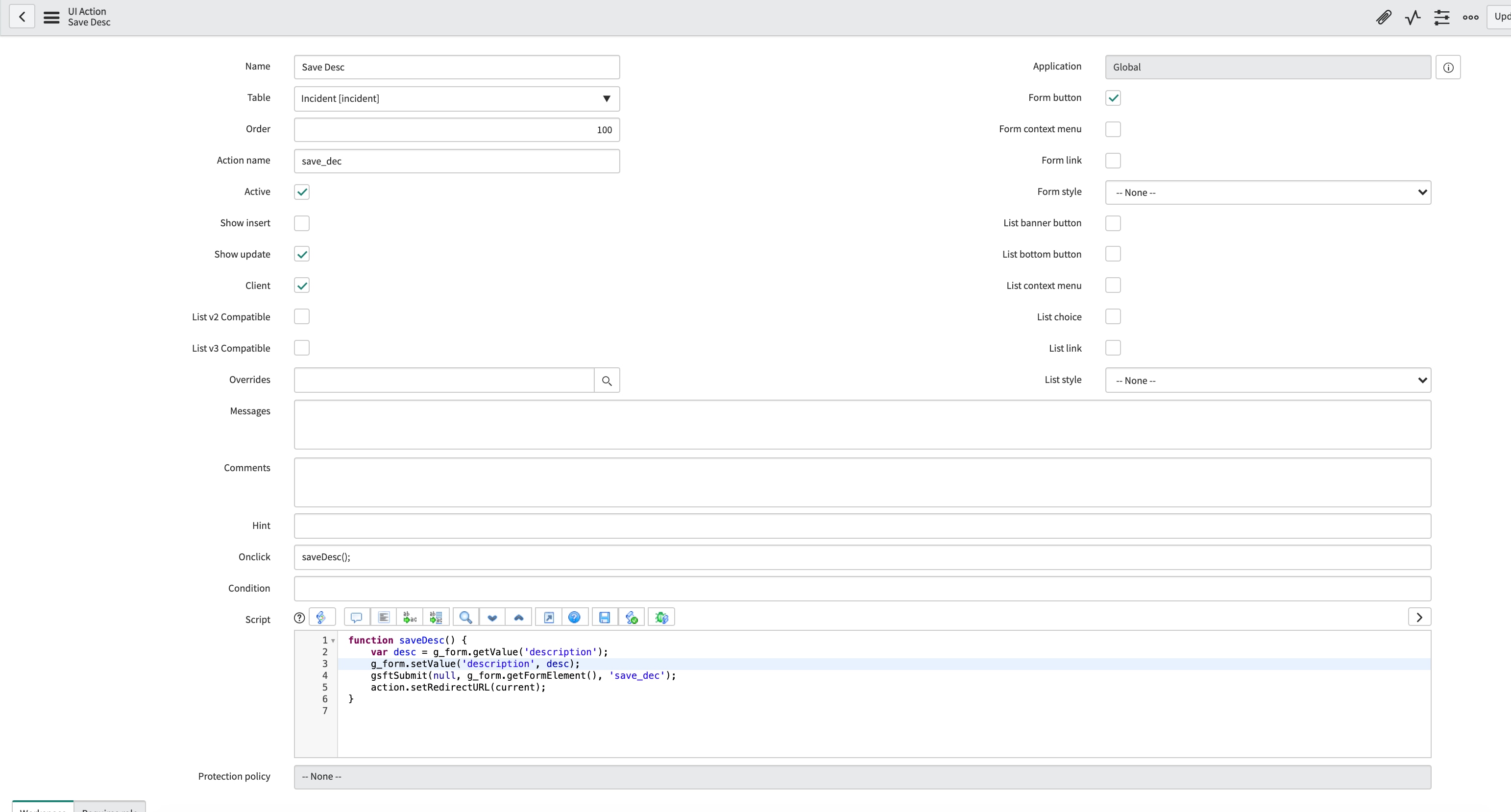
Can you add a screenshot of the entire UI Action?
Best regards,
Pedro
- Mark as New
- Bookmark
- Subscribe
- Mute
- Subscribe to RSS Feed
- Permalink
- Report Inappropriate Content
07-08-2021 01:35 AM
Added the screeshot of the UI action.

- Mark as New
- Bookmark
- Subscribe
- Mute
- Subscribe to RSS Feed
- Permalink
- Report Inappropriate Content
07-08-2021 01:39 AM
Hi
The code is incorrect. action.setRedirect is supposed to be inside the server script instead of client function.
However if you only need to update the field then no need to make the UI action to be run as Client first.
1. Uncheck the Client checkbox
2. Write below code to update the description:
current.description  = "Any value"
current.update();
action.setRedirectURL(current.getLink());
For more information on how client and server side code works in UI action, please follow:
https://servicenowguru.com/system-ui/ui-actions-system-ui/client-server-code-ui-action
Please mark this answer correct/helpful if it helps.
Thanks
Deepak
- Mark as New
- Bookmark
- Subscribe
- Mute
- Subscribe to RSS Feed
- Permalink
- Report Inappropriate Content
07-08-2021 01:46 AM
Hi
TRhis will work but If made any change to anyother fields those will also get updated. I want to update the description field only.