- Mark as New
- Bookmark
- Subscribe
- Mute
- Subscribe to RSS Feed
- Permalink
- Report Inappropriate Content
01-03-2021 01:19 AM
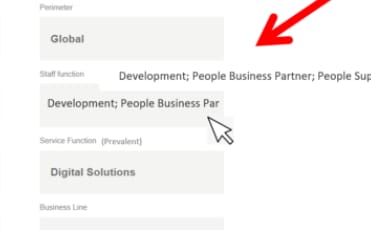
Please share screenshot of how it should be
Regards
Ankur
Ankur
✨ Certified Technical Architect || ✨ 10x ServiceNow MVP || ✨ ServiceNow Community Leader

- Mark as New
- Bookmark
- Subscribe
- Mute
- Subscribe to RSS Feed
- Permalink
- Report Inappropriate Content
01-03-2021 06:50 AM

- Mark as New
- Bookmark
- Subscribe
- Mute
- Subscribe to RSS Feed
- Permalink
- Report Inappropriate Content
01-03-2021 07:29 AM
Hi
You have to use the combination of ng-model and tool tip ,modify the widget like below
HTML
<div>
  <br>
  <br>
 <input type="text" ng-model="greeting" data-toggle="tooltip" data-placement="right" title="{{greeting}}"/>
</div>
Client Script
api.controller=function($scope) {
	/* widget controller */
	var c = this;

	$scope.toolTip2=$scope.greeting;
};
Regards
Pranav
- Mark as New
- Bookmark
- Subscribe
- Mute
- Subscribe to RSS Feed
- Permalink
- Report Inappropriate Content
01-05-2021 04:26 AM
Hi ,
Thanks for the reply,I have tried this and it worked for my requirement .
Can we adjust the size of the tooltip that is displaying?
Thanks,
Phani
- Mark as New
- Bookmark
- Subscribe
- Mute
- Subscribe to RSS Feed
- Permalink
- Report Inappropriate Content
01-05-2021 08:21 AM
Basically it will auto adjust based the text.
Regards
Pranav