- Mark as New
- Bookmark
- Subscribe
- Mute
- Subscribe to RSS Feed
- Permalink
- Report Inappropriate Content
11-19-2015 02:08 PM
Actually I can! I created a dynamic content block and built everything in it around the sys_id of the technician. Now, since this was my first iteration of this project, I actually ended up building separate content blocks for each Technician in the Service Center group. I quickly realized that was a bad idea since the turnover rate was a little high. My new iteration is run from a table and you simply add or remove a record for a technician and it'll automatically populate in the application. Anywho, to what you were looking for...
<?xml version="1.0" encoding="utf-8" ?>
<j:jelly trim="false" xmlns:j="jelly:core" xmlns:g="glide" xmlns:j2="null" xmlns:g2="null">

<!-- This will create a jelly variable that contains the users login id as well as the sys_id of their record in SN. -->
<j:set var="jvar_testuser" value="a8ad4da46f56250092a4186e6b3ee4e7" />


<!-- GET THE TECHNICIAN NAME -->
<g:evaluate var="jvar_darjohnson_name">
var gr = new GlideRecord('sys_user');
gr.get('sys_id','${jvar_darjohnson}');
var jvar_darjohnson_name = gr.name;
jvar_darjohnson_name;
</g:evaluate>

<!-- THIS IS CHECKING A FLAG ON THEIR USER RECORD TO DETERMINE IF THEY ARE ACTIVE(SCHEDULED TO BE ON THE CLOCK). THAT SCHEDULING FUNCTIONALITY IS RUN ON A SCHEDULED JOB THAT CHECKS THE SCHEDULE TABLE WHERE I CREATED RECORDS OF EVERYONES SCHEDULE AND THEIR MANAGER CAN SIMPLY MODIFY THEIR SCHEDULE OR MARK THEM AS BEING ABSENT AND THE APPLICATION WILL RESPOND ACCORDINGLY BY NOT MARKING THEM AS ACTIVE AND NOT ASSIGNING TICKETS TO THEM. -->
<g2:evaluate var="jvar_darjohnson_status">
var tr = new GlideRecord('sys_user');
tr.get('sys_id','${jvar_darjohnson}');
var jvar_darjohnson_status = tr.u_is_available_;
jvar_darjohnson_status;
</g2:evaluate>

<!-- THIS IS RUNNING A GLIDEAGGREGATE TO ACCOUNT FOR HOW MANY RECORDS ARE ACTIVE AND ASSIGNED TO THIS PARTICULAR TECHNICIAN -->
<g2:evaluate var="jvar_darjohnson_queue">
var qr = new GlideAggregate('task');
qr.addActiveQuery();
qr.addQuery('assigned_to','${jvar_darjohnson}');
qr.addQuery('u_resolved',false);
qr.addAggregate('COUNT');
qr.query();
var darjohnson_items = 0;
if(qr.next()){
darjohnson_items = qr.getAggregate('COUNT');
}
darjohnson_items;
</g2:evaluate>

<!-- THIS IS TAKING THOSE PREVIOUS QUERIES AND CREATING VARIABLES TO HOLD THE CONTENT BEFORE BEING DISPLAYED ON THE SCREEN. -->
<j:set var="jvar_tickets_today" value="$[gr.getValue('u_tickets_assigned_today')]" />
<j:set var="jvar_tickets_week" value="$[gr.getValue('u_tickets_assigned_this_week')]" />
<j:set var="jvar_tickets_month" value="$[gr.getValue('u_tickets_assigned_this_month')]" />

<!-- THIS IS PRESENTING THE STATUS OF THE TECHNICIAN -->
<!-- DECLARE THE OPPOSITE OF THE TECHNICIANS CURRENT STATUS -->
<j2:set var="jvar_darjohnson_opp_status" value="$[!jvar_darjohnson_status]" />


<!-- WRITE THE INFORMATION TO THE SCREEN -->
<div>
<p style="font-size:20px;font-weight:bold;color:#D2CECE;text-align:center">${jvar_darjohnson_name}</p>
<p style="font-size:18px;text-align:center;text-decoration:underline">Available</p>
<p id="darjohnsonStatus" style="text-align:center;font-size:18px;color:blue"> $[jvar_darjohnson_status] </p>
<p style="font-size:18px;text-align:center;">Tickets assigned today :   ${jvar_tickets_today}</p>
<p style="font-size:18px;text-align:center;">Tickets assigned this week :   ${jvar_tickets_week}</p>
<p style="font-size:18px;text-align:center;">Tickets assigned this month :   ${jvar_tickets_month}</p>
<p style="font-size:18px;text-align:center;">Queue : $[jvar_darjohnson_queue]</p>
</div>

<!-- THESE ARE THE BUTTONS THAT ALLOW YOU TO CHANGE THE TECHNICIANS STATUS AND VIEW ALL OF THE ITEMS IN THAT TECHNICIANS QUEUE -->
<div style="text-align:center">
<fieldset>
<legend style="margin-left:auto;margin-right:auto">Change Technician Status</legend>
<j:set var="jvar_button_title" value="Change Status" />
<g:macro_invoke macro="change_darjohnson_status" title="${jvar_button_title}" status="$[jvar_darjohnson_status]" tech="${jvar_darjohnson}" />
<g:macro_invoke macro="view_darjohnson_records" tech="${jvar_darjohnson}" />
</fieldset>
</div>
</j:jelly>
That's the code that's operating the content block for the first version of my application. Since we are planning an upgrade to Geneva in early 2016, I've started working on an upgrade to the application to provide improve how the application operates and provide a few additions. Here is what I currently have in the lab...

This provides a more visually pleasing interface to change the status, view the queue, chat with the technician(assuming the plugin is turned on, or send emails directly to the technician related to a specific record. Just a side thing i'm working on. Hope all of that info helps someone.
- Mark as New
- Bookmark
- Subscribe
- Mute
- Subscribe to RSS Feed
- Permalink
- Report Inappropriate Content
04-18-2016 11:39 PM
Hi Cal,
We are also looking into using the On-Call plugin for the same purpose.
Would it be possible for you to share how you managed to set it up? with any scripts/screenshots if possible?
Thanks in advance!
Regards,
Samiul
- Mark as New
- Bookmark
- Subscribe
- Mute
- Subscribe to RSS Feed
- Permalink
- Report Inappropriate Content
04-19-2016 06:21 AM
I'll get something together. We don't use the On Call, but I'll cobble together how we did it.
Thanks!
Cal
- Mark as New
- Bookmark
- Subscribe
- Mute
- Subscribe to RSS Feed
- Permalink
- Report Inappropriate Content
04-19-2016 09:52 PM
Whatever information If you could share, that'd be great!
Thanks heaps in advance!!
Regards,
Samiul
- Mark as New
- Bookmark
- Subscribe
- Mute
- Subscribe to RSS Feed
- Permalink
- Report Inappropriate Content
04-20-2016 12:38 PM
I put a flag on User that the Service Desk agents can turn off if they need to but it's mostly managed by a Scheduled job that looks at the Schedule table to see if the person is within this schedule. I then use part of an old lab to write to a table for who was the person that has not been assigned a ticket in the longest time. So it's 2 fold.
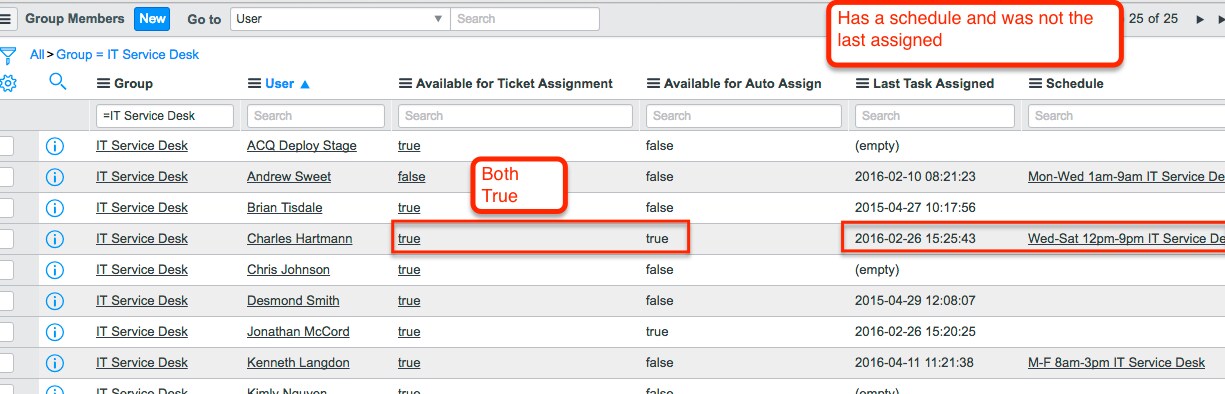
- Person must be On Shift which is dictated by the user record having the Available for Autoassign flag set (just a true.false flag added to user)
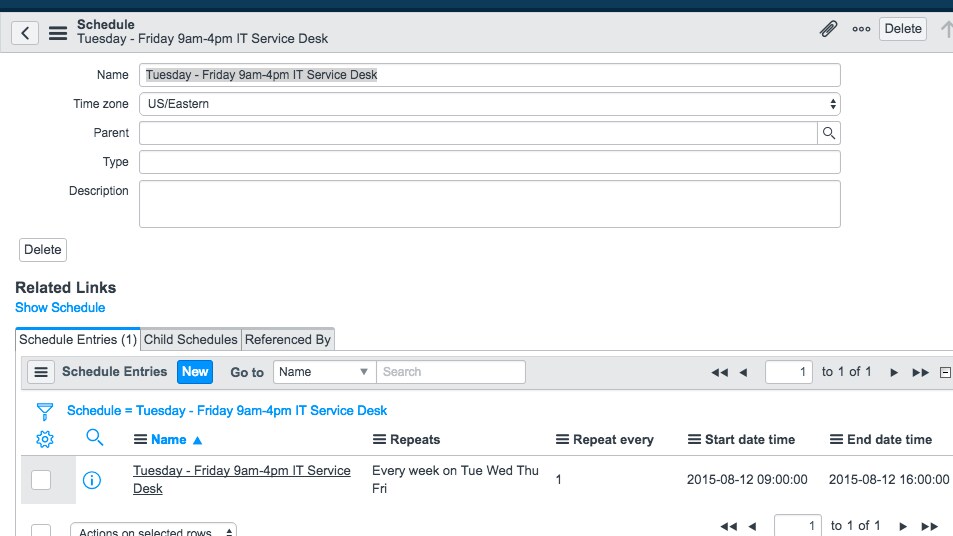
- The schedules are just the System Scheduler>Schedules:
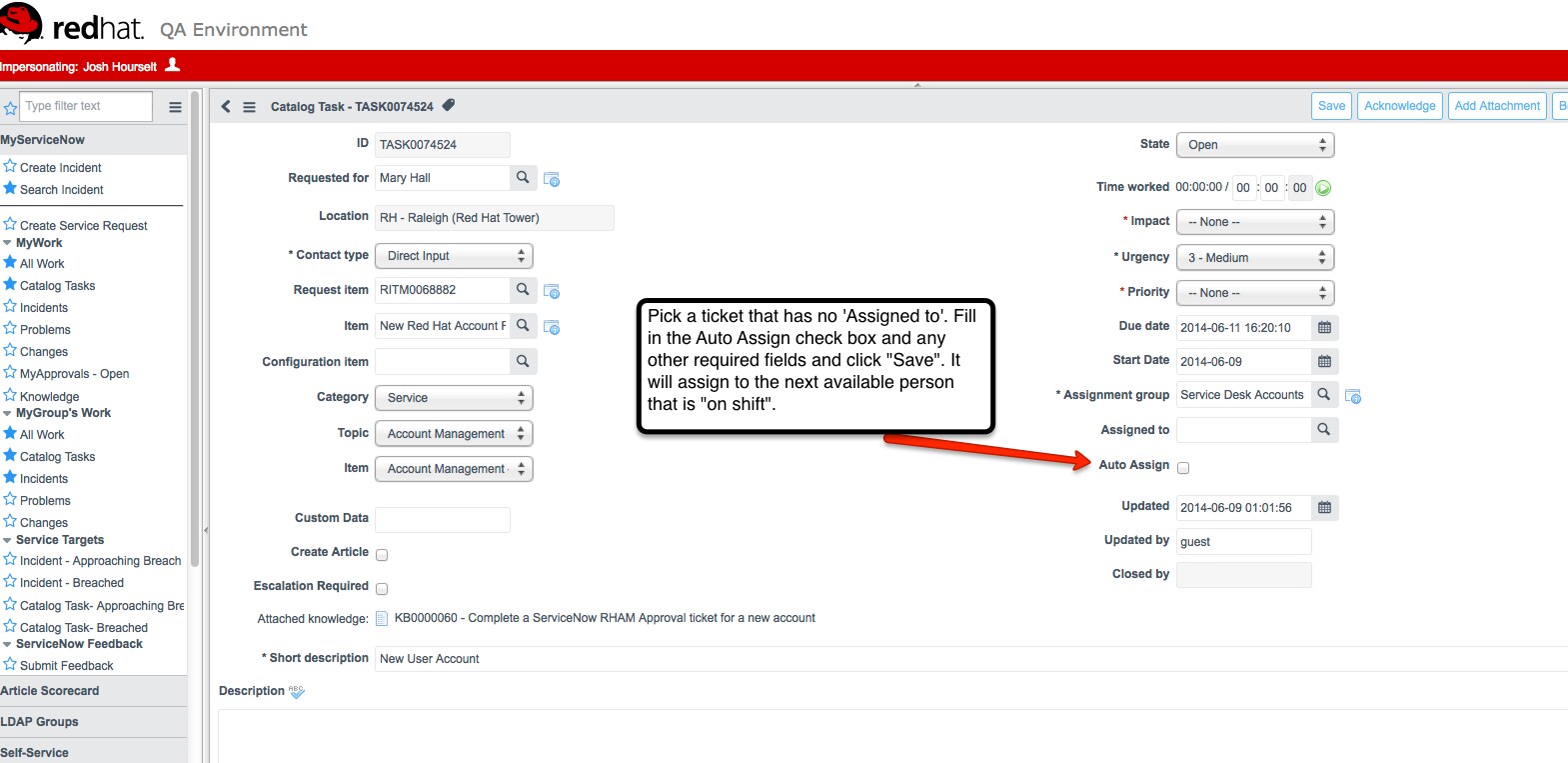
- The service desk triage agent does this manually, it could be automated, but somethings get assigned out differently, so they wanted the option. I just added a check box for them .
- The manager can set the schedule by person on the Group members table (I had to give them a role to modify) and also add the field from the Lab I used. Send me an email and I'll send you the PDF. But the field was Last Task Assigned:
- then the Scheduled job runs every 30 mins and checks the table and the schedule for if these are true and adds someone to the proper shift time so the Last assigned happens. I'm doing it really inefficient, but this gives you the idea:


//first shift
var schedRec = new GlideRecord('cmn_schedule');
schedRec.get('name', 'M-F 9am-4pm IT Service Desk');
//get the specific schedule for Service Desk Shift
var sched = new GlideSchedule(schedRec.sys_id);
var now = new GlideDateTime();
if (sched.isInSchedule(now)) {
//see if it's in schedule "NOW" and set those users that have a Schedule on their User record that matches the one queried. If it is "NOW", set the Auto Assign flag on user to True
var gr = new GlideRecord('sys_user');
gr.addQuery('active=true^u_available_for_ticket_assignm=true^schedule=81b226e52bb325004c71dc0e59da15b9^');
gr.query();
while(gr.next()) {
gr.setValue('u_on_shift', 'true');
gr.update();
}
That's it in a very small nutshell. If you send me your email, I'll forward the lab to you.
Thanks!
Cal