- Mark as New
- Bookmark
- Subscribe
- Mute
- Subscribe to RSS Feed
- Permalink
- Report Inappropriate Content
03-02-2017 08:51 AM
How can I change the label of the column for one list view only.
LIST COLUMNS
- time_card.task "Task"
- time_card.task.short_description "Short description"
- time_card.planned_task.top_task "Top task" -> "Planned task"
- time_card.planned_task.top_task.short_description "Short description" -> "Planned task short description"
Solved! Go to Solution.

- Mark as New
- Bookmark
- Subscribe
- Mute
- Subscribe to RSS Feed
- Permalink
- Report Inappropriate Content
03-02-2017 08:54 AM
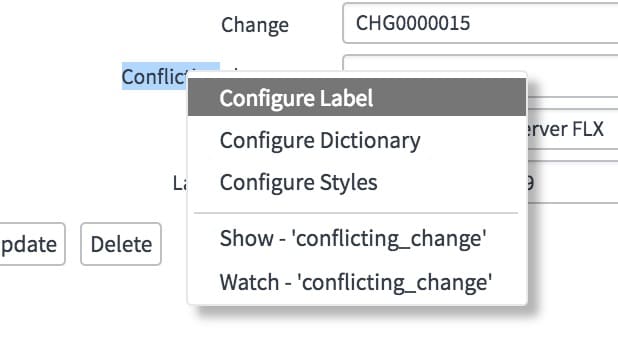
You can create a label specific to that table. When you open the form, right click on the label and choose Configure Label.
If the field is inherited form task, for example, it will say task.short_description, then give a label and plural.
Change the table name and the label and then it becomes an 'override' specific to that table.
IMPORTANT: Don't forget to use Insert (or Insert and Stay) rather than Update (or Save) to avoid changing the record globally. You want to make a new copy rather than update the original record.
- Mark as New
- Bookmark
- Subscribe
- Mute
- Subscribe to RSS Feed
- Permalink
- Report Inappropriate Content
03-02-2017 08:59 AM
This is a list and when I right click the label I do not have an option to configure label. I have list control, list calculations and list layout.


- Mark as New
- Bookmark
- Subscribe
- Mute
- Subscribe to RSS Feed
- Permalink
- Report Inappropriate Content
03-02-2017 09:02 AM
Hello Kipp,
You need to configure it via form i.e open the record and right click on the field and select Configure label.
- Mark as New
- Bookmark
- Subscribe
- Mute
- Subscribe to RSS Feed
- Permalink
- Report Inappropriate Content
03-02-2017 09:04 AM