- Mark as New
- Bookmark
- Subscribe
- Mute
- Subscribe to RSS Feed
- Permalink
- Report Inappropriate Content
04-11-2019 10:40 AM
I did try along the similar lines first, but I could see the CI in the cmdb, so it is a valid CI
What else can cause it ?
- Mark as New
- Bookmark
- Subscribe
- Mute
- Subscribe to RSS Feed
- Permalink
- Report Inappropriate Content
04-11-2019 10:53 AM
I tried this and it exactly gave me the same error. Tried to update the change task with a CI that did not meet the reference qualifier conditions.
Check if the CI you are trying to update meets the qualifier conditions for CI field on change task table or parent(task) table
- Mark as New
- Bookmark
- Subscribe
- Mute
- Subscribe to RSS Feed
- Permalink
- Report Inappropriate Content
04-11-2019 12:15 PM
HI Harshiya,
Sorry I didnt get what you wanted me to check. This record is on the change task.
Thanks,
- Mark as New
- Bookmark
- Subscribe
- Mute
- Subscribe to RSS Feed
- Permalink
- Report Inappropriate Content
04-11-2019 12:24 PM
so,
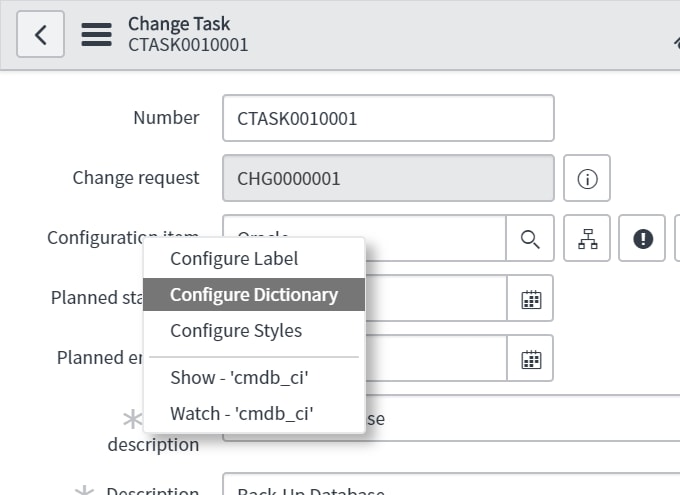
1. Go to change task form
2. right click on configuration item field and choose configure dictionary

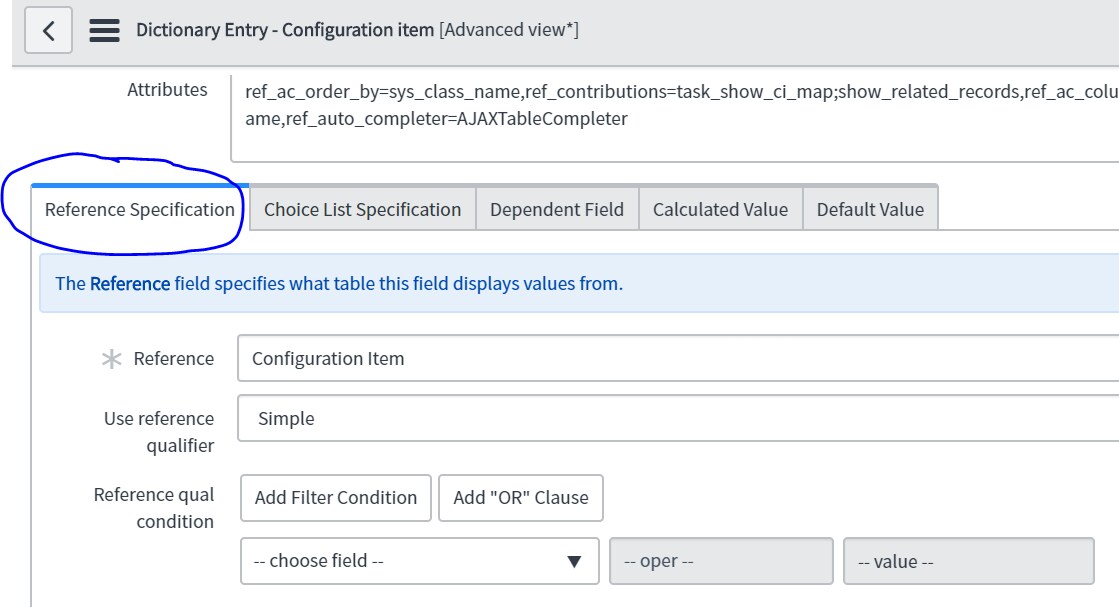
3. check reference specification section

4. check if the ci you are wanting to update is meeting the criteria in the reference qualifier section. If you dont find any check in task which is the parent table for change task. Like in the snapshot above i dont have any additional filters to filter the data i can select on the change form.
Also, post a screenshot of what is configured at your end
- Mark as New
- Bookmark
- Subscribe
- Mute
- Subscribe to RSS Feed
- Permalink
- Report Inappropriate Content
04-11-2019 01:32 PM