- Mark as New
- Bookmark
- Subscribe
- Mute
- Subscribe to RSS Feed
- Permalink
- Report Inappropriate Content
11-03-2025 06:36 AM
Hi Team,
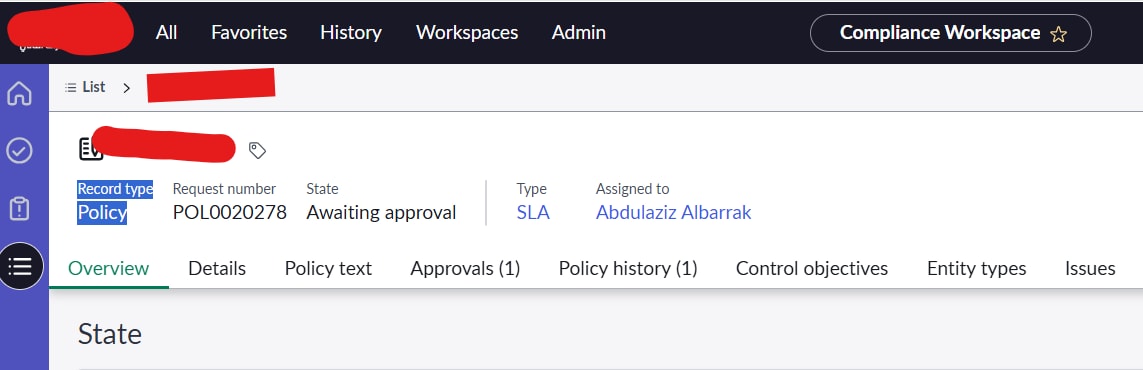
I need assistance with removing the form header content in the Compliance Workspace. Specifically, I’d like to remove the highlighted in "BLUE" section — “Record Type: Policy” — from the workspace header (please refer to the attached screenshot for clarity).
Could someone please guide me on how to remove this section? Your support would be greatly appreciated.
Solved! Go to Solution.

- Mark as New
- Bookmark
- Subscribe
- Mute
- Subscribe to RSS Feed
- Permalink
- Report Inappropriate Content
11-03-2025 08:35 AM
Hi @asaha ,
I check your problem it is coming from UX Header tables.

Table name for your reference - sys_ux_header_config_list
Search for your workspace, then search for form/table name in related list you will get the header fields.
For example I opened CSM/FSM workspace and in related list you will find the exact table name and once open any record you will find the header fields.

I opened Incident record

Please mark my answer correct and helpful if this works for you
Thanks and Regards,
Sarthak
- Mark as New
- Bookmark
- Subscribe
- Mute
- Subscribe to RSS Feed
- Permalink
- Report Inappropriate Content
11-03-2025 09:27 PM
Hi @Sarthak Kashyap
Thank you for looking in to it, but somehow my workspace "Compliance Workspace" is not in the list.

- Mark as New
- Bookmark
- Subscribe
- Mute
- Subscribe to RSS Feed
- Permalink
- Report Inappropriate Content
11-03-2025 09:50 PM
Hi @asaha ,
I checked for Compliance yes it is not available, do 1 thing navigate to sys_aw_form_header_list this table and search for record that you want to edit for example, open any record in workspace and from url pick the table name and search the table name in sys_aw_form_header_list this table.


Once you open the record you can able to add or remove any feidls.

Please mark my answer correct and helpful if this works for you
Thanks and Regards,
Sarthak
- Mark as New
- Bookmark
- Subscribe
- Mute
- Subscribe to RSS Feed
- Permalink
- Report Inappropriate Content
11-03-2025 10:02 PM
Brother,
I followed the steps, and that is correct I am able to ad/remove the contents from that header. But the one I want to remove is not present there. I want to remove the first option "Record type" but it is not there. Apart from it all the other options are there. Check below screnshots. In the list the "type" is not the first one.