- Mark as New
- Bookmark
- Subscribe
- Mute
- Subscribe to RSS Feed
- Permalink
- Report Inappropriate Content
03-06-2019 01:16 PM
Hey SN - trying to grab a little help (probably something easy I am missing)...
I am trying to, for the most part, copy what the VIP flag client script does - but with a different field and different color (to start).
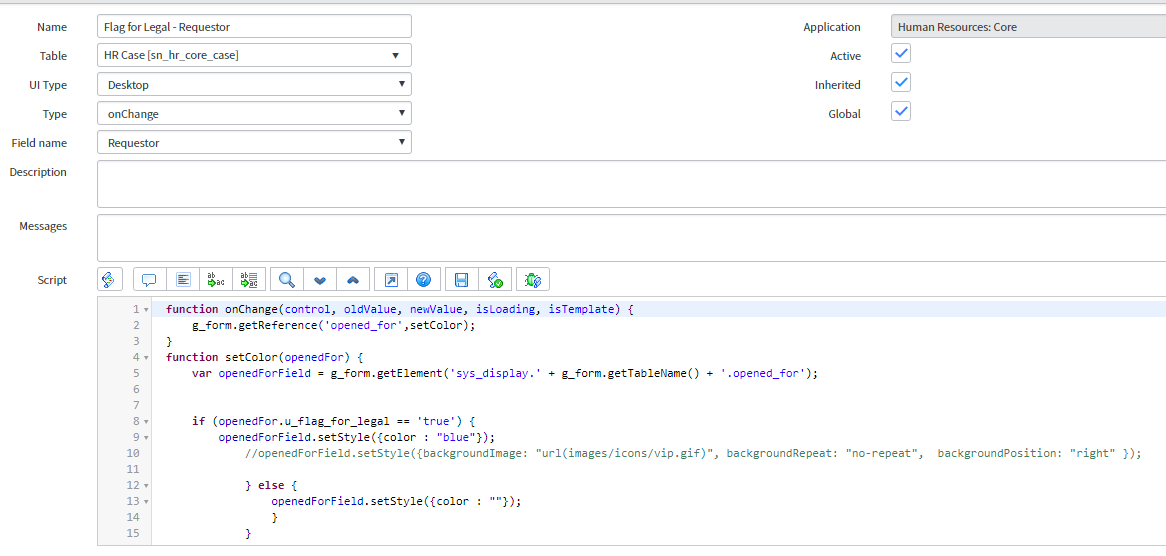
Here is what I have thus far:

The icon part will most likely come out OR be changed so something else later.. But, my main part right now is that I want to flag the user as a different color. But, the color is not showing up at all - just the icon.
Is there another part to this I am missing?
Any help would be great - it's the end of the day when I am trying this, so, it very well may be something so simple and I am overlooking it.
Thank you!
-Rob
Solved! Go to Solution.

- Mark as New
- Bookmark
- Subscribe
- Mute
- Subscribe to RSS Feed
- Permalink
- Report Inappropriate Content
03-06-2019 02:32 PM
Hmmm . . . seems to work fine for me. Which field do you have set on the client script?
- Mark as New
- Bookmark
- Subscribe
- Mute
- Subscribe to RSS Feed
- Permalink
- Report Inappropriate Content
03-06-2019 03:04 PM
Hey Michael,
I created two client script (as the one shown), one for subject person and one for requestor (opened_for), just like the regular VIP client scripts..
Both Subject and Requestor are the fields selected for their respected client scripts


I am baffled as to why it is not work. this does not seem really complex 😞
Mine look correct - right?
Thanks,
-Rob
- Mark as New
- Bookmark
- Subscribe
- Mute
- Subscribe to RSS Feed
- Permalink
- Report Inappropriate Content
03-07-2019 07:38 AM
So I also see that the VIP for Requestor and Subject person, have their own 'Field Styles'. So I did the same thing for the flag for legal.
Ex. for VIP:

What I did for legal:

And from the List view, it actually shows as green:

But as you already know because of this post, it is not working on the Case itself.
Thanks,
-Rob
- Mark as New
- Bookmark
- Subscribe
- Mute
- Subscribe to RSS Feed
- Permalink
- Report Inappropriate Content
03-07-2019 05:24 PM
Out of the box, i see a client script - Highlight VIP Subject person - on HR Case table, in HR Scope. Could the one you created be conflicting with this one?