Options
- Mark as New
- Bookmark
- Subscribe
- Mute
- Subscribe to RSS Feed
- Permalink
- Report Inappropriate Content
05-25-2021 06:15 AM
Hello Experts,
I am trying to do my hands on in Rest api integration in my PDI, using script include. Can anybody please confirm whether the script is ok? After this I am trying to call it via an UI action. Both the details are given below. Ideally on the button click, it should popup an alert and make two log entries. But nothing is happening.
Any help is much appreciated.
Script include:
var GetIPAddress = Class.create();
GetIPAddress.prototype = {
    initialize: function() {
    },

	getLocation: function(){

		var request, response, status, address;
		gs.log("GETIPAddress");
		address = '162.55.44.120';
		request = new sn_ws.RESTMessageV2();
		request.setEndpoint('https://api.ip2country.info/ip?'+address);
		request.setRequestHeader("Accept","application/json");
		request.setRequestHeader('Content-Type','application/json');
		response = request.execute();
		var JSONData = new global.JSON().decode(response);
		gs.print('Country Code: '+ JSONData.countryCode + ' Country Name: '+JSONData.countryName);
		gs.log(response.getBody());
		return JSONData.countryCode;
        //response = getresponse.getBody();
	},
    type: 'GetIPAddress'
};
UI Action
var confirmTemp = new GlideAjax('GetIPAddress');
   confirmTemp.addParam('sysparm_name', 'getLocation');
   confirmTemp.getXML(_handleResponse);

   function getResponse(response) { //This function does not appear to be executing
var answer = response.responseXML.documentElement.getAttribute("answer");
   answer = answer.toString();
alert(answer);
}
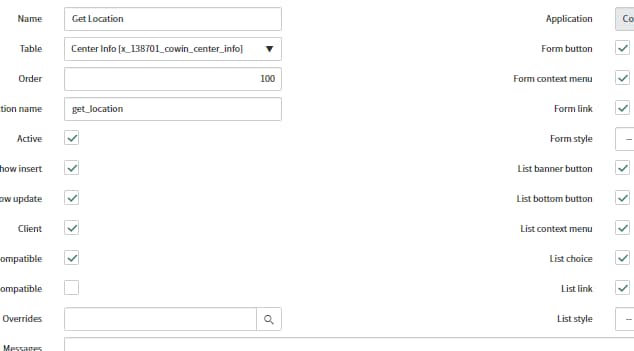
UI Action Screenshot

Thank you,
Satanik.
Solved! Go to Solution.
Labels:
- Labels:
-
Service Desk