- Mark as New
- Bookmark
- Subscribe
- Mute
- Subscribe to RSS Feed
- Permalink
- Report Inappropriate Content
06-25-2025 03:08 AM
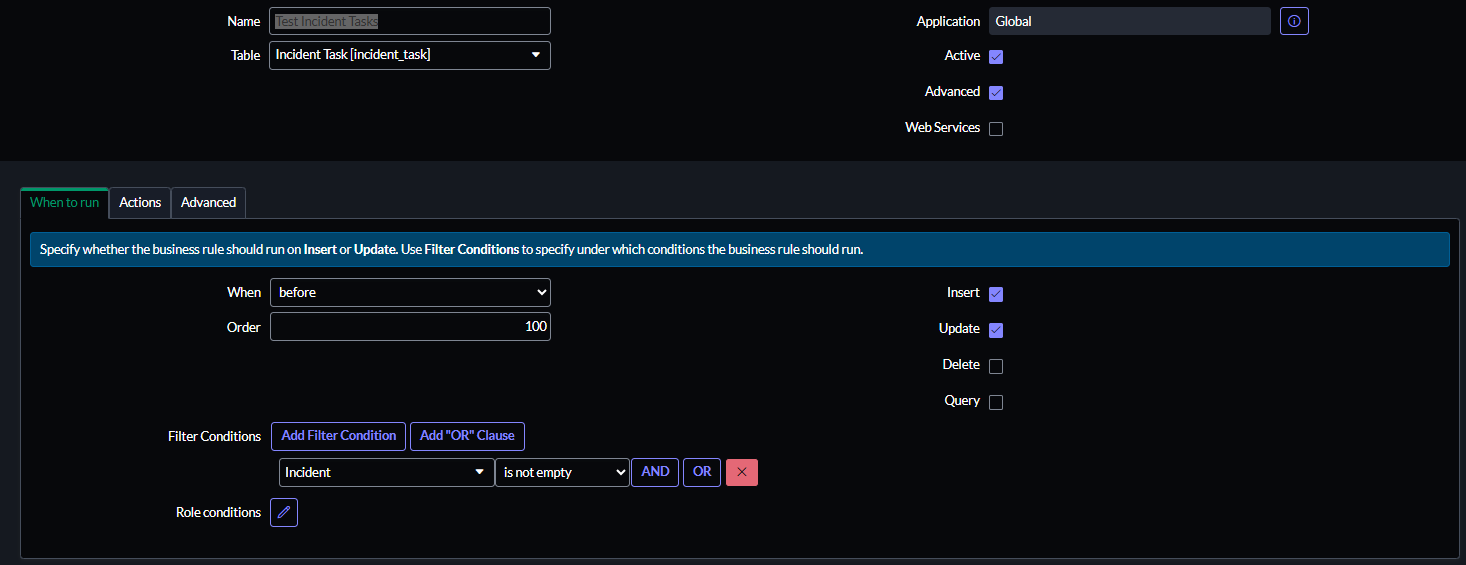
I have been trying to set up a Business Rule so when I create a Incindent Task from an incident it will copy desired fields to the task. Been using this Solved: copy fields from incident to incident task - ServiceNow Community . But apparently I cant seem to get it to work. Is there something I am missing? Have attached my Business rule. Hopefully someone can see what I am missing.
Solved! Go to Solution.
- Mark as New
- Bookmark
- Subscribe
- Mute
- Subscribe to RSS Feed
- Permalink
- Report Inappropriate Content
06-25-2025 03:21 AM
At first glance this look correct.
What is the exact issue?
Does the Incident Task actually have a reference to an Incident?
If yes, is the short description and assignment group populated in the linked Incident?
- Mark as New
- Bookmark
- Subscribe
- Mute
- Subscribe to RSS Feed
- Permalink
- Report Inappropriate Content
06-25-2025 03:24 AM
When i create the Task it it doesn't populate the desired fields. They are both populated in the incident


- Mark as New
- Bookmark
- Subscribe
- Mute
- Subscribe to RSS Feed
- Permalink
- Report Inappropriate Content
06-25-2025 03:35 AM
it should work fine if your incident task gets created and has incident field populated.
If you are using parent field then use that instead of incident field
If my response helped please mark it correct and close the thread so that it benefits future readers.
Ankur
✨ Certified Technical Architect || ✨ 10x ServiceNow MVP || ✨ ServiceNow Community Leader
- Mark as New
- Bookmark
- Subscribe
- Mute
- Subscribe to RSS Feed
- Permalink
- Report Inappropriate Content
06-25-2025 03:36 AM
Hi @Klaus Schacht ,
are you using incident field or parent field for linking incident task to the incident?
if it's using parent field for linking update you BR condition and values with parent instead of incident
Please mark my answer as helpful/correct if it resolves your query.
Regards,
Chaitanya