- Mark as New
- Bookmark
- Subscribe
- Mute
- Subscribe to RSS Feed
- Permalink
- Report Inappropriate Content
12-31-2025 09:06 AM
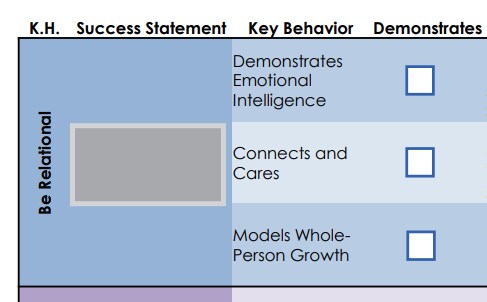
Hello, we are building a promotion journey that will be initiated by an employee's manager. As part of the journey, the manager will receive additional tasks later on, one of these being a matrix we use to determine an employee's criteria for leveling in our organization.
The manager uses the matrix to check off certain behaviors the employee has demonstrated. We thought of using an Employee Form for this, but don't really see any OOTB metrics in Survey Designer that would work well for this, except possibly multiple selection. Was wondering if anyone has had similar requirements / ideas. I've attached an example of the matrix.
Solved! Go to Solution.


- Mark as New
- Bookmark
- Subscribe
- Mute
- Subscribe to RSS Feed
- Permalink
- Report Inappropriate Content
12-31-2025 05:55 PM
@maxstnr If the Employee Form doesn't help in this case, you can choose to create an HR Task of type Submit Catalog Item. Create a record producer to achieve the desired UI using the variables and refer this Record producer in the HR Task template. Assign this task to the Hiring manager via Lifecycle event or service activity.
Hope this help.

- Mark as New
- Bookmark
- Subscribe
- Mute
- Subscribe to RSS Feed
- Permalink
- Report Inappropriate Content
12-31-2025 02:00 PM
Hi,
This is a pretty common scenario I see. If the matrix is something the manager fills out to support a promotion decisionand you may want to review it later compare across employees or use it in approvalsthen a survey usually isn’t the best fit. Surveys are great for feedback but not ideal as a system of record for decision-making data.
What tends to work better is making this part of the journey task itself. You can give the manager a task with a simple form that represents the matrix:
Each behavior or criterion as a row
A checkbox, radio button, or small choice field to indicate whether it’s been demonstrated
This keeps the data structured easy to report on and tied directly to the promotion process.
Surveys can work if this is a one-time assessment and you don’t care much about reporting or reuse later, but they get clunky fast when you try to recreate a real matrix layout.
If it helps frame the decision:
If the matrix influences the promotion outcome capture it in a task/form. If it’s just feedback, a survey is fine.
@maxstnr - Please mark as Accepted Solution and Thumbs Up if you found Helpful!!
- Mark as New
- Bookmark
- Subscribe
- Mute
- Subscribe to RSS Feed
- Permalink
- Report Inappropriate Content
12-31-2025 05:55 PM
@maxstnr If the Employee Form doesn't help in this case, you can choose to create an HR Task of type Submit Catalog Item. Create a record producer to achieve the desired UI using the variables and refer this Record producer in the HR Task template. Assign this task to the Hiring manager via Lifecycle event or service activity.
Hope this help.
- Mark as New
- Bookmark
- Subscribe
- Mute
- Subscribe to RSS Feed
- Permalink
- Report Inappropriate Content
01-01-2026 08:15 AM
Thank you! This makes sense