vinay_polisetty

ServiceNow Employee
Options
- Subscribe to RSS Feed
- Mark as New
- Mark as Read
- Bookmark
- Subscribe
- Printer Friendly Page
- Report Inappropriate Content
05-02-2016
09:57 AM
One of the major time consuming routines for both Quality Engineers and Developers at ServiceNow is to prepare a test environment to work across various releases and builds. We developed a solution for engineers to quickly deploy multiple instances and work on them simultaneously. These instances are primarily used for testing, and reproducing a bug in a collaborated fashion and upgrade testing. Testing and reproduction can be done across releases and builds. To put it in perspective, ServiceNow has about 21,742 builds and counting at a rate of 40 builds a day.
How test environments are typically deployed and why it is "typically" not productive/scalable? Typically, companies have several lab servers shared among teams. Some teams will have automation scripts in place to download the builds from the repositories and bring up the instance. Ideally, this approach should scale; but it does not. Automation scripts can be overwritten. You end up fixing the script that someone changed, and more often than not, will find more than one script doing the same thing (code duplication). The instances are not promptly cleaned after use, which results in endless "friendly" email reminders between teams to clean up the resources. Our custom developed solution tackles the hassle of managing clean up and communicating changes that need to be done. |
Like a lot of services and tools that are built for internal users at ServiceNow, we leveraged the power of the platform to do the heavy lifting. Considering our deep platform knowledge, and the ease of building an application on ServiceNow, looking elsewhere for tools or automation would have been counter productive.
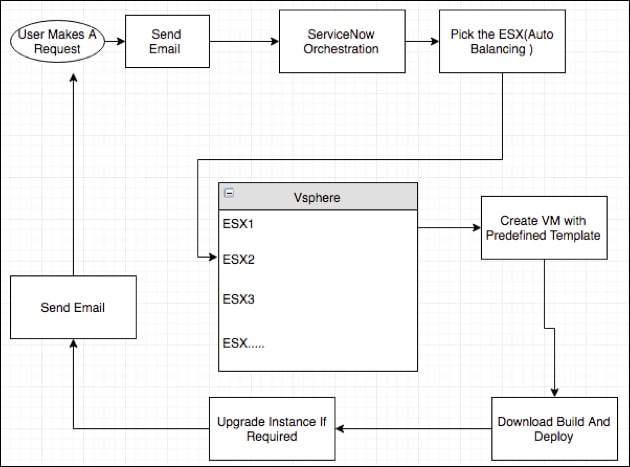
The application to mitigate the process is built with Catalog, Orchestration and email notification. The builds are installed in a VMware VM on an ESX host in the lab servers.
We utilized the Service Catalog to build a simple user-friendly UI page to accept the request for different builds.
Using Orchestration, we provision the virtual machines. The bulk of the provisioning a VM and installing the instance is done through orchestration.Orchestration provides API's to create VM's and decommission them. Orchestration also provides activities to run shell scripts and commands on the VM.
Using email notifications, we communicate with the users who have requests or contacted us about their test instance. An email will be sent out to the requestor when the request is made and also when the instance is ready to use with the IP of the instance.
Essentially we provide a place to manage and organize test enviroments for our friends in development, our quality engineers, even our documentation folks who need screenshots or to better understand what they are documenting.
What we provide our users with in our custom application:
- Request A ServiceNow Instance
- Request An Upgraded ServiceNow Instance
- Upgrade An Existing Instance
- Extend ServiceNow instance
- Decommission ServiceNow instance
Requesting A ServiceNow Instance: | A VMware virtual machine is created for each request and the requested build is installed in the VM, this ensures that an instance is allocated a predefined amount of resources (CPU/RAM). The user can make a request for an instance from the catalog form we talked about and the ServiceNow workflow will be triggered once the form is submitted. A VM is created in the lab server (on a particular esx host) and a DHCP IP is assigned to it. The requested build is downloaded from the repository and deployed. An email notification will be sent out with the assigned IP, once the instance is up and ready for use. We have multiple ESX hosts where the VM's are created; we have customized the orchestration such that the VM load is balanced on all ESX hosts. |
Requesting An Upgraded ServiceNow Instance | The users who are testing upgrade scenarios use this service. A catalog UI page is built to pick the releases and builds and the respective orchestration will be triggered which does downloads the builds and upgrades the instance. |
Upgrading An Existing Instance | If the instance that has been acquired with the "Request A ServiceNow Instance" has to be upgraded they can select this service from the catalog page. |
Decommissioning ServiceNow instance | Auto decommissioning: A default lease period is set for each VM. Once the lease period is expired the VM will be decommissioned. An email reminder will be sent out 24 hours prior the lease period expiry. This is to ensure that the VM's that are no longer used are promptly decommissioned to free up the much-required resources in the lab. We have a limit on the number of instances a user can request to ensure that the resources in the lab are not exploited by anyone. The users can request to decommission an instance once they are done working on it and request new ones. |
Extending ServiceNow instance | If the users wants to keep the instance for a longer period than the default lease period, they can request an extension. Through our custom catalog page, we make requesting to extend the life of instance easy. |
Pre-created Instances with the nightly builds | We have monitored the requests by the users and majority of them were requesting then nightly build to manually verify a few small scenarios. We have set of VM's with the nightly build deployed every night once the build is ready. These instances are shared across all the teams and are mostly used for minor tasks. |
We are now catering to all the ServiceNow Engineers in the company and we are seeing an average of 300 instance requests a week. At the rate the company is growing I am sure we will be seeing more requests. All we have to do to scale is add more ESX servers in the lab.
It did not take us long to realize that proper monitoring in place would help us solve issues proactively to avoid downtime. We have our own custom monitoring tool that helps us check the overall health of the provisioning system.
We now have a junta of happy ServiceNow Engineers who are spending more time fixing and finding bugs and less time in haggling over resources, dealing with the complex IT infrastructures and stepping on each other's feet.
- 5,755 Views
You must be a registered user to add a comment. If you've already registered, sign in. Otherwise, register and sign in.