Chuck Tomasi
Tera Patron
Options
- Subscribe to RSS Feed
- Mark as New
- Mark as Read
- Bookmark
- Subscribe
- Printer Friendly Page
- Report Inappropriate Content
08-25-2011
08:40 AM
The developers put so much cool stuff in ServiceNow software that sometimes things escape my notice. When I find them, I'm truly amazed. The filter tool option "Is One Of" falls in to that category.
(grin, it would have been crazy grammar to say "is one of" is one of my favorites.)
Before the advent of this option, one would have to build complex "or" sequences such as:
State | is | Authorize Approval OR
State | is | Pending CMDB Update OR
State | is | Raise and Record
Since state is a choice list, Is One Of works great in this scenario. All the choice list options are presented and one simply picks the ones they want to use. Let's take a look at building that same query above in just one line:

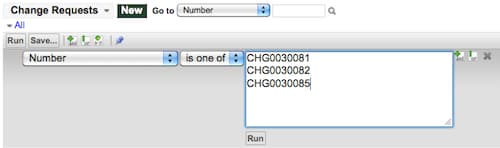
This option also appears if you are using string fields, although in my experience, it's not used quite as often. In this case, you are presented with an empty box to enter your options. Each line represents an option. For example, if I were looking for several known change numbers, I could enter a condition like the following.

This came in handy when a customer wanted to use the slushbucket to filter on a known list of items that were not related by class, status, or any other field in the system. He knew the name of each item and pasted it in this list and there they were, able to choose and move to the selected column.
FAQ:
Q: Is there a limit to how many things you can put in the string text box?
A: I haven't found one yet, but have only done limited testing.
Q: Why can't we use this for reference fields?
A: Remember, reference fields use a sys_id as the value (not the displayed field). Do you want to type in all those sys_id values? I don't.
Q: Is there an inverse operation? E.g. "Is Not One Of"?
A: Yes, for choice lists only.
Q: What do the encoded queries look like for that?
A: Right click on the breadcrumb and select Copy Query. In the examples above, the first would result in:
stateIN150,43,8
(Note the numeric state values 150, 43, and 😎
The second example would result in:
numberINCHG0030081,CHG0030082,CHG0030085
Reference:
http://wiki.service-now.com/index.php?title=Condition_Builder
- 6,172 Views
3 Comments
You must be a registered user to add a comment. If you've already registered, sign in. Otherwise, register and sign in.