Deepak Ingale1
Mega Sage
Options
- Subscribe to RSS Feed
- Mark as New
- Mark as Read
- Bookmark
- Subscribe
- Printer Friendly Page
- Report Inappropriate Content
06-13-2016
08:02 PM
Update sets are very important and critical when it comes to release management. Customizations within update set can be reviewed on instance itself via these update sets or those can be reviewed in build document provided by the development team.
It is always better to review these on Instance itself because this gives us the "true" representation of what are things lying inside it. It is not always possible to capture these things for development team on " build " document .
How to check customizations within an update set
- Open "local update sets" module in "system update sets" application
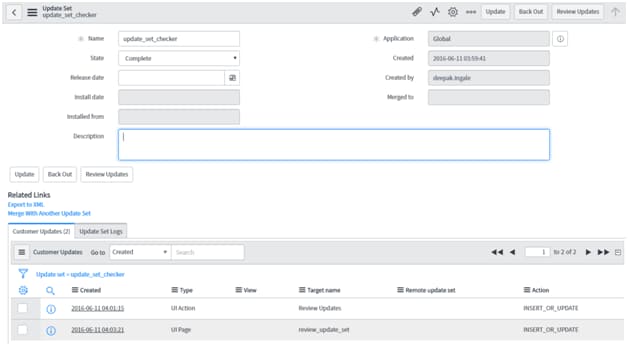
- Select the update set you want to review and check related list with "Customer Updates"
- This related list contains related records which are customizations within an update set. These individual records are stored in 'sys_update_xml' table.
- Open any of the record to see what it contains, these customizations are stored in "xml" format.
- Click on payload which will open up the customization in xml format
- To check what record in the system got modified, we will have to click on "Show Related Link" context menu link at the bottom of the page. It opens up the concerned record.
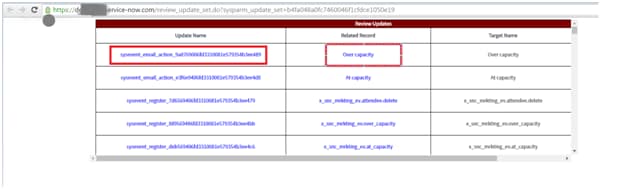
This complete process involves lots of clicks to review single update. I have created a small utility (update_set_checker) which lists down all the related customizations on a single page involving links to both record in XML format ("sys_update_xml") and actual record which got modified. This helps developers / reviewers to check customizations efficiently. This utility captured in update set has been attached here.
What it contains
- This utility has two updates, one is UI Action button "Review Updates" configured on update set table.
- Second is UI Page (review_update_set) which get called when UI Action Button is clicked.
How does it works
- Select the update set for review
- Click on Review Updates UI Action Button
- It calls the UI Page in browser's new window
- This UI Page has links to both Update as well as its related record in the system.
Advantages
- It list downs all the related record within an update set on a single page, reviewers can efficiently check for customizations via this.
Feedback
- Kindly try this out and let me know your feedback on it for any improvements that you may want to have for this utility.
Kindly do not forget to like or bookmark this post if it assists you.
Labels:
- 2,483 Views
You must be a registered user to add a comment. If you've already registered, sign in. Otherwise, register and sign in.