hvrdhn88
Giga Patron
Options
- Subscribe to RSS Feed
- Mark as New
- Mark as Read
- Bookmark
- Subscribe
- Printer Friendly Page
- Report Inappropriate Content
09-04-2017
02:52 AM
URL Type Variable
Hello All,
I tried to create this for users who want to add URL on catalog form .
Below are the steps that you need to follow .
Note: OOTB This variable type is available on Jakarta.
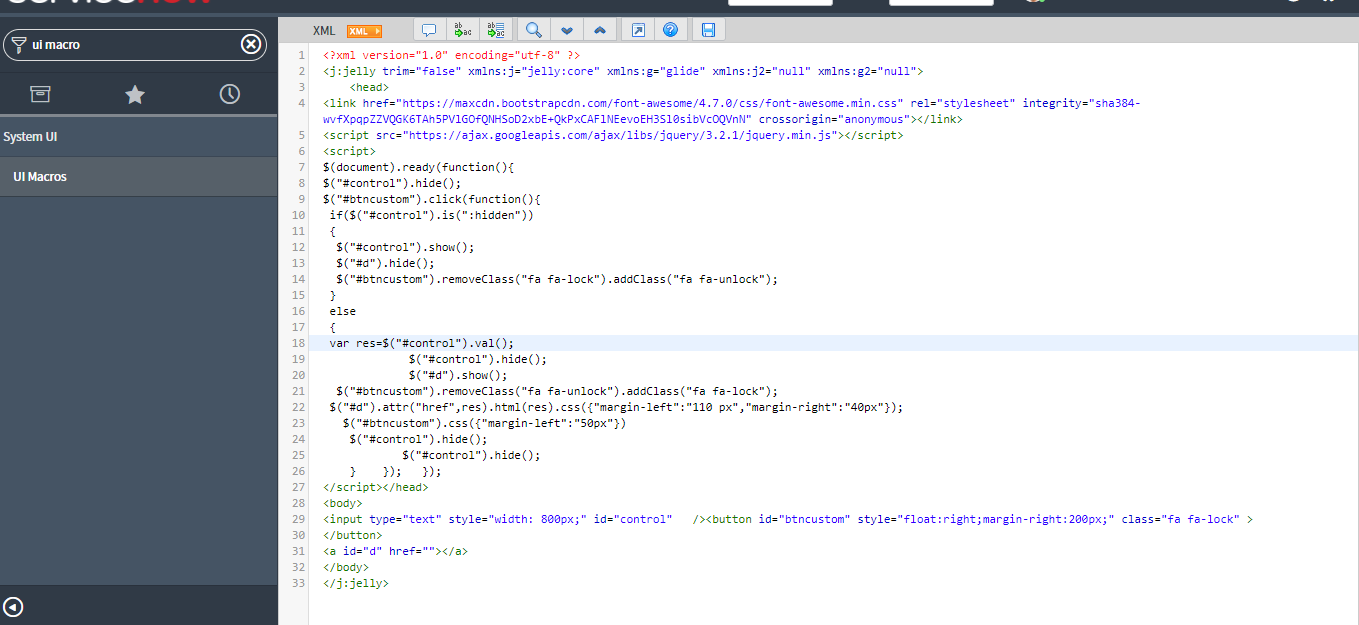
- Create UI Macro.
System UI >> UI Macros
- Create one macro type variable on your catalog form.
Now you will see the lock icon on catalog form. to add any url you need to click on lock icon and place your url there and lock it.
Step 1
Step 2
Step 3
I hope this help you
Please let me know if i have missed anything here
Labels:
- 4,077 Views
6 Comments
You must be a registered user to add a comment. If you've already registered, sign in. Otherwise, register and sign in.