Suzanne Smith

ServiceNow Employee
Options
- Subscribe to RSS Feed
- Mark as New
- Mark as Read
- Bookmark
- Subscribe
- Printer Friendly Page
- Report Inappropriate Content
12-18-2014
09:02 AM
"We are visual creatures. Visual things stay put, whereas sounds fade."
-Steven Pinker
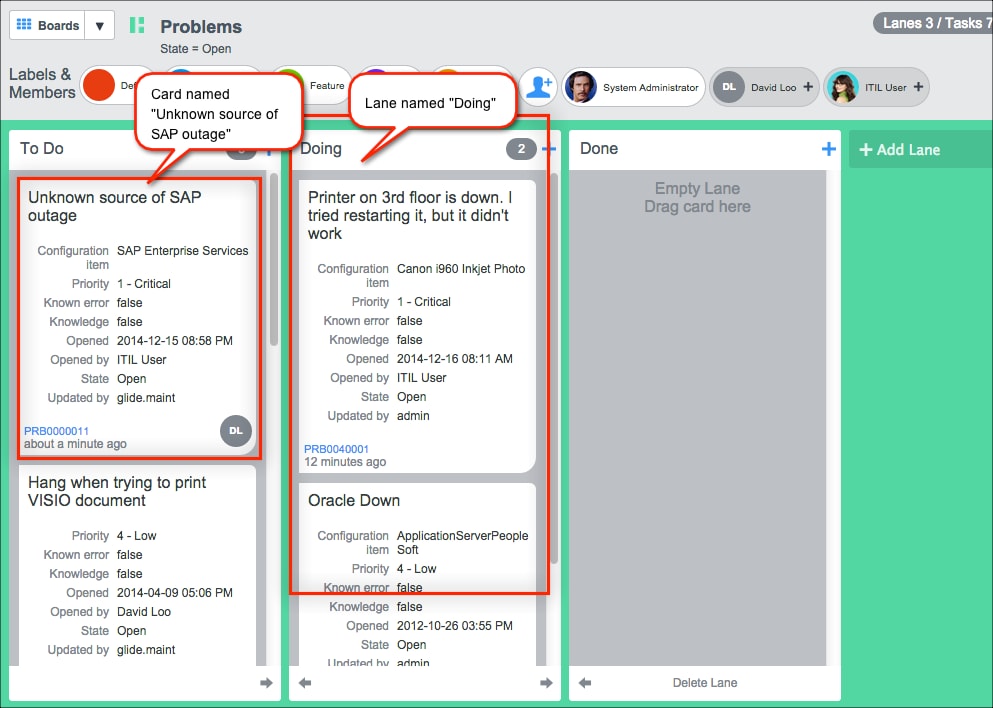
Visual task boards are a great new application in the Eureka release. Visual task boards are a graphic-rich method of showing tasks on cards organized into groups or lanes. For example, here is a visual task board created by a Problem manager showing open problems on cards that are sorted into lanes named To Do, Doing, and Done.
A key element of using visual task boards is controlling who can see the boards and cards you create. Keep the following in mind:
- To see a list of the visual task boards you own or have access to, navigate to Self-Service > My Task Boards.
- Anyone who is a member of a board can see that board. Use the Labels & Members toolbar at the top of the board to manage members.
To add a user to the board, click the add member icon:
After clicking the add member icon, search for the name of the user to add:
To remove a user, click the x next to their avatar: - There is a difference between board members and task assignees. If you create a board from a list, users assigned to the tasks in the list appear on the board with a grey background and do not have access to the board. For example, in our Problem board above, David Loo is assigned to a problem, but he does not have access to the board. Click the plus sign next to his name, however, and you can promote David to a board member so he can see the entire board.
We have received some interesting questions in the Community about visual task boards since the application was made available in the Eureka release:
- jsoriano asked about modifying cards to only show a couple of fields. Community members Dimitar Dimitrov and Jason Aloia helped out with suggestions.
- David Wall and Pete Beesley had some issues with the visual task board Welcome screen appearing and not appearing at times. Several community members, including Jason Bremer offered answers.
- Sherry Sullivan had a issue with activating visual task boards and Chris Tucker was there with advice.
ServiceNow offers more information about visual task boards in the product documentation:
- 15,296 Views
14 Comments
- « Previous
-
- 1
- 2
- Next »
You must be a registered user to add a comment. If you've already registered, sign in. Otherwise, register and sign in.