Dan Martinez
Tera Expert
Options
- Subscribe to RSS Feed
- Mark as New
- Mark as Read
- Bookmark
- Subscribe
- Printer Friendly Page
- Report Inappropriate Content
06-01-2020
06:25 AM
This plugin is used to ensure the right people certify that the data kept in our instance is correct, something quite useful when performing audits on our instance. It can help to validate data in any table in ServiceNow and it is not especially difficult to be used once one knows the basic concepts, which I will explain in this blog article.
The first thing that we need to do in order to set it up, is to create a Certification schedule, selecting the following:
- “Table”: Where the information that we would like to have reviewed is
- In order to filter data on the “Table” selected, we can use “Certification Filters”, specified under the module with that name. It allows us to use a condition builder to be able to filter the records we are interested in.
- “Display fields”: The fields to be displayed to the person reviewing the list of records. This will give them context to know whether the certification fields are right or not
- “Certification fields”: The fields that need to be certified
- “Assignment Type”: Who is going to review the data on each of the records
- “User Field”: A user specified on a field within the records to be reviewed. For instance the “Manager” specified in a Group or the “Managed By” specified on a CI
- “Specified User”: A single user, not dependant on what each record contains. i.e: CMDB Manager for Cis
- “Group Field”: Similar to “User field” but with groups. A group will be assigned to review the data, based on a group field within the record being reviewed. i.e: “Managed by group” on a CI
- “Assigned to empty”: What to do if nobody is assigned to the task created based on what was defined on “Assignment Type”. The options are to create the task anyway or to skip its creation.
- “Days to complete”: This will be used to calculate the “Complete By” field on a Certification instance record and the Certification task being created.
Then a description and instructions for the tasks being created. Please, be descriptive enough so that the people assigned to them know what is expected from them.
Based on the “Run” field specified above, the Certification Schedule will be launched, creating what ServiceNow call “Certification Instances”. These will group the “Certification tasks” which will be assigned to the people defined on the schedule.
It is important to highlight that “Preview Certification Tasks” will let us know what will happen if the Schedule is executed at the moment when the link is clicked.
When the Certification Schedule is actually executed, it will create the Certification Instance and its tasks that will look like this:
These tasks will allow the assigned person or group to take a decision on each of the records to be reviewed. In the case above “Don Goodliffe” needs to check whether the “Cost Center”, “Group Email”, “Type” and “Default Assignee” are correct. These were the fields selected as “Certification fields”. “Name” is the field that gives context to this record, as defined in the “Display fields” field.
The user can certify the fields one by one and add comments to each of them separately. It is important to highlight that once a decision is done, the record will disappear from the list because the standard behaviour of the list is “Show Pending Records”. This can be changed to “Show all records” to see how the whole certification task is looking like.
In our case, we assume the group email is updated, so we just specify this is wrong:
By hovering over the exclamation mark icon, we get the comments that the agent entered:
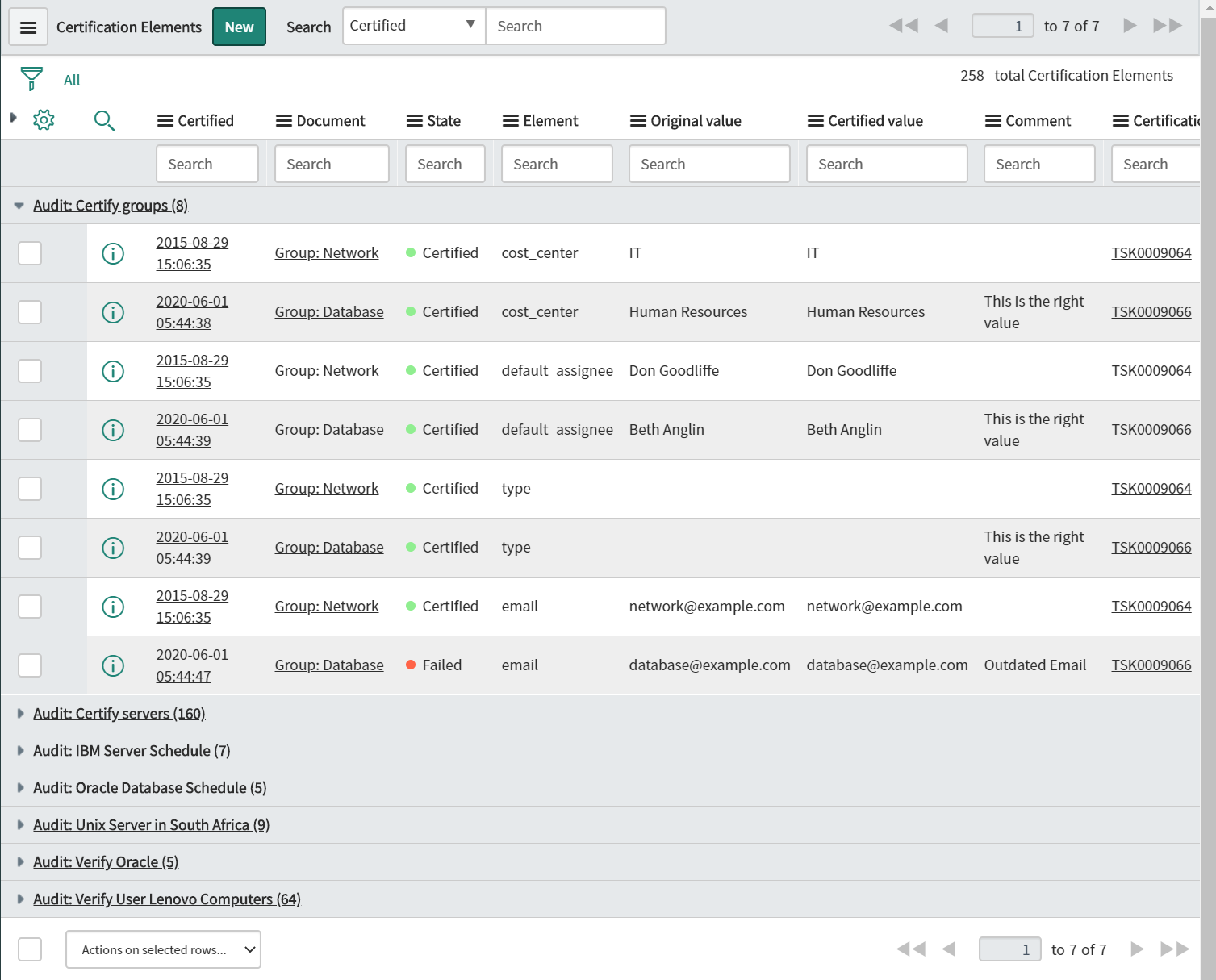
The decisions taken here can be seen from the “Audit Results” module where each of the decisions is kept so that the right people are to be able to report on it:
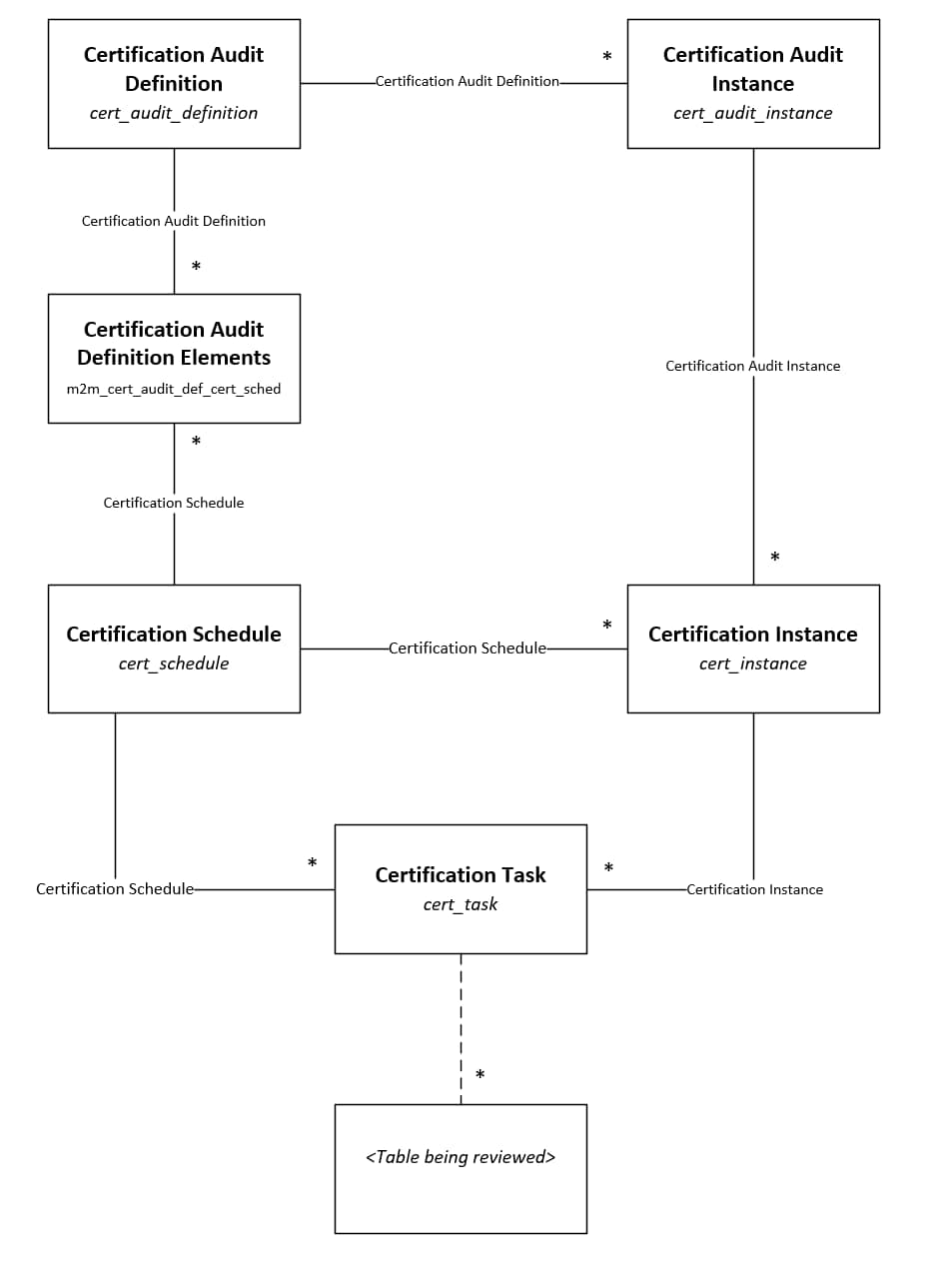
The last modules that are part of this plugin are “Audit Definitions” which are the records that contain the different “Certification Schedules” required for this Audit and the Certification Audit Instances, which are instances of these “Audit Definitions”. You can think of these as the “Certification Schedules” and the instances. They contain the certification instances obtained via that Audit Definition.
In order to provide a good summary, here’s the diagram that represents the different relations between the tables that are contained in this plugin and were described above:
I hope this article helps to understand this plugin. Personally, I find it utterly useful, especially to:
- Prevent spreadsheets being extracted and sent via email to validate data
- Being able to ensure someone is responsible to perform the check
- Keep the results in a visible place to both the responsible of carrying out the checks and the accountable person that will have to decide what to do with the data that couldn’t be validated.
If this blog article was useful to you, please click on “Helpful”
Other blog articles created by me:
- 31,259 Views
15 Comments
- « Previous
-
- 1
- 2
- Next »
You must be a registered user to add a comment. If you've already registered, sign in. Otherwise, register and sign in.