How to disable the automatic load of the Right Sidebar options in SOW view?

- Mark as New
- Bookmark
- Subscribe
- Mute
- Subscribe to RSS Feed
- Permalink
- Report Inappropriate Content
3 hours ago - last edited 2 hours ago
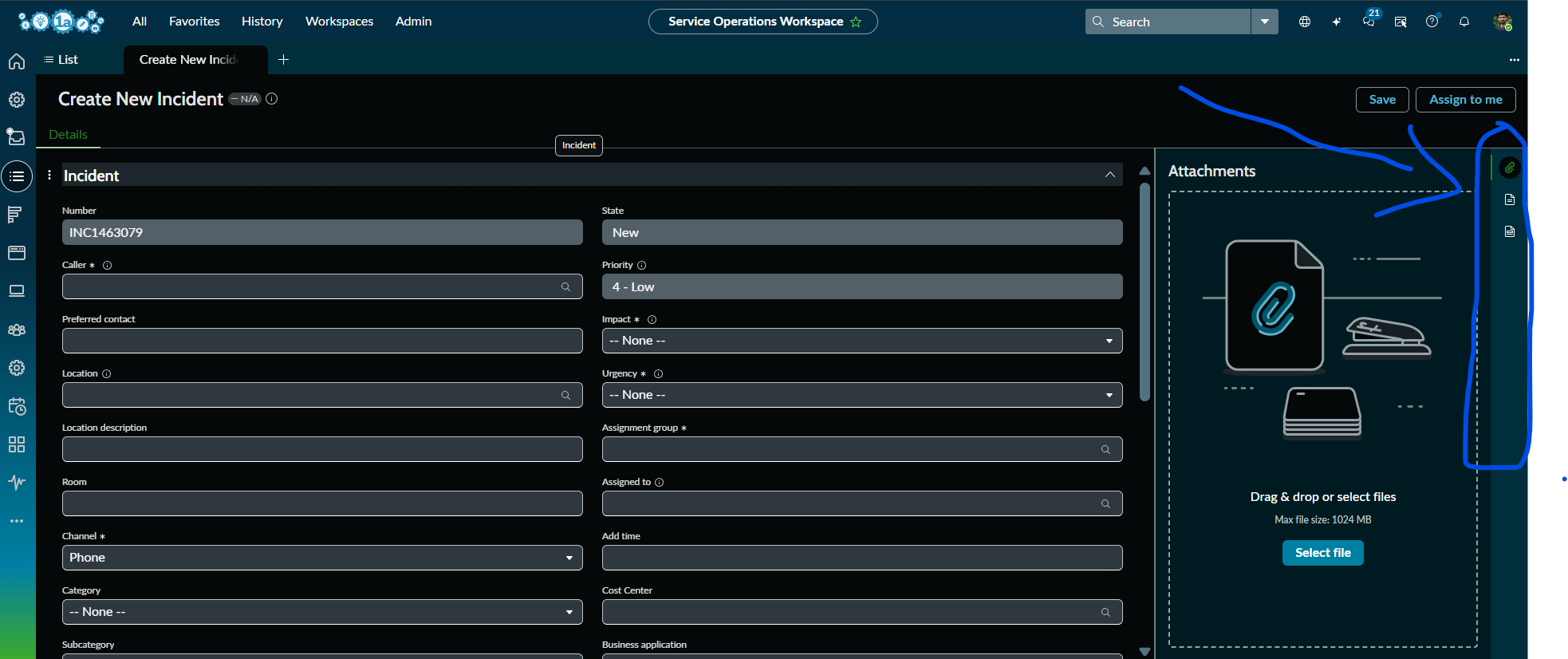
How to disable the automatic load of the Right Sidebar options by default when you refresh the SOW and try to create a new Incident in SOW view?
Only if you click on any of the options in the right side bar(like Attachments, Response Templates, Templates, Agent Assist) etc.,, it should be visible on the screen, if not it has to be in the right side itself. Please advise.
The Contextual Side Panel (Right Sidebar) in Service Operations Workspace is automatically opening the Attachments tab whenever a new Incident record is created. We want the sidebar icons (Attachments, Templates, Response Templates, Agent Assist, etc.) to remain visible, but the panel itself should stay collapsed by default and open only when an agent clicks an icon.
- Mark as New
- Bookmark
- Subscribe
- Mute
- Subscribe to RSS Feed
- Permalink
- Report Inappropriate Content
56m ago
Client requirement is like that, They want the panel itself should stay collapsed by default and open only when an agent clicks an icon.


- Mark as New
- Bookmark
- Subscribe
- Mute
- Subscribe to RSS Feed
- Permalink
- Report Inappropriate Content
54m ago
Don’t take me the wrong way, but education is key here. This is a system-level feature, and adding or hiding it would introduce customisation and technical debt. What business value would we gain by hiding or classifying it? Is there any real benefit that justifies the additional complexity?
Regards
Dr Atul G. - Learn N Grow Together ServiceNow Techno - Functional Trainer
LinkedIn: https://www.linkedin.com/in/dratulgrover
YouTube: https://www.youtube.com/@LearnNGrowTogetherwithAtulG
******************************************************************************************
- Mark as New
- Bookmark
- Subscribe
- Mute
- Subscribe to RSS Feed
- Permalink
- Report Inappropriate Content
39m ago
@Dr Atul - LNG Client requirement is like that,seems crazy!! But they want the panel itself should stay collapsed by default and open only when an agent clicks an icon.
They want to see the maximized full screen, once they're about to create a new Incident in SOW view by default.
- Mark as New
- Bookmark
- Subscribe
- Mute
- Subscribe to RSS Feed
- Permalink
- Report Inappropriate Content
28m ago
As a client-facing expert, this is where your experience adds value. Educate the client and challenge the request by asking what business value they expect to gain from collapsing it by default. Is there a genuine complexity or usability issue that justifies the change, or is the existing functionality already complete and adequate?
Avoid unnecessary customisation that introduces technical debt without delivering clear business value. Our role is to guide the client towards the best solution and strongly recommend avoiding changes that don't have a justified business need.
Regards
Dr Atul G. - Learn N Grow Together ServiceNow Techno - Functional Trainer
LinkedIn: https://www.linkedin.com/in/dratulgrover
YouTube: https://www.youtube.com/@LearnNGrowTogetherwithAtulG
******************************************************************************************
- Mark as New
- Bookmark
- Subscribe
- Mute
- Subscribe to RSS Feed
- Permalink
- Report Inappropriate Content
an hour ago
Why do you want to disable this? It is designed to help agents navigate quickly and is provided as an out-of-the-box platform feature.
Regards
Dr Atul G. - Learn N Grow Together ServiceNow Techno - Functional Trainer
LinkedIn: https://www.linkedin.com/in/dratulgrover
YouTube: https://www.youtube.com/@LearnNGrowTogetherwithAtulG
******************************************************************************************