Oscar Lopez
Mega Guru
Options
- Post History
- Subscribe to RSS Feed
- Mark as New
- Mark as Read
- Bookmark
- Subscribe
- Printer Friendly Page
- Report Inappropriate Content
on 11-02-2020 06:37 PM
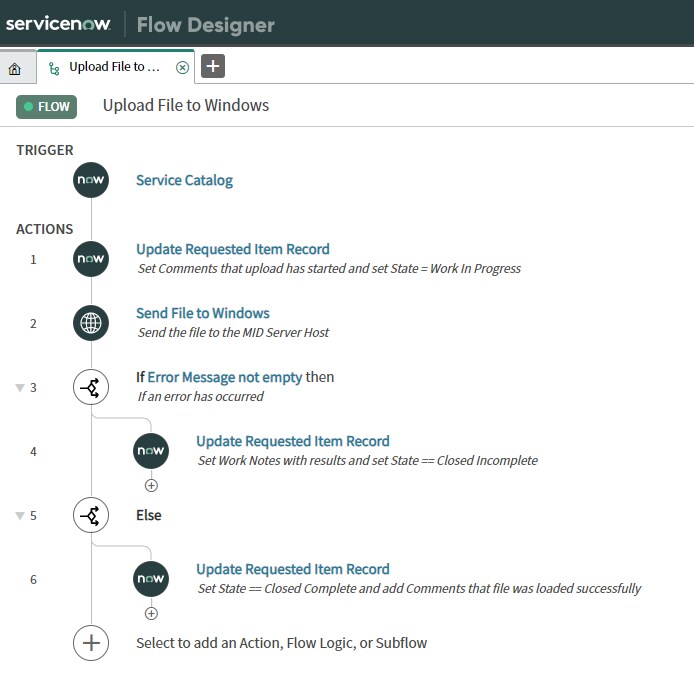
Allow the end users to upload files to a Windows Server throughout Service Request using Integration Hub and PowerShell.
Script Step - Base64 Encoding (Global Scope)
/* Get file attachement */
var att = new GlideRecord("sys_attachment");
att.addQuery("sys_id", inputs.attachment_sys_id);
att.query();

if(att.next()) {
  /* create input stream */
  var attIS = new GlideSysAttachmentInputStream(att.sys_id);
  /* create Byte Array holder */
  var byteArrayOS = new Packages.java.io.ByteArrayOutputStream();
  /* write Byte Array */
  attIS.writeTo(byteArrayOS);
  /* get Base64 Encoding */
  outputs.file_base64_encoded = GlideBase64.encode(byteArrayOS.toByteArray());
  /* concatenate Folder Path with File Name */
  outputs.file_path = inputs.folder_path + "\\" + att.file_name;
}
PowerShell Script
function Convert-StringToBinary {
	[CmdletBinding()]
	param (
		[string] $EncodedString,
		[string] $FilePath = ('{0}\{1}' -f $env:TEMP, [System.Guid]::NewGuid().ToString())
	)

	try {
		if ($EncodedString.Length -ge 1) {
		     # decodes the base64 string
		    $ByteArray = [System.Convert]::FromBase64String($EncodedString);
		    [System.IO.File]::WriteAllBytes($FilePath, $ByteArray);
		}
	}
	catch {
	}
}

Convert-StringToBinary -EncodedString $Base64String -FilePath $TargetFileName

Cheers!!
Oscar Lopez
@oslovanet
Labels:
- 2,832 Views
Comments

Gerrity
Tera Expert
- Mark as Read
- Mark as New
- Bookmark
- Permalink
- Report Inappropriate Content
02-27-2022
12:23 PM
Hi Oscar,
Thanks for taking the time to create this.
Question, everything executes but no files are being uploaded to the sys_attachment table. The Script Step seems to get the attachment_sys_id and the target_folder_path but the step output data of Base64 Encoded and File Name are empty.
Any possible ideas?
Cheers