- Mark as New
- Bookmark
- Subscribe
- Mute
- Subscribe to RSS Feed
- Permalink
- Report Inappropriate Content
04-30-2025 07:49 PM
Task Details :
Discovery Schedule:
- Name: Windows and Linux Server Schedule
- Run: Weekly on Saturday at 2am
- Discovery IP Ranges: 192.168.16.11, 192.168.16.12 (Use Enter new IP ranges to quickly add the 2 Ip addresses.
Error:
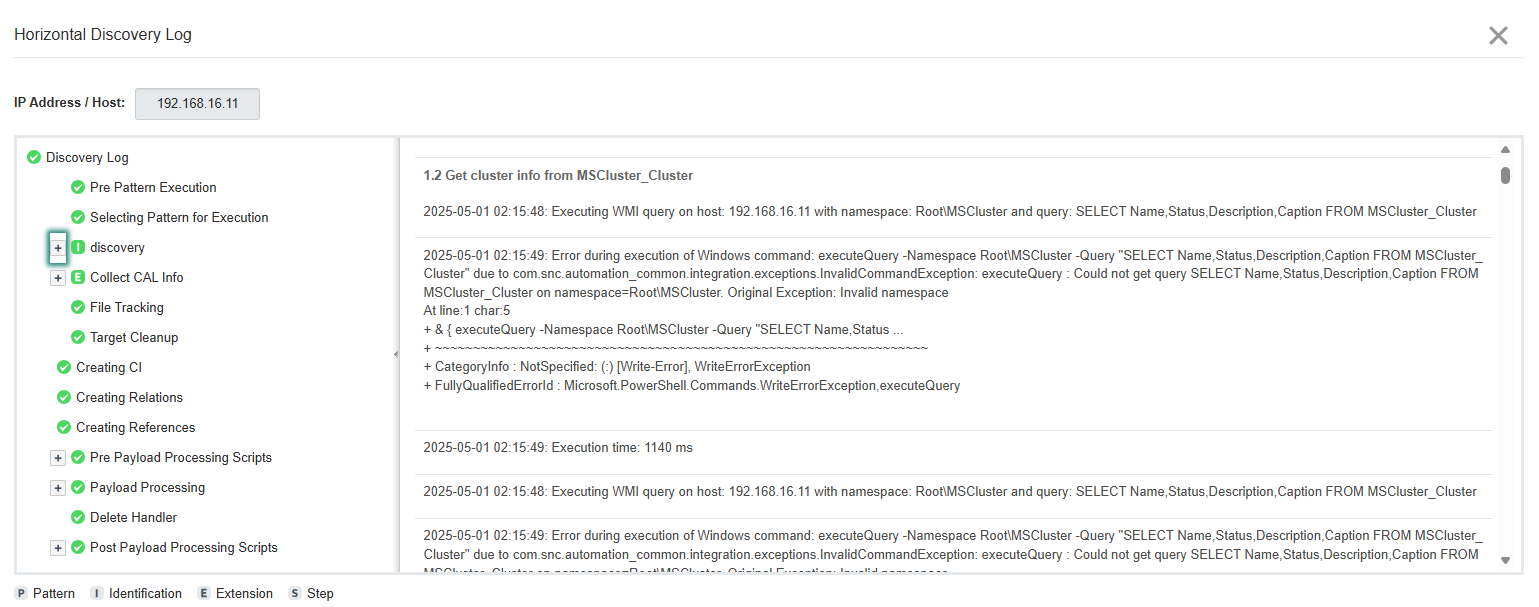
Earlier, there was an issue with Windows credential authentication, which I resolved with the help of the ServiceNow helpdesk team. They confirmed it was an instance issue. Now, I can authenticate the Windows credential in the test authentication credential module. However, I am unable to discover the Windows device due to authentication failure. Has anyone else experienced this? Any advice would be greatly appreciated.
Solved! Go to Solution.
- Mark as New
- Bookmark
- Subscribe
- Mute
- Subscribe to RSS Feed
- Permalink
- Report Inappropriate Content
04-30-2025 10:15 PM - edited 04-30-2025 10:16 PM
Hi @sujith,
This happened with me too. I created a Support Case and it was resolved by the ServiceNow Support team. They said it is a known issue. Other students have reported it as well.
There is an issue with that Windows Server.
Create a ticket and they will fix it for you.
Let me know if it helped!
Regards,
Vikas K
- Mark as New
- Bookmark
- Subscribe
- Mute
- Subscribe to RSS Feed
- Permalink
- Report Inappropriate Content
05-20-2025 10:34 AM
how to raise a case , pls help

- Mark as New
- Bookmark
- Subscribe
- Mute
- Subscribe to RSS Feed
- Permalink
- Report Inappropriate Content
09-27-2025 11:04 AM
I have ran the discovery twice, and task got validated.