Nishu Saini
Kilo Guru
Options
- Post History
- Subscribe to RSS Feed
- Mark as New
- Mark as Read
- Bookmark
- Subscribe
- Printer Friendly Page
- Report Inappropriate Content
on 05-05-2022 07:38 AM
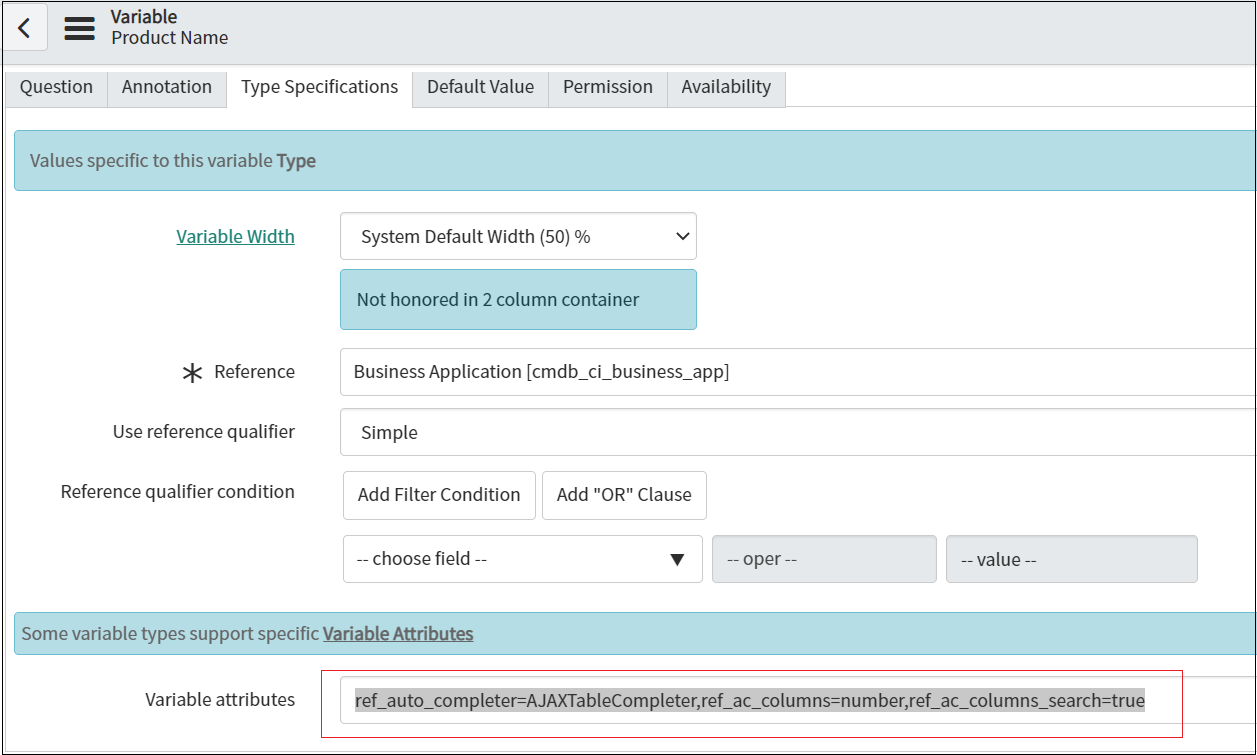
To configure the search for a reference variable on a catalog item based on two columns. The following steps are required.
For example, search a product with a name or number. This can be achieved by adding below line of code in variable attributes
| ref_auto_completer=AJAXTableCompleter,ref_ac_columns=number,ref_ac_columns_search=true |

Image 1 : Variable image for reference

Image 2 : Catalog item form view
Please mark helpful, if applicable.
- 2,860 Views
Comments

namanjain2
Tera Contributor
- Mark as Read
- Mark as New
- Bookmark
- Permalink
- Report Inappropriate Content
05-05-2022
07:56 AM
Nice article