Add button not working on SOW View

- Mark as New
- Bookmark
- Subscribe
- Mute
- Subscribe to RSS Feed
- Permalink
- Report Inappropriate Content
04-03-2026 02:50 AM
Hi,
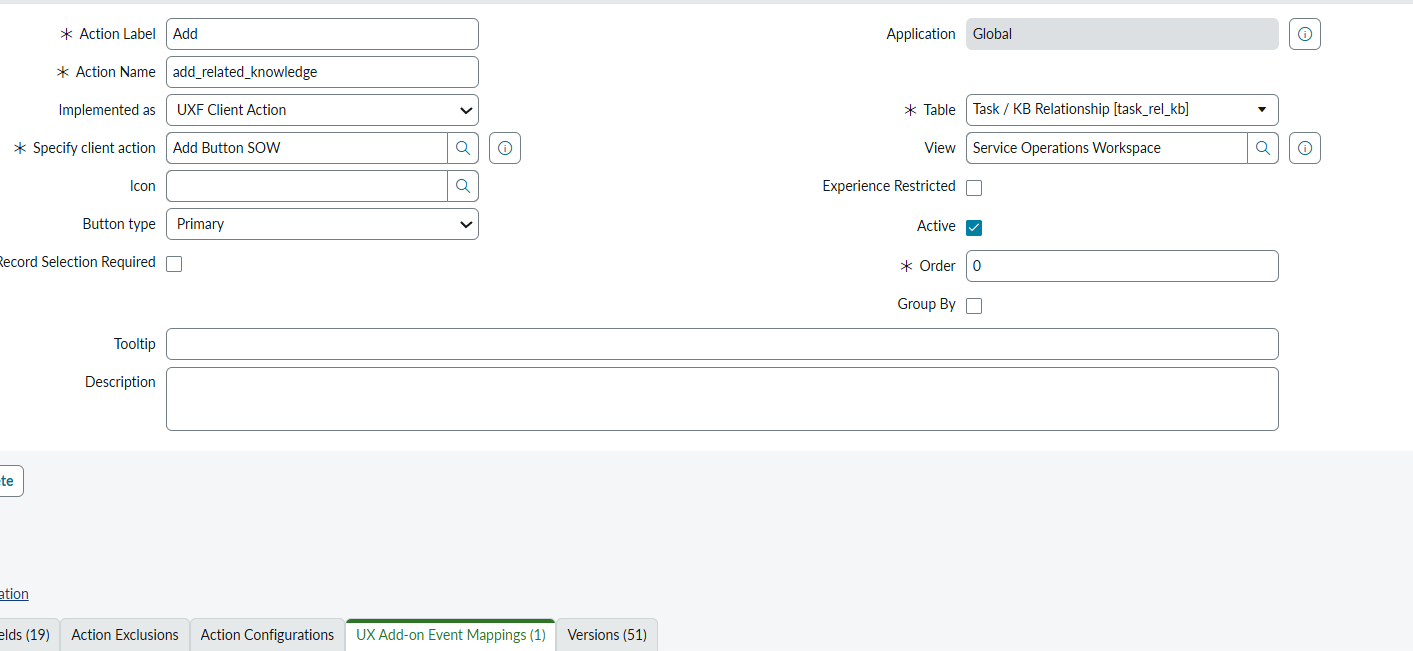
I have created an Add button in the Service Operations Workspace on the Change table for the Related Knowledge related list. When I click the Add button, the form opens as expected, and I am able to select the articles. However, after clicking Add, the selected articles are not being added to the related list.
I have attached screenshots for reference. Could you please help me resolve this issue?


- Mark as New
- Bookmark
- Subscribe
- Mute
- Subscribe to RSS Feed
- Permalink
- Report Inappropriate Content
04-03-2026 06:41 AM
The event mapping handles opening the modal via [Record Page] Open modal, but there's no mechanism to handle the modal's submit callback — the part that actually inserts records into task_rel_kb after the user clicks Add
Looking at your Target Payload Mapping, it passes columns, extensionPoint, and hideSelectAll, but it's missing the properties the modal needs to perform the insert, such as the target table, relationship field, parent sys_id, and a submit handler or callback.
2 possible approaches to fix this
Approach 1 — Use the OOB Related Records "add" capability
The Related Records component has a built-in add action that handles the full lifecycle (open picker → receive selections → insert relationship records). Instead of wiring a custom declarative action with a manual event mapping to [Record Page] Open modal, check whether the OOB action already exists for the task_rel_kb table. Go to sys_declarative_action_assignment and look for existing assignments on the Related Records component for the Knowledge relationship. If one exists but is inactive or scoped differently, enabling or cloning it for SOW is the simplest fix.
2 — Fix the custom event mapping payload
If you need to keep the custom route, your Target Payload Mapping needs additional properties so the modal knows how to complete the operation. You're missing things like table (should be task_rel_kb), parentTable, parentSysId, relationship, and the sysparm_collection_relationship / sysparm_collectionID equivalents in the Now Experience payload format. The exact property names depend on which modal variant [Record Page] Open modal invokes — you can inspect the OOB event mappings on similar "add" actions (like Add Related Incident or Add Related Problem in SOW) to see the full payload structure they use.
- Mark as New
- Bookmark
- Subscribe
- Mute
- Subscribe to RSS Feed
- Permalink
- Report Inappropriate Content
04-03-2026 06:47 AM
Hi @Naveen20 ,
Thanks for the reply, please find my below payload which i created newly
{
"size": "lg",
"route": "mra",
"fields": {
"query": "{{query}}",
"table": "task_rel_kb",
"parentRecordSysId": "{{parentRecordSysId}}",
"userGivenTable": "kb_knowledge",
"label": "Add Knowledge Articles",
"parentFieldName": "parent",
"referencedFieldName": "child",
"extensionPoint": "DEFAULT",
"columns": "number,short_description,workflow_state",
"hideSelectAll": false,
"relatedListName": "{{relatedListName}}"
},
"params": {
"type": "m2m"
}
}
when I am testing this , i am getting as below error when i am clicking on add button
Can't display this list
Exception encountered processing path: /GlideNowListLayoutComposite_Query/getNowListLayoutComposite - Invalid table name sn_install_base_item
- Mark as New
- Bookmark
- Subscribe
- Mute
- Subscribe to RSS Feed
- Permalink
- Report Inappropriate Content
04-03-2026 07:15 AM
You need to convert your payload to use the proper binding format. Here's the corrected Payload
{
  "size": "lg",
  "route": "mra",
  "fields": {
    "query": {
      "binding": {
        "address": ["query"]
      },
      "type": "EVENT_PAYLOAD_BINDING"
    },
    "table": "task_rel_kb",
    "parentRecordSysId": {
      "binding": {
        "address": ["parentRecordSysId"]
      },
      "type": "EVENT_PAYLOAD_BINDING"
    },
    "userGivenTable": "kb_knowledge",
    "label": "Add Knowledge Articles",
    "parentFieldName": "parent",
    "referencedFieldName": "child",
    "extensionPoint": {
      "binding": {
        "address": ["extensionPoint"]
      },
      "type": "EVENT_PAYLOAD_BINDING"
    },
    "columns": {
      "binding": {
        "address": ["columns"]
      },
      "type": "EVENT_PAYLOAD_BINDING"
    },
    "hideSelectAll": {
      "binding": {
        "address": ["hideSelectAll"]
      },
      "type": "EVENT_PAYLOAD_BINDING"
    },
    "relatedListName": {
      "binding": {
        "address": ["relatedListName"]
      },
      "type": "EVENT_PAYLOAD_BINDING"
    }
  },
  "params": {
    "type": "m2m"
  }
}
Try this