How to call script include in indicator source?

- Mark as New
- Bookmark
- Subscribe
- Mute
- Subscribe to RSS Feed
- Permalink
- Report Inappropriate Content
06-27-2022 12:28 AM
How to call script include in indicator source?
In indicator source I am calling script include like below... when I use like below '0' Records are getting.. what's wrong in that..
Sys Id is one of javascript: new x_abc_ewtwe_.getAccount().getTasks();
In report the above condition is working as Expected
But in performance analytics if I use the same above condition '0' tasks are getting.. what's wrong in that?
- Mark as New
- Bookmark
- Subscribe
- Mute
- Subscribe to RSS Feed
- Permalink
- Report Inappropriate Content
06-27-2022 02:08 AM
- Mark as New
- Bookmark
- Subscribe
- Mute
- Subscribe to RSS Feed
- Permalink
- Report Inappropriate Content
03-20-2026 10:13 PM
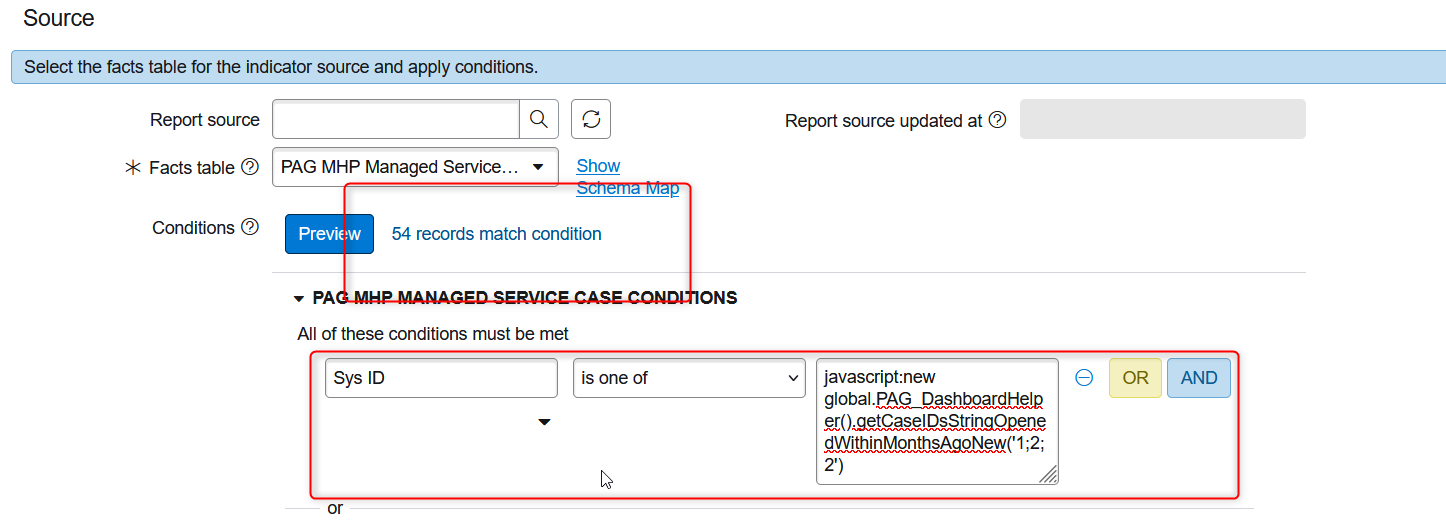
everything is correct only that is you need specify which access qualifier you are using to call,
Let say your records in global application scope then the code should be
javascript: new global.x_abc_ewtwe_.getAccount().getTasks();
You can refer below image which I attached for

- Mark as New
- Bookmark
- Subscribe
- Mute
- Subscribe to RSS Feed
- Permalink
- Report Inappropriate Content
03-20-2026 11:45 PM
Hi @Sathwik1 ,
Hope you are doing well.
- Scope Access: Set the Script Include’s Accessible from field to "All application scopes".
- Return Format: PA requires a Comma-Separated String of Sys IDs. If your script returns an Array, PA won't "see" the records.
- No Session Logic: Ensure the script doesn't rely on
gs.getUserID()orcurrent, as these are often null during background PA collection.
Example Code Snippet :1. The Script Include :Make sure this is marked Client Callable (if used elsewhere) and All Application Scopes.
var getAccount = Class.create();
getAccount.prototype = {
    initialize: function() {},

    getTasks: function() {
        var taskIds = [];
        var gr = new GlideRecord('task');
        // Example: Fetching active tasks for a specific account
        gr.addActiveQuery();
        gr.query();

        while (gr.next()) {
            taskIds.push(gr.getUniqueValue());
        }

        // CRITICAL: PA needs a String, not an Array object
        return taskIds.join(',');
    },

    type: 'getAccount'
};
- Field:
Sys ID - Operator:
is one of - Value:
javascript:new x_abc_ewtwe_.getAccount().getTasks();
Try the solution above.. If the solution is helpful for you please accept it and mark it as helpful.
Regards,
Sagnic
- Mark as New
- Bookmark
- Subscribe
- Mute
- Subscribe to RSS Feed
- Permalink
- Report Inappropriate Content
03-20-2026 11:54 PM
Hello use the below formatjavascript:new global.x_abc_ewtwe_.getAccount().getTasks();
the above one will work smooth please follow below image
while pasting its a typo error for the previous one