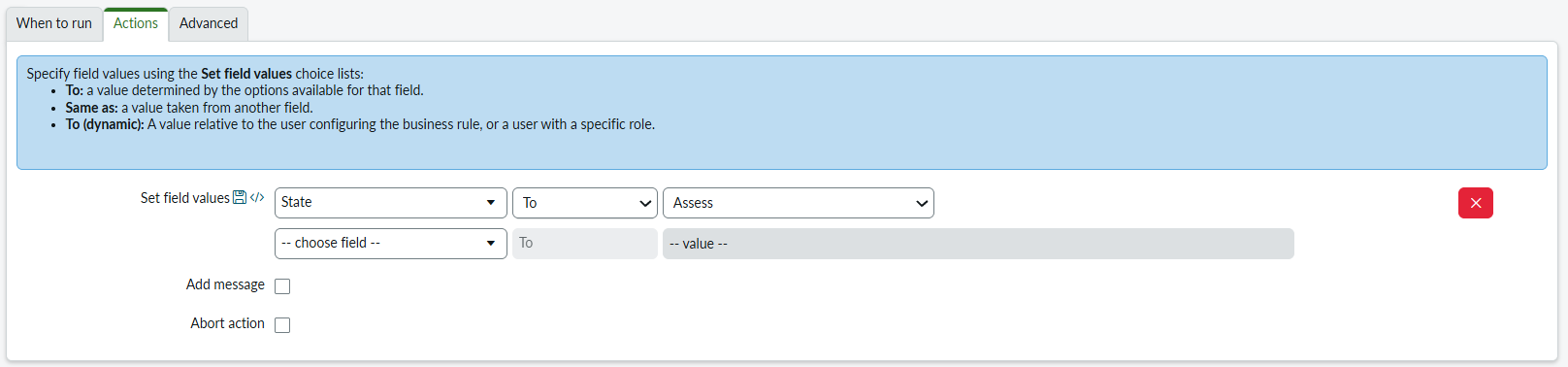
how to control state transitions on change table using business rule

- Mark as New
- Bookmark
- Subscribe
- Mute
- Subscribe to RSS Feed
- Permalink
- Report Inappropriate Content
01-22-2026 09:26 AM
Hi community, i have a ask from my manager, to control state transitions on change table on PDI, like state should move from New->assess->authorize->schedule......... based on any field conditions, if assignment group is not empty it should move from New->assess using business rule. i have tried it but didn't achieved. i have deactivated change transition on change model table and UI actions. but still i cant make it.is this really possible to achieve through business rules if so can you write solution to it, it would be helpful for me.
thanks.
- Labels:
-
Change Management
- Mark as New
- Bookmark
- Subscribe
- Mute
- Subscribe to RSS Feed
- Permalink
- Report Inappropriate Content
01-22-2026 08:04 PM
Using a Business Rule is possible, however in this case the condition is not met.
When inserting a record, the After Business Rule is executed before the Assignment Rule.
Assignment Rules run in the Assignment Engine, which is triggered only after the record has been committed to the database.
Therefore, at the time the After Business Rule runs, the assignment_group field does not yet have a value, causing the Business Rule not to execute due to the condition not being satisfied. I tested again with the following configuration, and it works as expected.
If this response was helpful, please mark it as Accept as Solution and Helpful to support the community.

- Mark as New
- Bookmark
- Subscribe
- Mute
- Subscribe to RSS Feed
- Permalink
- Report Inappropriate Content
01-22-2026 11:31 PM
Hi @kumar junior11
Create a before update business rule if you already deactivate the change transition, make sure the order of business rule will be 1000 , to ensure it runs after standard field processing, but be aware OOB state model rules usually run around 100-200. Sometimes you need to go lower or higher depending on what specifically is blocking it, but 1000 is usually safe for overrides.
Filter conditions -
-
State is New
-
Assignment group is not empty
-
Assignment group changes
(function executeRule(current, previous /*null when async*/) {

    current.setValue('state', -4);
    workflow.scratchpad.state_transition_forced = true;

    gs.addInfoMessage('Assignment Group detected. Auto-transitioning to Assess.');

})(current, previous);
Happy to help!
To help others in the community find this solution, kindly mark this response as the Correct Answer and Helpful.
Warm Regards,
Deepak Sharma
Community Rising Star 2025
- Mark as New
- Bookmark
- Subscribe
- Mute
- Subscribe to RSS Feed
- Permalink
- Report Inappropriate Content
01-23-2026 10:08 AM
thank you for the response @DuyPham @DuyPham
first thing i wanted to clarify is there is no option given to deactivate the change model transitions.
with your solution I'm able to move states from new to assess, based on the state = assess, approval's are triggering, if approval approved, then state is setting to authorize, here i didn't write any business rule, even i deactivated two UI actions (request approval) but it is automatically moving state, i wanted to handle all the states using business rule but, not able to figure out what is running back that is hitting this state transitions.
if you can help me with other state transitions, it would be help full and I'm gonna complete my task.
thank you.