- Mark as New
- Bookmark
- Subscribe
- Mute
- Subscribe to RSS Feed
- Permalink
- Report Inappropriate Content
12-16-2025 02:52 PM
Hello,
New to workspaces.Is there a way to create a UI action button on the form related list called "Export to PDF" so that when the user clicks the button it should export the related list records and user should be able to download. Is it possible to do in workspaces?
Thank you.
Solved! Go to Solution.
- Mark as New
- Bookmark
- Subscribe
- Mute
- Subscribe to RSS Feed
- Permalink
- Report Inappropriate Content
12-17-2025 01:19 AM - edited 12-17-2025 01:47 AM
It is possible with a custom UI action.
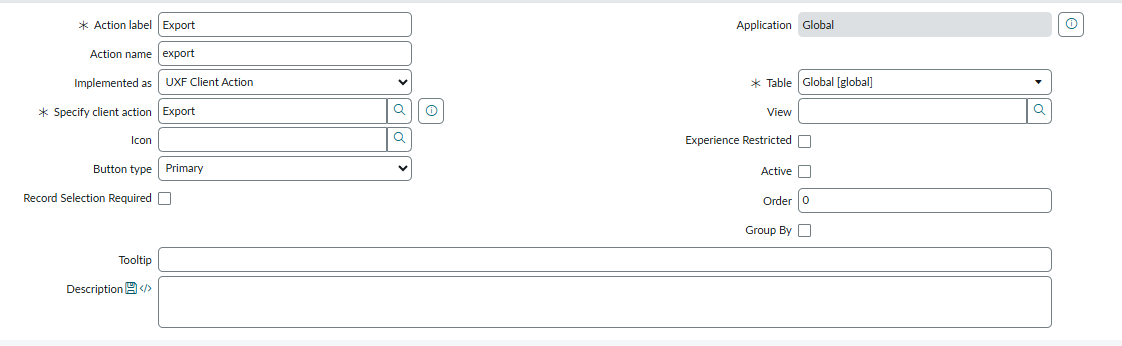
Create a Related List Declarative Action as shown in the screenshot. Enter your table name if you want this to be visible only on a specific related list table or set it to "Global" and add a condition for which table you want this to be visible on.
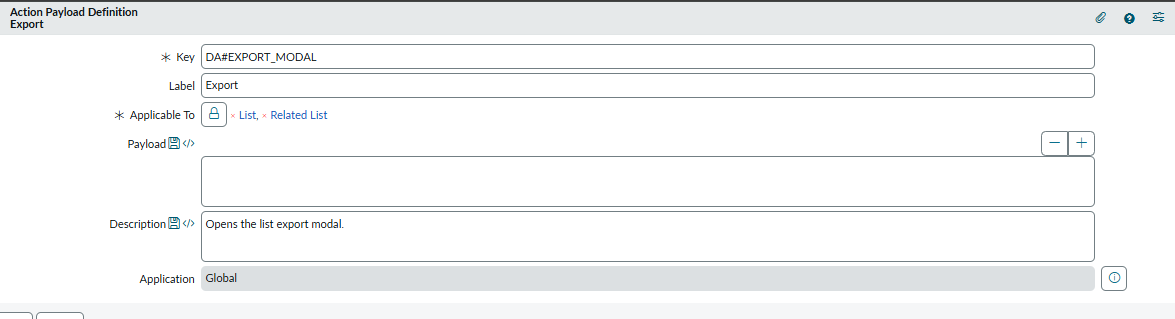
In the "Specify client script" field, use the OOB Action Payload Definition (Export) shown in the screenshot.
That's it.
A few things to remember:
- Since the action is on the Global table, this UI action will be visible on every related list. You will need to add a visibility condition to the UI action if you don't want to visible on all related list.
- Check if it follows the related list filter condition. We have implemented this in the Zurich version of ServiceNow. I'm not sure about previous versions.
For information only: The "Export" payload definition is used in the OOB "Export" button on the list view. We copied the same configuration to the related list button. You don't need to implement any API or script. I have added the screenshot for reference, copy the same.
Action Payload Definition (search, don't create/update)

Related List Declarative Action

Regards
----
If this response was helpful, please select "Accept as Solution" and "Helpful." This helps both the community and me.
- Mark as New
- Bookmark
- Subscribe
- Mute
- Subscribe to RSS Feed
- Permalink
- Report Inappropriate Content
02-10-2026 12:21 PM
Hi!
I am using this action payload setup on a ui action button since Xanadu and just recently upgraded to Zurich but now the export delivers the entire related list. Do you have any insight on how to ensure that the filter conditions are provided in the export?

- Mark as New
- Bookmark
- Subscribe
- Mute
- Subscribe to RSS Feed
- Permalink
- Report Inappropriate Content
02-25-2026 08:38 AM
I am facing same issue. Is there any resolution for Zurich release?
- Mark as New
- Bookmark
- Subscribe
- Mute
- Subscribe to RSS Feed
- Permalink
- Report Inappropriate Content
02-12-2026 02:06 PM