Remove 'duplicate' RITM from an Approval Report

- Mark as New
- Bookmark
- Subscribe
- Mute
- Subscribe to RSS Feed
- Permalink
- Report Inappropriate Content
09-21-2026 09:17 AM - edited 09-21-2026 09:21 AM
Good afternoon,
We have many catalog items with multiple approvers.
How can I filter out a report so that it only shows one approver per RITM even if the RITM has multiple approvers?
In the attachment there are RITMs showing approval for 9; approval for 6 - only want to show one per RITM
Thank you in advance,
Rachel


- Mark as New
- Bookmark
- Subscribe
- Mute
- Subscribe to RSS Feed
- Permalink
- Report Inappropriate Content
09-21-2026 09:37 AM
Hi @rconstantino ,
its simple - don't group by "Approval for" it shows one row per one approval though their are tagged to single RITM
do you have a different requirement?
- Mark as New
- Bookmark
- Subscribe
- Mute
- Subscribe to RSS Feed
- Permalink
- Report Inappropriate Content
09-21-2026 09:55 AM
I only grouped by 'approval for' to show the issue.

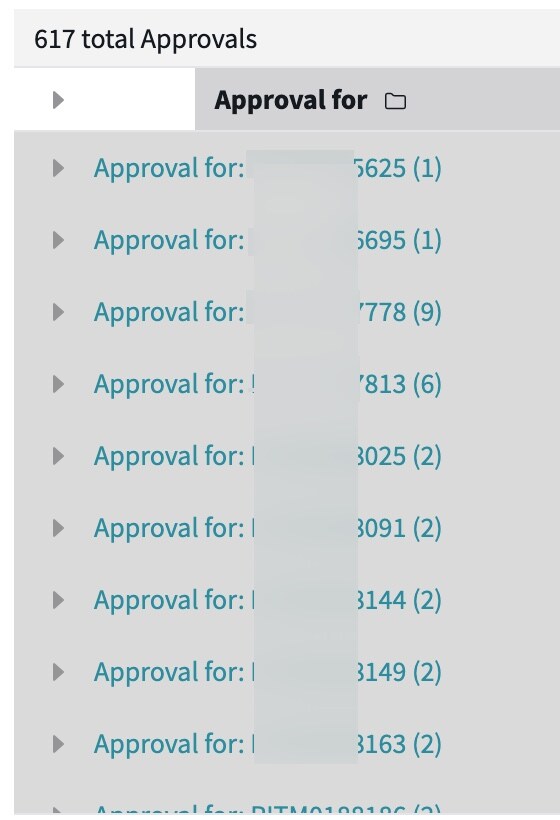
The RITM ending in 778 - this has 9 approvers on it; I want the report to only display this once.
How do I achieve that?
- Mark as New
- Bookmark
- Subscribe
- Mute
- Subscribe to RSS Feed
- Permalink
- Report Inappropriate Content
09-21-2026 10:17 AM
Hi @rconstantino ,
Can you add a large image (when you paste the image, click on large size) - unable to read the above one and also when you say "I want the report to only display this one" - which one are you referring, this could be a group approval, could you please provide more context?
- Mark as New
- Bookmark
- Subscribe
- Mute
- Subscribe to RSS Feed
- Permalink
- Report Inappropriate Content
09-21-2026 10:42 AM
Sorry about the image. I've uploaded again so hopefully this is better but i do have to blur out most of the screen shot.
Under approval for - there are 9 rows for RITM ending in 778 because that RITM is pending approval from 9 different users (the RITM only requires 1 out of the 9).
Not shown in the screen shot there is a RITM ending in 813 with 6 rows.
For each RITM that has multiple rows because of multiple approvers how can I show on the report only one row for each RITM that has multiple approvers?
Is it possible (with a data source or other means) to only show one row for RITM.

