Unable to find Change Request like Normal change, Standard Change and Emergency change in the incide

- Mark as New
- Bookmark
- Subscribe
- Mute
- Subscribe to RSS Feed
- Permalink
- Report Inappropriate Content
06-03-2026 12:38 AM
Hi,
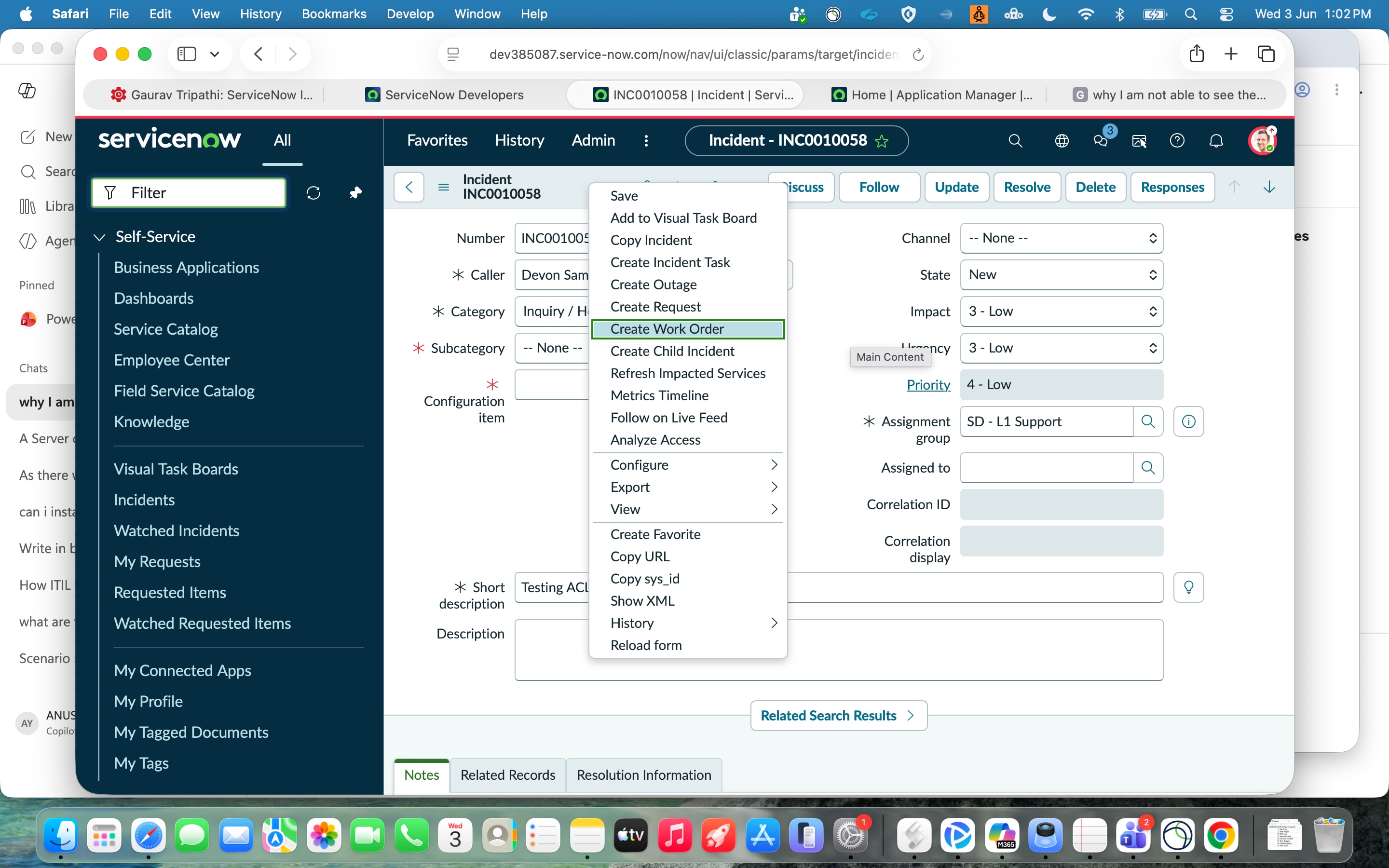
I am unable to find the Change Request like Normal Change, Standard Change and Emergency Change in the existing incident record. I wanted to create a normal change from existing incident record, but I am not finding the options in the context menu and grey area if I right click.
I tried
1. I could see the change_request table in the tables and its list
2. In incident UI action I could see the create change request
3. plugins - I am unable to find the


- Mark as New
- Bookmark
- Subscribe
- Mute
- Subscribe to RSS Feed
- Permalink
- Report Inappropriate Content
06-03-2026 01:03 AM
Hi
Could you please try with a new user and grant ITIL role access to that user?
Also, it looks like this issue may be related to a plugin. Since this is a PDI instance, it can sometimes be unstable. Please verify the plugin, as you mentioned that it is not installed. You may need to install the required plugin and report any plugin-related issues if they persist.
One more thing—could you check whether you are able to see the Change module in the application navigation? If not, this has become a fairly common issue on PDIs recently.
In that case, it may be better to release this instance and request a new one, as the current instance could be corrupted or unstable. or take a lower version PDi and then upgrade or latest version

Regards
Dr Atul G. - Learn N Grow Together ServiceNow Techno - Functional Trainer
LinkedIn: https://www.linkedin.com/in/dratulgrover
YouTube: https://www.youtube.com/@LearnNGrowTogetherwithAtulG
******************************************************************************************
- Mark as New
- Bookmark
- Subscribe
- Mute
- Subscribe to RSS Feed
- Permalink
- Report Inappropriate Content
06-03-2026 11:39 PM - edited 06-03-2026 11:40 PM
I have checked the plugins, change related incident plugin is there. But I don't see the Change module in the application navigator. May be I have to release the instance
- Mark as New
- Bookmark
- Subscribe
- Mute
- Subscribe to RSS Feed
- Permalink
- Report Inappropriate Content
06-03-2026 11:56 PM
In that case, it may be better to release this instance and request a new one, as the current instance could be corrupted or unstable. or take a lower version PDi and then upgrade or latest version.
Regards
Dr Atul G. - Learn N Grow Together ServiceNow Techno - Functional Trainer
LinkedIn: https://www.linkedin.com/in/dratulgrover
YouTube: https://www.youtube.com/@LearnNGrowTogetherwithAtulG
******************************************************************************************

- Mark as New
- Bookmark
- Subscribe
- Mute
- Subscribe to RSS Feed
- Permalink
- Report Inappropriate Content
06-04-2026 12:42 AM
Hi @AnushaY75520426 ,
Repair the Plugin
Clear Cache using Cache.do
and try
before requesting New PDI instance
Regards
Tanushree Maiti
ServiceNow Technical Architect
LinkedIn: https://www.linkedin.com/in/tanushreemaiti