Variable Editor variables cannot be set to Read-Only via Client Script or UI Policy on extended Cust

- Mark as New
- Bookmark
- Subscribe
- Mute
- Subscribe to RSS Feed
- Permalink
- Report Inappropriate Content
07-06-2026 05:23 AM
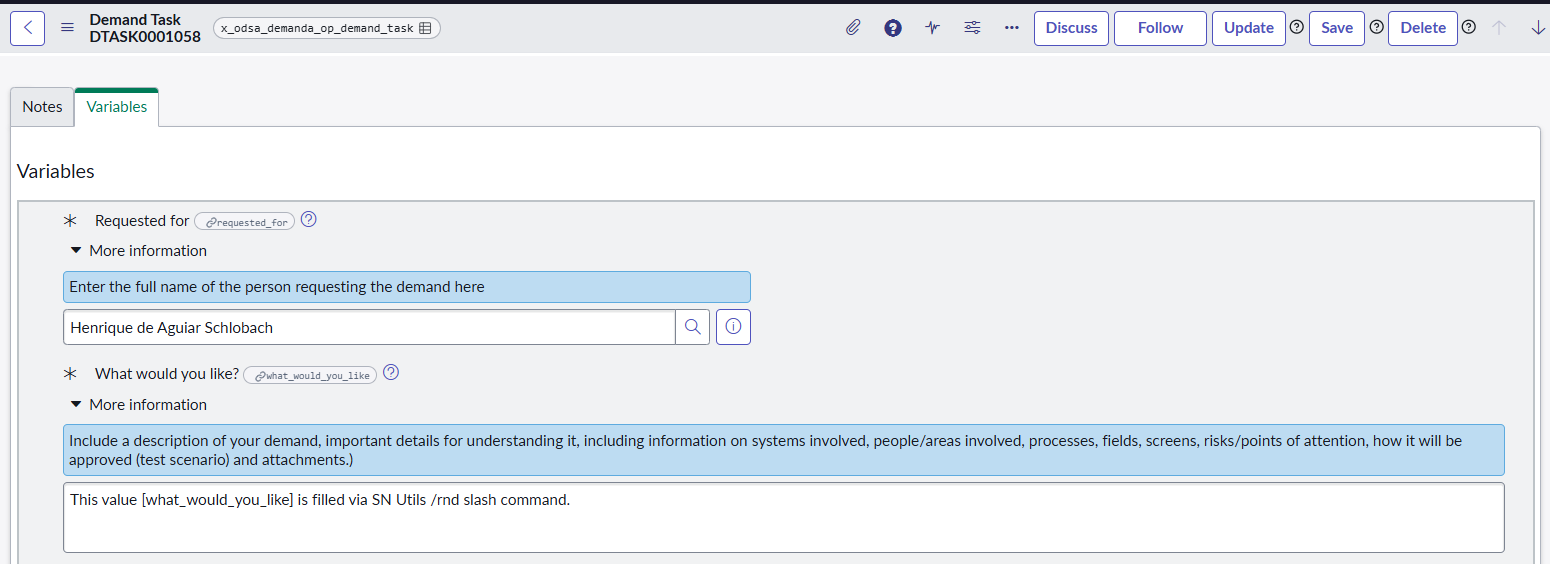
Context: We have created a custom task table (x_odsa_demanda_op_demanda_task) that extends the native task table. This custom table is inside a Scoped Application (Demanda OdontoPrev). We use the Catalog Builder Formatter (Variable Editor) to pull service catalog variables into this custom task form.The Issue:We need to make all variables inside the Variable Editor read-only on the custom task form, but all standard platform approaches fail.What we have already tested and didn't work:g_form.setVariablesReadOnly(true);: Fails silently. It seems this API is hardcoded to only work on out-of-the-box tables like sc_req_item and sc_task, ignoring extended custom task tables.Catalog UI Policies / Catalog Client Scripts: Even with "Applies on Catalog Tasks" checked, the rules do not trigger or map correctly when rendered inside this specific custom task table.DOM Manipulation Scripts (document.querySelectorAll, etc.): Completely blocked by Scoped App security guidelines, throwing Cannot read properties of null (reading 'querySelectorAll') in the browser console (even with Isolate Script = false).g_form.getEditableFields() and g_sc_form APIs: Do not return or recognize the Formatter fields (IO:sys_id) on this extended table context.Request:Is there any Out-of-the-Box property, specific macro configuration, or standard API that enables g_form.setVariablesReadOnly() to work seamlessly on custom task tables inside Scoped Applications? How can we lock these variables dynamically without hitting scope security barriers?

- Mark as New
- Bookmark
- Subscribe
- Mute
- Subscribe to RSS Feed
- Permalink
- Report Inappropriate Content
07-06-2026 03:30 PM
Hi @Henrique_sch ,
What you're running into isn't a scope-security bug on your side, it's a hardcoded limitation of the Variable Editor Formatter itself. The client-side bridge that lets g_form talk to that widget is only wired up for sc_req_item and sc_task, and every symptom you listed traces back to that one fact.
- g_form.setVariablesReadOnly(true) is built to operate against those two tables. On any other table, even one that extends task, the call executes without error but the widget never receives the instruction, so it fails silently, exactly what you're seeing.
- Catalog UI Policies and Catalog Client Scripts with "Applies on Catalog Tasks" checked are designed to support the VEditor specifically for Requested Items and Catalog Tasks (sc_req_item/sc_task). A custom table that extends task but isn't sc_task doesn't get picked up by that pairing, so the rule looks valid in the policy builder but never actually fires against your Formatter.
- g_sc_form only exists in the context of an actual catalog item or RITM form. It's never instantiated on a generic task-extended table, which is why your script hits null. That's not the scoped-app sandbox blocking you, the object genuinely isn't there.
- g_form.getEditableFields() enumerates real GlideForm elements. The IO:-prefixed fields the Variable Editor Formatter renders live inside its own widget and are only registered as GlideForm elements on sc_req_item/sc_task, so on your table they're invisible to that API too.
There's no out-of-the-box property, macro flag, or catalog UI policy setting that extends this bridge to arbitrary custom task tables. I've checked the Formatter configuration and the VEditor's supporting client scripts and it's baked into the platform code path, not something exposed for reconfiguration. I'd treat this as a platform gap rather than keep hunting for a setting that fixes it.
Two approaches actually hold up in production for this situation:
- Enforce read-only at the data layer instead of the UI layer. Since you can't reliably reach the variable fields on the client for this table, don't depend on the client. Put a write ACL or a before update Business Rule on sc_item_option / sc_item_option_mtom that rejects value changes once your custom task reaches the state where variables should lock. That's enforced server-side no matter what the widget renders. Pair it with g_form.addInfoMessage() on load to tell the user the values are locked, even though visually they may still look editable. Less elegant, but reliable and scope-safe since it never depends on the missing client bridge.
- Stop relying on the Catalog Builder Formatter for the locking behavior and render your own variable view. Query sc_item_option_mtom off the parent RITM yourself and render the variables through a UI macro you own (in Global scope, referenced by your scoped Formatter). Since you control the Jelly/rendering, you drive the read-only attribute from your own condition directly, rather than through g_form, so the hardcoded sc_req_item/sc_task check in the OOB widget never enters the picture. This is the same pattern people use to get a working variable editor on child tasks other than sc_task: Variable editor on child task (other than catalog task).
One thing worth ruling out before you invest in either of the above: check the Write Roles field on the individual catalog variables and on the variable set. If it was populated with something like nobody during an earlier attempt to lock things down, it can make variables read-only or block writes independent of anything in your client scripts, and it won't surface as an error anywhere obvious. There's a good writeup of this exact gotcha here: RITM & Catalog Task Variables Read Only.
For reference on what g_form.setVariablesReadOnly() is actually documented to support, see the GlideForm (g_form) API reference.
Thank you,
Vikram Karety
Octigo Solutions INC
