- Post History
- Subscribe to RSS Feed
- Mark as New
- Mark as Read
- Bookmark
- Subscribe
- Printer Friendly Page
- Report Inappropriate Content
06-03-2022 11:39 AM - edited 06-17-2024 08:44 AM
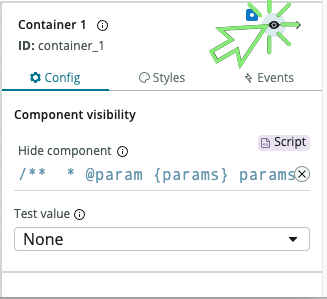
- Select the component or container that needs to have a dynamic visibility
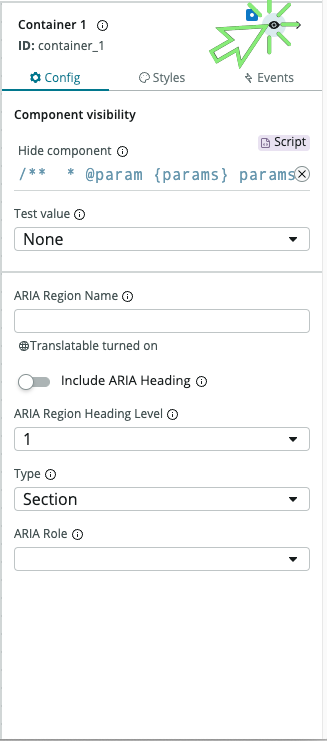
- In the config panel, click the visibility icon
- Click on the script icon
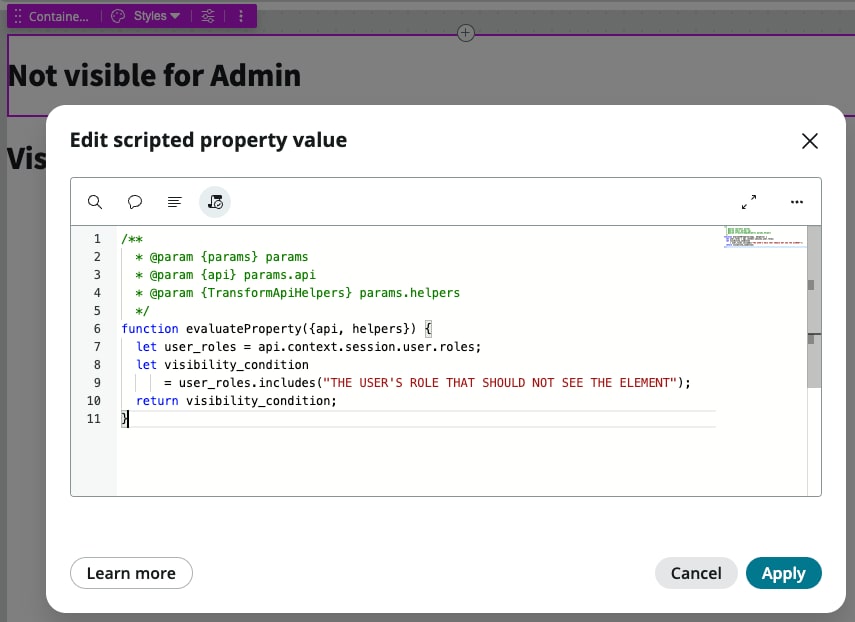
- Set the visibility condition
/** * @param {params} params * @param {api} params.api * @param {TransformApiHelpers} params.helpers */ function evaluateProperty({api, helpers}) { let user_roles = api.context.session.user.roles; let visibility_condition = user_roles.includes("THE USER'S ROLE THAT SHOULD NOT SEE THE ELEMENT"); return visibility_condition; }


- 20,831 Views

- Mark as Read
- Mark as New
- Bookmark
- Permalink
- Report Inappropriate Content
What if I just want to hide this container for everyone?
- Mark as Read
- Mark as New
- Bookmark
- Permalink
- Report Inappropriate Content
@Marc Mouries , i have created a component which is visible for case and INC, can we hide component for case so that it is shown only for INC, this i have done on CSM workspace.
Thanks in advance for the response, it will be very helpful.

- Mark as Read
- Mark as New
- Bookmark
- Permalink
- Report Inappropriate Content
How to show a container/component in UI Builder based on the logged-in user's role
ex: I have to show only to one particular role.
- Mark as Read
- Mark as New
- Bookmark
- Permalink
- Report Inappropriate Content
How to hide a container/component in UI builder based on group.
Ex: I have to hide only to one particular group
- Mark as Read
- Mark as New
- Bookmark
- Permalink
- Report Inappropriate Content
@Community Alums , you can use something like this
- Mark as Read
- Mark as New
- Bookmark
- Permalink
- Report Inappropriate Content
Hello,
How can I access user groups using this method?
- Mark as Read
- Mark as New
- Bookmark
- Permalink
- Report Inappropriate Content
@Marc Mouries @Divakar Raj1 - Hi thank you for the post. We are setting up agent assist and would also like to hide the tab using script based on record table.
We have multiple Agent Assist variants, and each one should be on a different table, we have tried adding conditions to the tabs to hide it for other tables and make it visible to specific tables however it doesnt seem to be working as expected. We have tried adding the script below to one of the agent assist tabs, however it isn't working, do you know what script we could use to ensure correct visibility based on conditions?
/**
 * @param {params} params
 * @param {api} params.api
 * @param {TransformApiHelpers} params.helpers
 */
function evaluateProperty({api, helpers}) {
    // Get the current table name
    var currentTable = api.data.record.table;

    // Check if the current table is x_finan_accounts_payable
    if (currentTable === 'x_finan_accounts_payable') {
        // Return condition to show the tab
        return 'true';
    } else {
    }
}
- Mark as Read
- Mark as New
- Bookmark
- Permalink
- Report Inappropriate Content
Hello, I came across this thread as I am trying to hide the 'Activity Stream Compose' and 'Activity Stream' components if a user has a certain role and the subcategories on the incident table is one of a few options. I am new to javascript and UI builder so please be patient. I tried the code below (removing personal info) but still my users with the role excluded can see this. Any suggestions?

/**
  *  {params} params
  *  {api} params.api
  *  {TransformApiHelpers} params.helpers
  */
function evaluateProperty({api, helpers}) {
  var currentTable = incident;
  var validSubcategories = ['test 1', 'test 2', 'test 3', 'test 4', 'test 5', 'test 6'];

  if (currentTable === 'incident') {
    let user_roles = api.context.session.user.roles;
    let visibility_condition
      = user_roles.includes("CAB_test_role");
      var isValidSubcategory = validSubcategories.indexOf(subcategory) > -1;
	return visibility_condition;
  }
}
- Mark as Read
- Mark as New
- Bookmark
- Permalink
- Report Inappropriate Content
This is the script you can use inside that tab settings for hiding the tab dynamically:
function evaluateProperty({
- Mark as Read
- Mark as New
- Bookmark
- Permalink
- Report Inappropriate Content
Olá Title: Difficulty hiding/showing tab dynamically in UI Builder
Description: I am building a page in UI Builder that contains tabs and two forms. The first form is visible to all users. The idea is that when a user selects a specific option in a choice field (for example, a value like “Licitação”), a corresponding tab should appear dynamically. If the user does not select this option, the tab should remain hidden.
The issue is that when I try to use a script in the Hide component property of the tab, the field value is not returned correctly. Because of this, the tab does not appear as expected.
Question: What solutions or documentation can I consult to understand if it is possible to configure dynamic tab visibility in UI Builder based on choice field values? Is there a recommended way to ensure that the field value is correctly returned by the Data Resource so the script works?
- Mark as Read
- Mark as New
- Bookmark
- Permalink
- Report Inappropriate Content
@KimberlyR830277 I would not use a Tab in this scenario. I'd use a UI pattern called Progressive Disclosure and I'd guide users with a stepper component which would show an additional step if they selected a value like “Licitação”.