- Mark as New
- Bookmark
- Subscribe
- Mute
- Subscribe to RSS Feed
- Permalink
- Report Inappropriate Content
02-03-2026 10:13 AM
Hi,
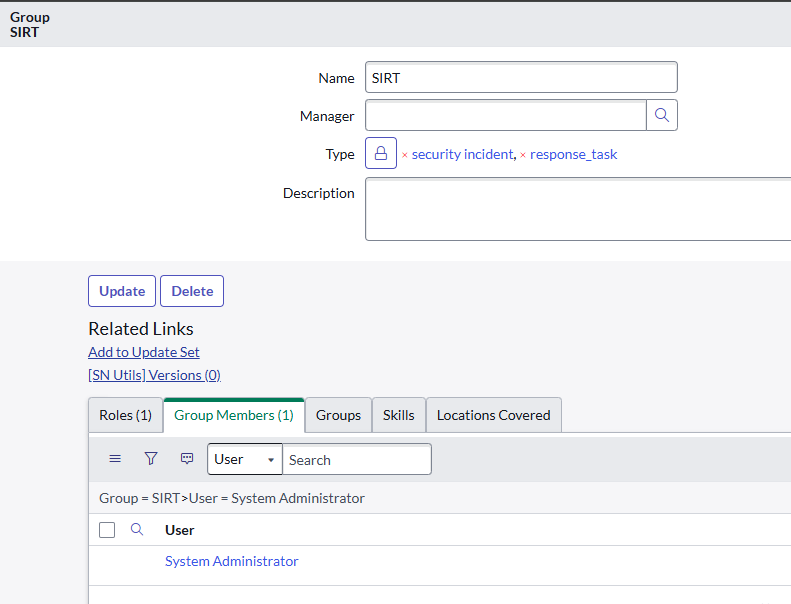
I'm having trouble completing task 1. I've already configured the required settings more than 3 times, and it still fails to validate the task. Any suggestions?
Solved! Go to Solution.
- Mark as New
- Bookmark
- Subscribe
- Mute
- Subscribe to RSS Feed
- Permalink
- Report Inappropriate Content
02-04-2026 12:39 AM
Hi @Carlos Muniz ,
It seems like Group Type and Manager and Roles is wrong for Security Managers Group..
Look at the requirement text carefully:
“Next, open and configure the Security Managers group so it contains the sn_ti.admin role.”
It does NOT ask you to add group types or Manager or Roles to Security Managers Group ..(Note: Remove those if you added the above feilds manually or else leave it as it is..)
Fix (do this exactly)
Step 1: Open Security Managers group
Go to User Administration → Groups
Open Security Managers
Step 2:Assign Roles
Make sure Roles tab contains:
✅ sn_si.admin
(It can still have sn_si.manager — no issue)
Step 4: Click Update
Step 5: Go back to the simulator and click Validate Task
If this works, Please Mark it as helpful and please Accept My Solution...
- Mark as New
- Bookmark
- Subscribe
- Mute
- Subscribe to RSS Feed
- Permalink
- Report Inappropriate Content
02-05-2026 01:17 AM
If this works right for you.. Can you mark my reply as helpful and Accept My Solution. This would helps me to keep contributing towards the ServiceNow Community..
Best Regards
SIVASANKARI S
- Mark as New
- Bookmark
- Subscribe
- Mute
- Subscribe to RSS Feed
- Permalink
- Report Inappropriate Content
02-04-2026 12:39 AM
Hi @Carlos Muniz ,
It seems like Group Type and Manager and Roles is wrong for Security Managers Group..
Look at the requirement text carefully:
“Next, open and configure the Security Managers group so it contains the sn_ti.admin role.”
It does NOT ask you to add group types or Manager or Roles to Security Managers Group ..(Note: Remove those if you added the above feilds manually or else leave it as it is..)
Fix (do this exactly)
Step 1: Open Security Managers group
Go to User Administration → Groups
Open Security Managers
Step 2:Assign Roles
Make sure Roles tab contains:
✅ sn_si.admin
(It can still have sn_si.manager — no issue)
Step 4: Click Update
Step 5: Go back to the simulator and click Validate Task
If this works, Please Mark it as helpful and please Accept My Solution...
- Mark as New
- Bookmark
- Subscribe
- Mute
- Subscribe to RSS Feed
- Permalink
- Report Inappropriate Content
02-04-2026 10:32 AM
Hi SIVASANKARIS
The correct role is sn_ti.admin, I was putting sn_si.admin. Now it works. Thank you for your attention.
- Mark as New
- Bookmark
- Subscribe
- Mute
- Subscribe to RSS Feed
- Permalink
- Report Inappropriate Content
02-05-2026 01:17 AM
If this works right for you.. Can you mark my reply as helpful and Accept My Solution. This would helps me to keep contributing towards the ServiceNow Community..
Best Regards
SIVASANKARI S