Vulnerability Response: VIT impacted services not sync with the current service of the CI

- Mark as New
- Bookmark
- Subscribe
- Mute
- Subscribe to RSS Feed
- Permalink
- Report Inappropriate Content
04-08-2026 09:57 AM
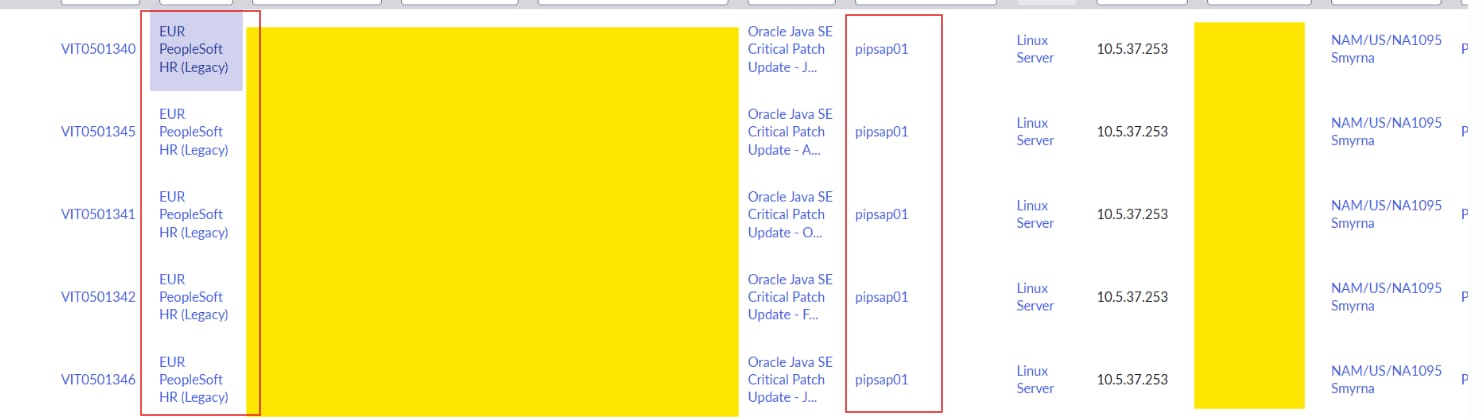
We are experiencing an issue in Vulnerability Response where the impacted service on a Vulnerable Item (VIT) is not being populated after recalculation. The impacted service is derived from the Related Services table (sn_vul_m2m_ci_services), which is a VR‑maintained cache populated by the service‑impact recalculation logic. The affected CI has been validated to be correct in CMDB: it is linked to a valid Application Service, the service‑derivation logic (CIUtils().servicesAffectedByCI()) successfully returns a service, and the CI now has recent scan data with the last scan date being today, meaning it fully meets the 90‑day scan eligibility requirement.
As part of troubleshooting, we explicitly reset the Discovered Item (sn_sec_cmn_src_ci) field has_impacted_services to pending to re‑queue the CI for processing. We also deleted existing or stale entries in the sn_vul_m2m_ci_services table for the CI to ensure a clean recalculation, then ran both the OOTB “Set related CI services for VI” job and our wrapper job “Adecco – Refresh VUL Services,” which uses the same BusinessServiceUtil logic. Despite these steps, the CI remains stuck in has_impacted_services = pending after the job runs, and no new record is written to sn_vul_m2m_ci_services.

- Mark as New
- Bookmark
- Subscribe
- Mute
- Subscribe to RSS Feed
- Permalink
- Report Inappropriate Content
04-20-2026 05:18 PM - edited 04-20-2026 05:36 PM
Good debugging. Looking at your screenshots though, the m2m table does have a record for pipsap01. It's just pointing at the wrong service (EUR PeopleSoft HR Legacy instead of the current NAM PeopleSoft HR-Payroll SS upstream). And has_impacted_services is stuck at pending because the Discovered Item isn't getting picked up by the process job at all. Two separate problems.
Why the stale row persists
Looking at sn_vul.BusinessServiceUtil, there are two paths that write to sn_vul_m2m_ci_services. copyServiceMappingEntries() copies rows from the CMDB svc_ci_assoc table and sets is_service_mapping=1. _linkCiToServices() calls CIUtils to traverse the CMDB and writes with is_service_mapping=0. Each path has its own cleanup:
_deleteExistingCopies()only deletesis_service_mapping=1rows whosesvc_ci_assocsource no longer exists._deleteOldServices()only deletesis_service_mapping=0rows no longer in the latest traversal.
Neither cleanup touches the other's rows. So if your stale row has is_service_mapping=1 AND svc_ci_assoc still has the old mapping, the row sticks around forever. Every run of copyServiceMappingEntries() just re-copies it.
First thing to check: open the existing row in sn_vul_m2m_ci_services and look at is_service_mapping. Then check svc_ci_assoc for your CI. If EUR PeopleSoft HR Legacy is still there, the problem is upstream in CMDB, and running the VR job won't fix it until Service Mapping or the CSDM process refreshes svc_ci_assoc.
Why has_impacted_services is stuck at pending
The process() function queries sn_sec_cmn_src_ci for Discovered Items with has_impacted_services=pending, plus a few other filters. If the DI matches, process() runs on it and sets the flag to true or false. It never leaves it at pending after processing. So if yours is stuck, the DI isn't matching the query.
Three filters to check on the DI record:
-
Scan date on the DI itself. The query needs
last_scan_date,last_comp_scan_date,non_infra_last_scan_date, ornon_infra_last_comp_scan_dateto be within the last 90 days on the DI (not on the CI). If you have multiple DIs for this CI and you resetpendingon a stale one, the job skips it. Check all four scan date fields on the DI you reset. -
Ignored CI class. The
sn_sec_cmn.ignoreCIClassForServiceproperty excludes entire CI classes. OOB value iscmdb_ci_unclassed_hardware,cmdb_ci_incomplete_ip,sn_sec_cmn_unmatched_ci. A Linux Server wouldn't hit those defaults, but check your instance in case something got added. -
Max CI per run.
sn_vul.impacted_services.max_ci_to_processcaps the batch. Code default is 5 million, but in practice this is usually set much lower (500,000 is common). If your target CI isn't in the first N CIs the job processes, it won't be reached this run.
What to do in order
- Check
is_service_mappingon the stale row. - If it's 1, check
svc_ci_assocfor your CI. The fix is in CMDB, not VR. - Check the four scan date fields on the specific DI you reset.
- Check the
sn_sec_cmn.ignoreCIClassForServiceproperty. - Check
sn_vul.impacted_services.max_ci_to_process. - If none of that explains it, try the
Full refresh related CI services for VIjob instead of the daily one. It callsprocess(true), which marks DIs aspendingagain and drops thehas_impacted_services=pendingfilter on VIT updates. It still applies the scan date and ignore class filters though.
On your Adecco wrapper job: if it's a thin wrapper around process(), fine. If it's writing directly to sn_vul_m2m_ci_services anywhere, that can leave rows that neither cleanup path owns. Worth confirming it's not getting in the way.
Most likely your fix is upstream. svc_ci_assoc is stale, Service Mapping hasn't caught up with the new upstream relationship, and the VR job is just re-copying whatever sits in svc_ci_assoc. Fix the CMDB side first.
Verify all of this against current ServiceNow docs and your instance before changing anything.
If this helped, please mark helpful or accept as solution so others running into the same issue can find it.